The original Jianying Editor Skill GitHub URL returned 404 on 2026-11-08. If you need to arrange short-video media, narration, and subtitles into a Jianying draft, choose an independently verifiable tool first, then inspect and export the draft in desktop editing software. The unavailable URL is not an installation source, and the public evidence does not support calling any same-named project its official successor.
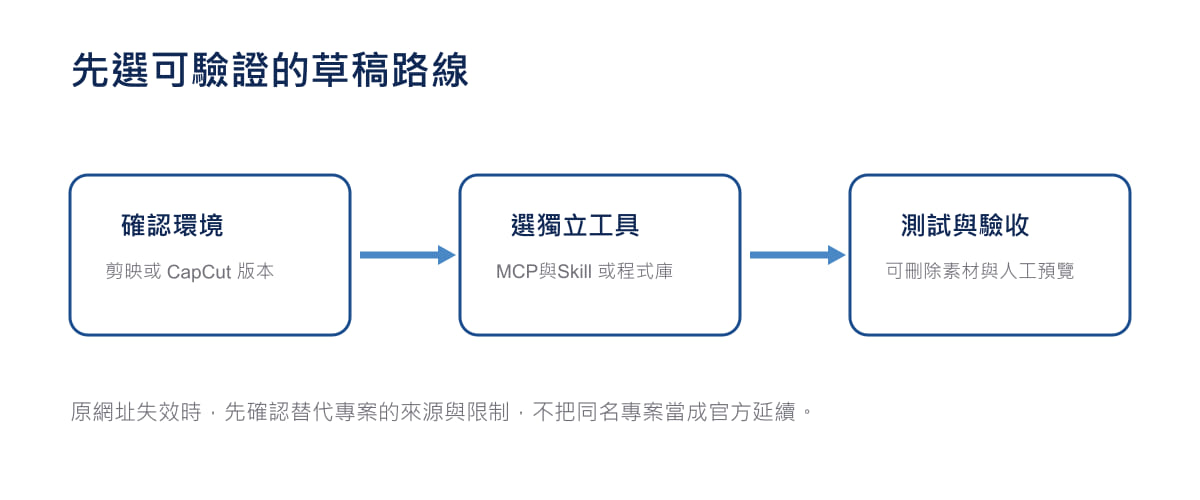
Original diagram: Gwarket / Aaron Huang · CC BY 4.0 ·
Choose the tool by the way you work
| Route | Best for | Publicly documented scope | Limitation to know first |
|---|---|---|---|
| VectCutAPI | People who want an API or MCP to assemble video, audio, subtitles, and a timeline first | Its README lists Jianying/CapCut draft management and MCP and Skill integration | Its README requires Python 3.10+, FFmpeg, and Jianying or CapCut International. Cloud preview and cloud rendering are separate services; do not treat them as the local-draft workflow. |
| pyJianYingDraft | People who want Python to create or modify draft content directly | Its README feature table separates support for Jianying 5.9 and newer 10.8 versions | Windows supports draft generation, template mode, and version-limited automated export. Linux and macOS do not support automated export; drafts still need Windows Jianying for export. |
They are independent projects. VectCutAPI suits API- or MCP-based assembly; pyJianYingDraft suits explicit Python control of draft structure. For one short video, start with the route whose inputs and outputs you can inspect rather than pursuing automated export first.
Run a 30-second draft from setup to verification
The following is a job guide you can run yourself, not a record of a completed edit. Download the original 30-second short-video draft job brief. It is an authored teaching file in Chinese; prepare the lawful media it lists. The brief defines three timeline sections—0–5 seconds, 5–20 seconds, and 20–30 seconds—with their media, audio, and subtitle arrangements, and uses 1920×1080 at 30 fps as its example output.
- Get an alternative upstream. Choose VectCutAPI or pyJianYingDraft according to your working method, then read that project's Quick Start and license. Do not use the original Skill's 404 URL.
- Prepare the stated job. Use the brief's inputs, filenames, and three timeline sections. This separates draft-content problems from media-path and output-setting problems.
- Create a draft from the upstream documentation. VectCutAPI's public README documents draft-management support and MCP startup; pyJianYingDraft's README includes an example that creates a draft with media and text. Use only draft-creation methods documented by the upstream you selected.
- Verify item by item, then export manually. Open the draft in desktop editing software. If its list does not refresh, pyJianYingDraft's README suggests reopening Jianying or entering and leaving an existing draft to refresh the list. Confirm each media segment, then audio and subtitle timing, then play the exported file before treating it as deliverable.
This sequence separates generating a draft from confirming an output. The former can reduce setup time; the latter still needs a person's judgment about media rights, wording, pacing, and whether the image fits its intended use.
The job brief inputs and timeline
| File | Duration or format | Purpose |
|---|---|---|
01-opening.mp4 |
5 seconds | Opening visual |
02-demo.mp4 |
15 seconds | Main demonstration visual |
03-close.mp4 |
10 seconds | Closing visual |
voiceover.wav |
At least 30 seconds | Narration track. You may instead use licensed background audio, but must not assume both are present. |
subtitles.csv |
UTF-8 CSV | start,end,text fields; time is in seconds. |
| Time | Video track | Audio track | Subtitle text in the original Chinese brief |
|---|---|---|---|
| 0–5 seconds | 01-opening.mp4 |
0–5 seconds of voiceover.wav |
0,5,先整理素材,再建立可檢查的草稿。 |
| 5–20 seconds | 02-demo.mp4 |
5–20 seconds of voiceover.wav |
5,20,選擇工具後,先用短片確認時間軸,並核對字幕與素材路徑。 |
| 20–30 seconds | 03-close.mp4 |
20–30 seconds of voiceover.wav |
20,30,在桌面剪輯軟體預覽後,再人工匯出成片。 |
The brief's export checklist is: preview the full 30 seconds; export short-video-check-1080p30.mp4; use 1920×1080 and 30 fps unless you first change the job specification; verify the filename, resolution, and frame rate; then play from first to last frame to confirm subtitles and sound match the brief. Do not use formal media or the only copy of an asset for the first test.
Version limits change the workflow
pyJianYingDraft's README lists feature status separately for 5.9 and newer 10.8 versions. It also says that newer draft_content.json files are often not directly readable plaintext JSON; loading an existing draft as a template may require fallback_loader. Creating a new draft and reading or rewriting an existing template are therefore different jobs.
The same README ties batch-export limitations to visible controls in older Jianying releases: it lists Jianying 6 and earlier as available, and Jianying 7 and later as unavailable. This is the project's documented scope, not a compatibility guarantee for every draft tool. If your version is not explicitly documented, keep manual preview and manual export, and test with disposable media first.
VectCutAPI's README says a project can be output as a draft for further editing in Jianying or CapCut; it also offers cloud-rendering capability. Decide whether you need a local draft or a cloud workflow before choosing, then read the relevant service and configuration documentation separately.
If a generated draft opens with missing media, diagnose it with Jianying Skill: Diagnose Missing Media in Drafts.
The original Skill is historical reference only
The original GitHub URL was not publicly accessible in this check. A 2026-05-23 Wayback capture can help identify the historical documentation, but it is not a currently installable package or evidence of an actively maintained release.
Do not execute old installation commands merely because a third-party directory still lists the old URL. Do not treat a same-named repository as a migrated version unless author or GitHub relationship information supports that conclusion; otherwise, it is an independent code source.
Sources and verification date
Verification date: 2026-11-08.
- Original Jianying Editor Skill URL: HTTP 404 in this check.
- Wayback capture of the original project: historical-documentation identification only.
- pyJianYingDraft README: feature table, cross-platform, and export limits.
- pyJianYingDraft Apache-2.0 license.
- VectCutAPI README: draft management, requirements, and MCP/Skill integration.
- VectCutAPI Apache-2.0 license.