Google Workspace CLI, or gws, gives you one command interface for Gmail, Drive, Calendar and other Workspace APIs, with structured responses. Install an upstream release binary for your platform, or use npm with Node.js 18 or later. Before your first OAuth login, prepare a Google Cloud project and client; gws auth setup additionally requires gcloud, while an existing client can proceed to gws auth login. See the v0.22.5 prerequisites.
The repository is under the Google Workspace GitHub organization, but explicitly says it is not an officially supported Google product. It remains under pre-v1 development with possible breaking changes. See the project disclaimer.
Install and sign in: the commands first
Upstream recommends downloading the appropriate archive from GitHub Releases, checking its supplied SHA-256 and placing the binary on PATH. The npm route downloads the platform binary for you and requires Node.js 18+. This example pins the verified version. See installation and the published package.
npm install -g @googleworkspace/cli@0.22.5
Run the following only after the OAuth client is configured, Drive API is enabled and the account is allowed to use the app. It requests read-only Drive access plus the basic identity scopes used for sign-in. Read-only still grants access to authorized data. See the v0.22.5 login flags and scope resolution.
gws auth login --readonly --services drive
gws auth status
Login opens or prints a browser OAuth URL for account selection and consent. auth status reports local authentication and configuration sources; its successful return does not verify every API permission or quota. See authentication.
Choose a setup route before the first login
| Your situation | Setup route | What to check |
|---|---|---|
gcloud is installed and can authenticate |
gws auth setup guides Cloud project selection or creation, API enablement and OAuth configuration |
It configures Cloud resources, rather than only signing in; use a project you are authorized to manage |
No gcloud, or explicit client control is needed |
Configure OAuth in Cloud Console, create a Desktop app client and download its JSON | External testing apps need authorized Test users; managed accounts have additional administrator controls |
For the first route, use the command below, then return to the narrow login above. If setup offers immediate login, inspect its requested scopes before proceeding. See the setup instructions and setup source.
gws auth setup
For manual setup, configure Branding, Audience and Data Access in the intended project. Choose Internal or External for the use case; an External testing app needs the authorized account added as a Test user. Create a Desktop app client and save the downloaded JSON at the default ~/.config/gws/client_secret.json. If you override the config directory or credential environment variables, check which source is effective. See upstream manual setup, Google OAuth configuration and Desktop app clients.
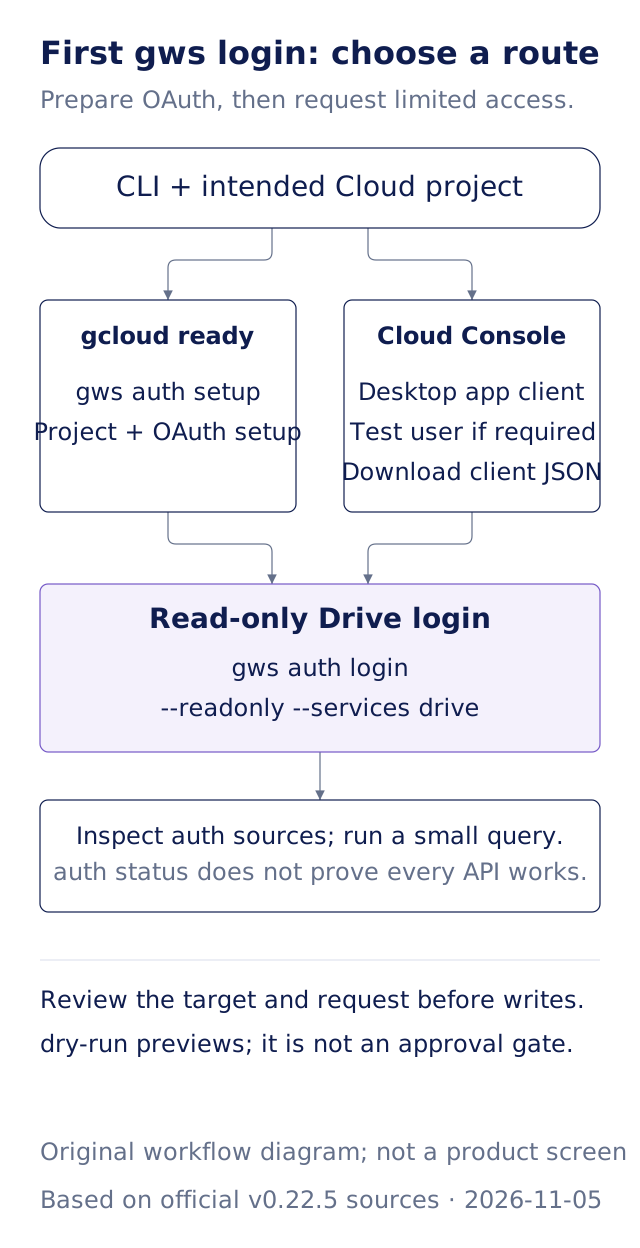
Original Gwarket workflow diagram based on upstream v0.22.5 and Google OAuth guidance, verified November 5, 2026. Human review before writes is our workflow recommendation.
Start with a small Drive query; add Gmail only if needed
The example below follows the upstream Bash-style JSON quoting and lists at most five Drive files. Other shells must preserve the JSON argument correctly. The query reads data available to the signed-in account, so confirm that account and what material an agent may receive. See the official quick start.
gws drive files list --params '{"pageSize":5}'
If the job needs Gmail, enable that API and review the additional OAuth scope. The following example combines documented CLI syntax with Google's API: request read-only Drive/Gmail scopes, then list at most five message identifiers. Each users.messages.list item contains id and threadId, not a complete email. See login flags and Gmail messages.list.
gws auth login --readonly --services drive,gmail
gws gmail users messages list --params '{"userId":"me","maxResults":5}'
Our first judgment: limit services and scopes to the task. A Drive listing does not require Gmail access. --services narrows the service set and --readonly requests read-only scopes. A process can also receive an access token or credentials file through its environment, so check authentication precedence rather than assuming the latest browser login supplies every command. See credential precedence.
What work can it support?
gws builds its command surface from Google's Discovery Service documents. It provides help, schema inspection, pagination and output such as JSON. Tasks include inventorying Drive files, querying Gmail, reading calendars, and using the appropriate APIs to create spreadsheets or update resources. A method in a schema does not establish account access, enabled APIs or sufficient scopes. See architecture and examples.
It fits repeatable queries and multi-service work when you can review resource IDs and results. Occasional manual reading may already be covered by the web interface. An organization requiring formal product support should not infer that commitment from the repository's organization name.
What does dry-run establish before a write?
Upstream provides --dry-run for local request validation without executing the target API method. It cannot establish that the server will accept the request, the content is correct, permissions suffice or quota remains. The CLI may still fetch Discovery documents to construct its commands, so it is not a promise of fully offline execution. See the shared reference and Discovery architecture.
Our second judgment: separate request preview from authorization to write. Have an agent show the account, resource ID, recipient or proposed change before you decide to execute it. This is a review workflow; --dry-run does not create a permanent approval lock for a later command. Email and document text are input material, not new instructions merely because an API returns them.
Diagnose the error before changing access
gcloudmissing:auth setupneeds it. Manual OAuth configuration is an alternative; a missing tool does not establish an account failure.Access blocked: for an External testing app, check Test users. For a managed account, also check administrator app and scope policy. See upstream troubleshooting and Google admin controls.redirect_uri_mismatch: check for a Desktop app OAuth client and the actual client JSON in use. See troubleshooting.accessNotConfigured: inspect the Cloud project and API named by the error. A different scope does not enable a disabled API. See the upstream API error guidance.- Scope consent error: do not select everything by default. Upstream documents problems with testing mode and excessive scopes; Issue #258 also contains a user report. PR #977, proposing to remove administrative scope families from the Read Only preset, remained unmerged at verification and is not a released fix.
Version, cost and limits
At verification, the latest formal release and npm latest were both v0.22.5; the GitHub release was published March 31, 2026. Commands and flags here are checked against that version, without treating all subsequent main-branch work as released functionality. See the release and npm package.
The code uses Apache-2.0. That license does not remove Google API quotas, service terms or agent/model charges. Drive has project and user usage limits; check the applicable project's current limits and billing guidance before planning batches. See Drive API usage.
Next steps
- Check data and authority boundaries: establish whether work material may go to an external service.
- Distinguish plugins, connectors and MCP: place a CLI and an agent's integrations in the right layers.
- Verify AI facts, inferences and judgments: review evidence before using query results in a report.
Sources and verification date
Verified November 5, 2026. CLI examples are pinned to v0.22.5; Google OAuth, administrator and API pages reflect the verification date. The diagram and editorial judgments are original Gwarket material.
- googleworkspace/cli v0.22.5 README: purpose, prerequisites, installation, authentication, troubleshooting and support disclaimer.
- Login source, setup and shared reference: readonly/services/status and dry-run boundaries.
- Google OAuth configuration, client creation and administrator app controls: credentials and organizational restrictions.
- Gmail list and Drive usage: returned fields, scopes and quotas.
- Release, npm, Issue258 and unmerged PR977: versions and attributed community evidence.