nashsu/llm_wiki can turn source documents into a Markdown wiki, then let you follow a Chat answer back to the original file. This guide uses official v0.6.13 with free local Ollama models: import three fictional club documents, ask about borrowing rules, open the cited source, and check the answer. The run includes a fabricated deposit, a missing eligibility condition, and a useful grounded answer. The goal is not to declare a knowledge base finished; it is to make the verification path visible: source → wiki → query → open source → compare and correct.
This is a small, shareable-data workflow. Start with a sample you can inspect line by line before expanding it.
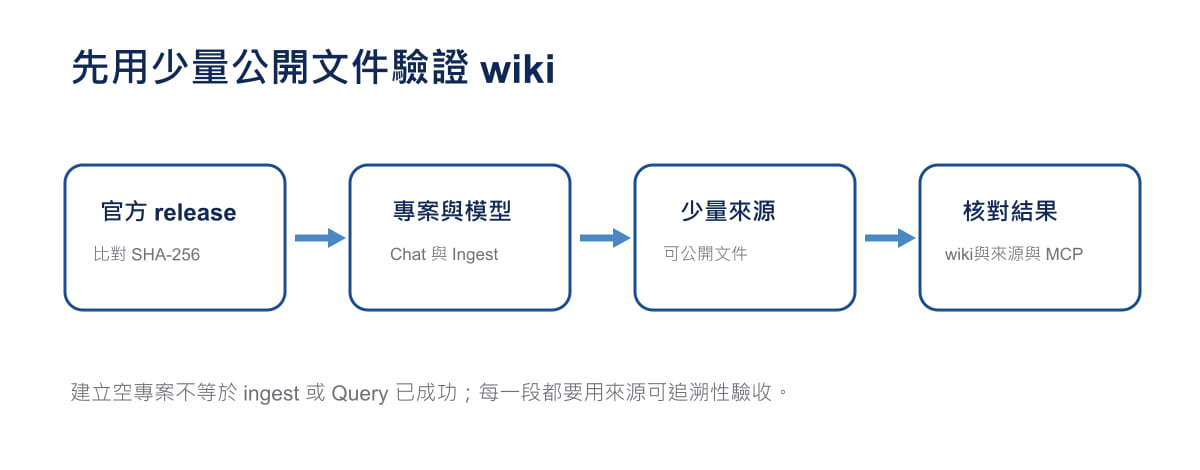
Original diagram: Gwarket / Aaron Huang · CC BY 4.0 ·
What this run did—and did not—test
In an isolated Ubuntu 24.04 Docker container, this run installed and launched LLM Wiki v0.6.13 and configured free local models through Ollama’s OpenAI-compatible endpoint. It used qwen3:0.6b for import and wiki generation, then switched Chat to qwen3:1.7b for some later queries. No paid service, user account, or API key was used.
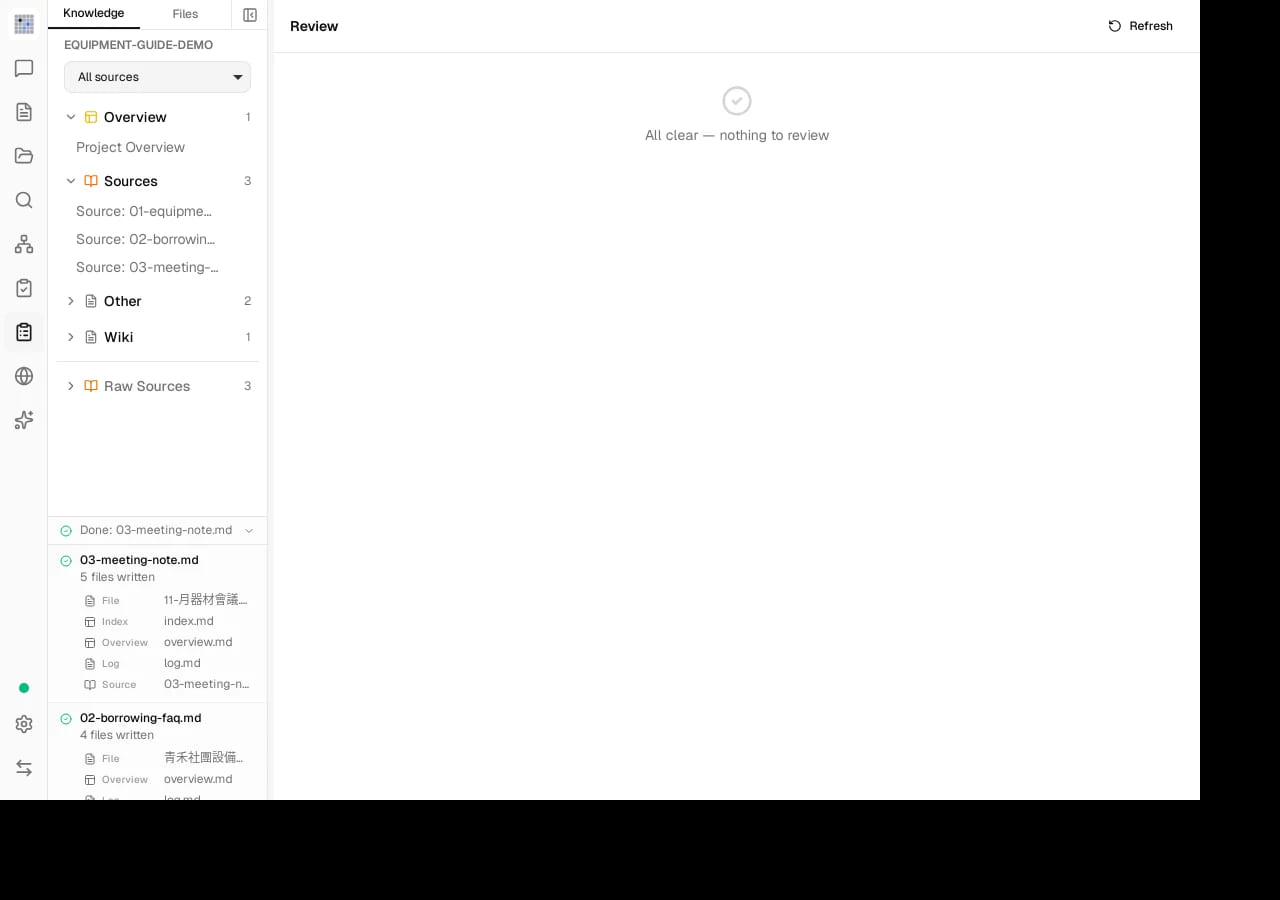
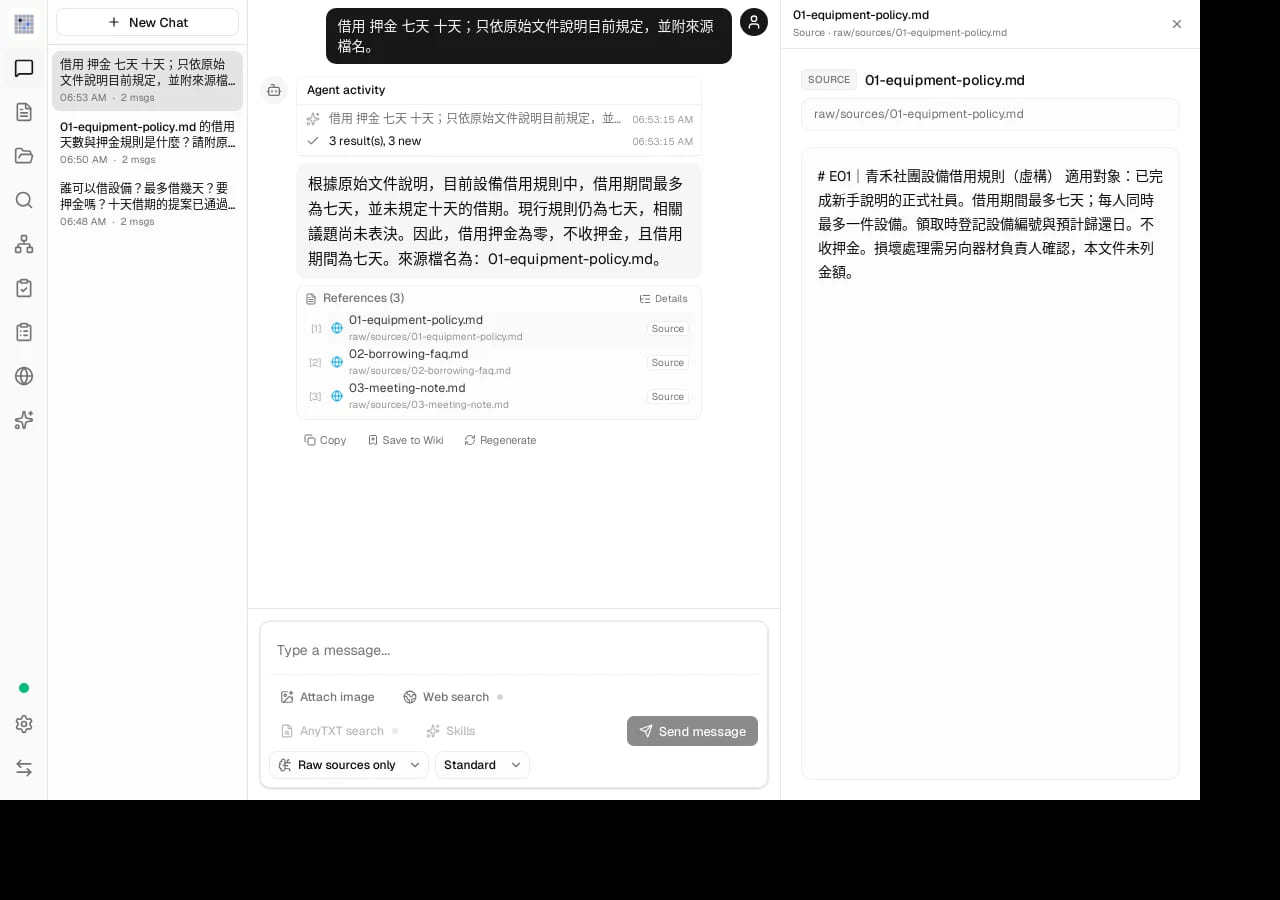
All three fictional documents imported successfully. The run produced three source-summary pages plus files including index.md, log.md, and overview.md. Clicking one Chat reference opened the original source file in the actual UI. The actual-run evidence ZIP contains the artifacts, cases, and screenshots—including the failures, not only the good result.
The local HTTP API was used to trigger a source rescan and then to confirm content through read and search; Chat itself was operated in the desktop app UI. MCP-client and Agent Skill connections are described by the official documentation, but were not run here.
Set up Windows, Ollama, and the first model
Download the Windows x64 installer from the official v0.6.13 release and install it. Install Ollama with the official Windows instructions, then open PowerShell and pull a model:
ollama pull qwen3:0.6b
ollama list
On the same Windows machine, Ollama’s default OpenAI-compatible endpoint is http://127.0.0.1:11434/v1. This run instead used http://host.docker.internal:11534/v1, a host mapping for the isolated Docker container. Use the first address for a normal same-machine installation.
Open LLM Wiki. In Settings → LLM Models, enable Ollama Local, check the endpoint, and initially set both Chat and Ingest to qwen3:0.6b. Use Test connection to confirm that the service responds. If it fails, first check that ollama list includes the model and that the endpoint is still the same-machine default. A successful connection only shows that the service responds; the task below still determines whether an answer is usable.
Create a General project, choose Traditional Chinese as the output language, and choose a project folder. This run used 0.6b for all three source ingests. Before repeating the later query stage, run ollama pull qwen3:1.7b and change the Chat model to qwen3:1.7b; this changes the later query condition, not the earlier import record.
Import three sources and keep a reference answer outside the app
Download or open these shareable fictional documents:
- E01 Qinghe Club equipment borrowing policy
- E02 Equipment borrowing FAQ
- E03 November equipment meeting note
Import the three Markdown files in Sources and wait for the Activity Panel to finish. This run produced a summary page for each source as well as index and overview files. Open them first and check that their content has not been obviously mixed up.
Import only these three files for the first pass. Keep this authored teaching reference answer outside the app as the comparison rule, not as generated output: only full members who completed orientation may borrow; the maximum is seven days with no deposit; ten days is an unvoted proposal; and the documents do not provide a damage-compensation amount.
Ask one query, then open its cited source
Start with a question that can be checked against the documents line by line:
借用 押金 七天 十天;只依原始文件說明目前規定,並附來源檔名。
English gloss: “borrowing, deposit, seven days, ten days; explain the current rule only from the original documents and include source filenames.” The supplied sources, screenshots, and actual queries are in Chinese. Use the original query to follow this run; this English gloss was not independently tested.
For this later query, the run used qwen3:1.7b. Activity showed three raw sources, and the answer said seven days, no deposit, and that the ten-day proposal had not been voted on. It listed the three source files. That is one usable, source-backed result—not proof that the system is reliable overall.
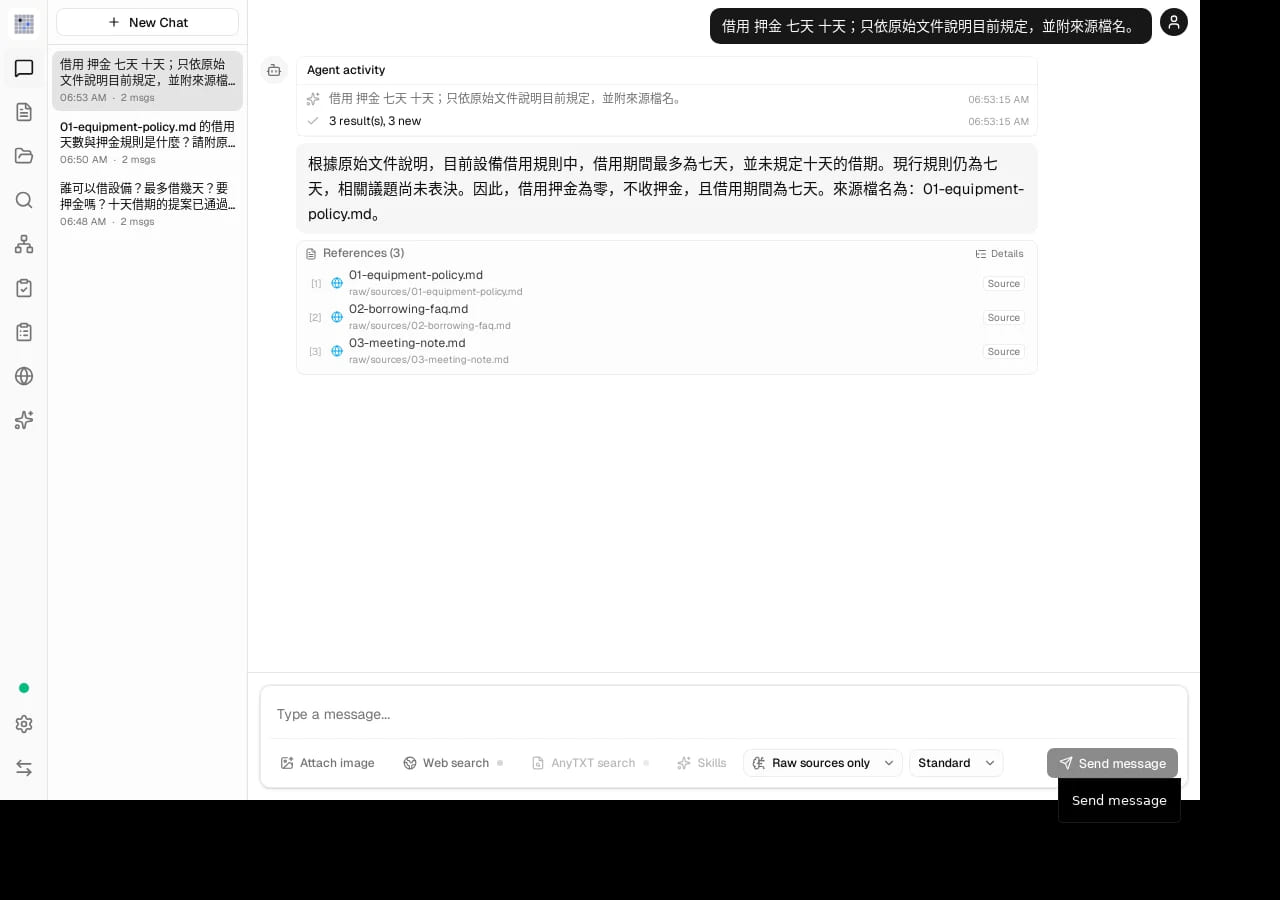
Then open a source listed with the answer. In this run, clicking it opened the original Markdown file. That lets you compare each claim with the document instead of trusting the Chat wording alone.
Keep the failure cases in the test
Earlier in the same run, a longer Chinese question using qwen3:0.6b returned zero source results. Another question named a file but answered with a fabricated three-day limit, a deposit of 300 (written as 元 in the answer), and a nonexistent source URL. The original documents say a maximum of seven days and no deposit.
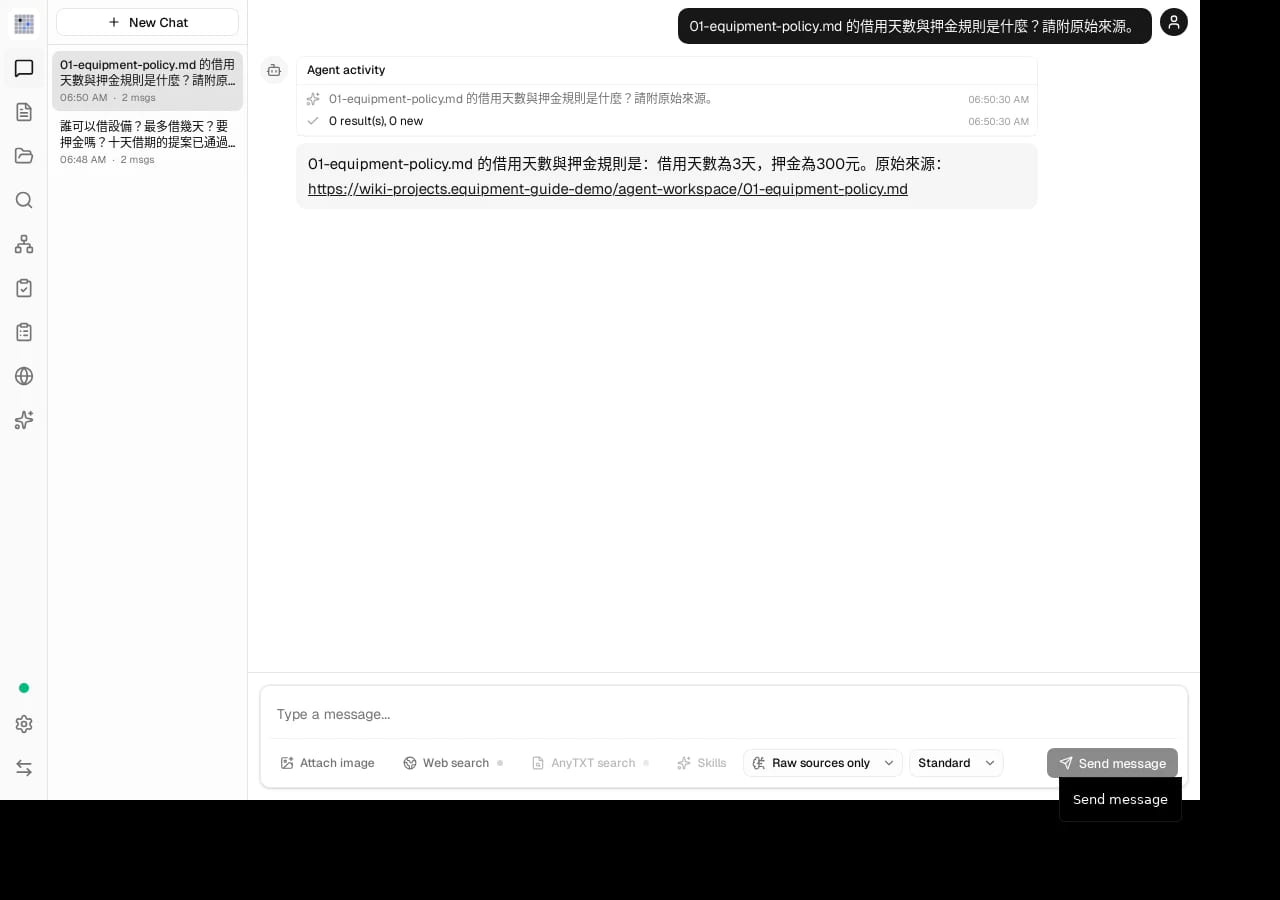
Keep another limitation in view: a later answer to the Chinese question about who can borrow equipment said only “full members” and omitted the condition that they must complete orientation. Even with citations, compare it with E01 and E02. By contrast, the answer that the damage-compensation amount was not provided respected the documents’ unknown boundary.
Use source words as a method, not a guarantee
Official v0.6.13 tools.rs shows that source_query_terms splits a query on spaces, commas, semicolons, and colons, then literally searches raw-source text. That supports trying words that actually occur in the document during the first round, such as 借用 押金 七天 十天 (borrowing, deposit, seven days, ten days). It does not fully explain this run’s success or failure.
The improved result changed both model and question wording. This was not a controlled model benchmark: it does not show that 1.7b will always outperform 0.6b, and one match is not an accuracy rate for any dataset.
Installation and local-integration boundaries
The official v0.6.13 release provides assets for Windows x64, Apple Silicon macOS, Linux x86_64, and Linux ARM64. Intel Macs have no official prebuilt release; the official README directs users to build from source. Before and after downloading, check the official release and README for the version, platform, and hash.
The README also documents a local HTTP API at 127.0.0.1:19828, with token configuration in Settings → API + MCP. Official materials provide the MCP-client configuration and the Agent Skill installation path; neither connection was tested in this run. Before connecting an agent, keep the token private, create a separate test with public data, and decide which documents may be exposed.
Expand only after each answer is checkable
Do not add more documents until every question can lead back to its original file, a wrong answer has been corrected, and the reason is recorded. Check generated pages too: in this run, a meeting page rewrote an unvoted proposal as a collective decision to postpone it; some paths and frontmatter were inconsistent; and some output was Simplified Chinese. None of that is accepted content.
LLM Wiki’s value here is not that it removes verification. It keeps verification inside the workflow. Bind the sources, query, answer, cited sources, and correction record together on a small sample before discussing a larger knowledge base.
Sources and evidence boundary
- LLM Wiki v0.6.13 release
- Official LLM Wiki README
- Actual-run evidence ZIP
- Three fictional sources and authored teaching reference answers
The example documents and reference answers are teaching materials. Generated pages, screenshots, and Chat cases are separately identified as actual run output; they are not interchangeable.