| In one line | Give it a URL and your AI coding tool rebuilds the site as editable Next.js code |
| Good for | Moving your own site to Next.js, or recovering a live site whose source is lost |
| Not for | Phishing, impersonation or passing off someone else's design (prohibited officially) |
| Free to use? | Free and open source; AI usage depends on your plan |
| Requirements | Node.js 24+; Claude Code, Codex CLI, OpenCode or Cursor |
| Version | v0.6.1 (released 2026-10-05) |
| Maintenance | Actively maintained (last update 2026-10-05) |
| Our record | Based on official documentation, checked 2026-11-09; not yet tested |
What is the AI Website Cloner Template?
The AI Website Cloner Template (MIT license, GitHub JCodesMore/ai-website-cloner-template, latest release v0.6.1 from 2026-10-05) is a Next.js project template. Inside the project, you give your AI coding agent /clone-website https://your-url and it rebuilds that website as clean, editable Next.js code, then compares the rebuild with the original side by side.
- Recommended agent: Claude Code. Codex CLI, OpenCode and Cursor are also supported
- Good for: moving your own site from WordPress, Webflow or Squarespace to Next.js; recovering a live site whose source code is gone; learning how production sites build their layouts
- Not for: phishing or impersonation, passing off someone else's design as your own, or breaking a site's terms of service (all listed in the official README)
What you need
- Node.js 24 or later
- A supported AI coding agent (Claude Code, Codex CLI, OpenCode or Cursor) with browser access enabled
Official tech stack: Next.js 16 (App Router, React 19, strict TypeScript), shadcn/ui, Tailwind CSS v4 and Lucide icons.
Is the AI Website Cloner free?
The template itself is free and open source (MIT). Rebuilding a site uses your AI agent's quota: Claude Code, Codex and Cursor bill under their own plans, and OpenCode depends on the model you connect. It checks desktop and mobile layouts, tries interaction states and compares pages one by one, so more pages means more usage. The project doesn't publish a typical usage figure.
Quick start
Option 1: let your agent set it up (recommended by the project). Paste this into Claude Code or Codex:
Set up https://github.com/JCodesMore/ai-website-cloner-template
as a standalone project in a new folder on my computer.
Ask me where to put it. Clone the repository, remove its origin remote,
install dependencies, and run npm run check. Leave it ready for me
to clone a website.
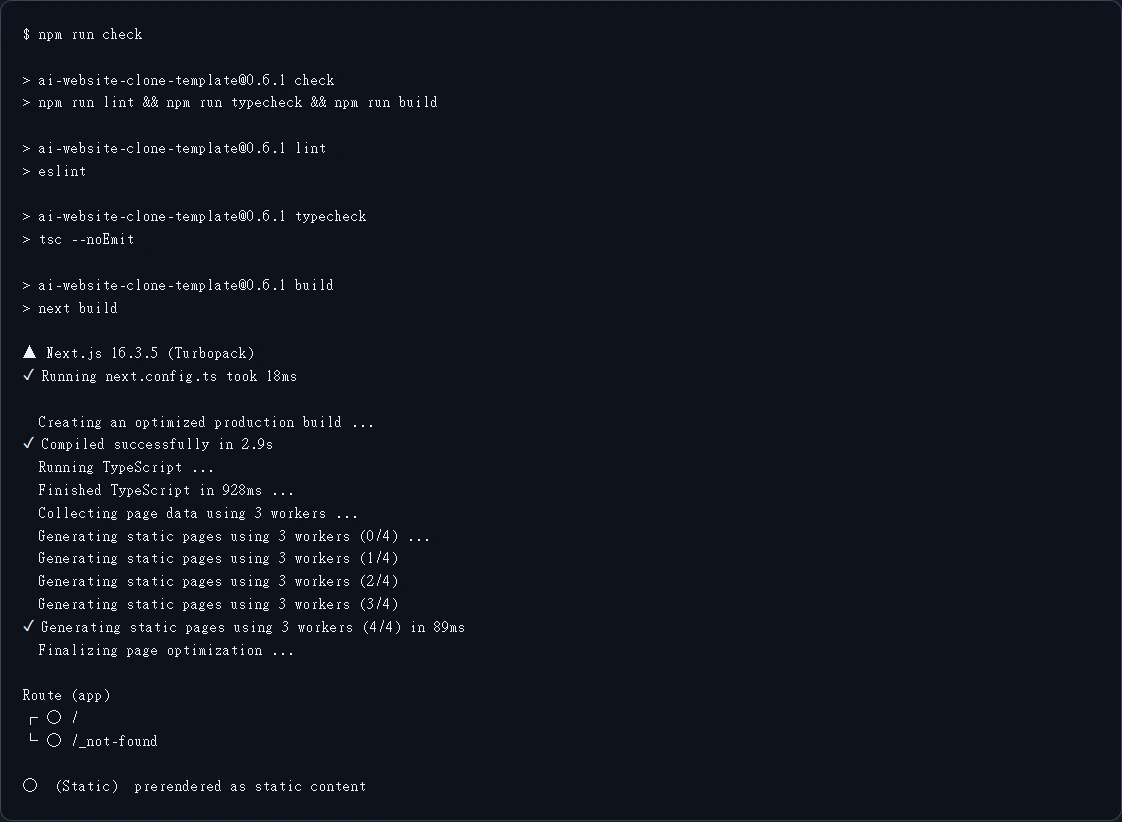
Option 2: create your own repository from the template. Click Use this template on the project page, name it and click Create repository. Then give your agent the new repository's link and ask it to clone it, install dependencies and run npm run check.
Clone your first website
Open the project with browser access enabled. In Claude Code or Cursor, run:
/clone-website https://example.com
Replace the URL with the site you want to rebuild. When it's done, ask your agent for any changes.
Codex, Cursor and OpenCode read the project's skill directly from .agents/skills/clone-website/; Claude Code uses a small command bridge so /clone-website works. The README does not document the exact trigger phrase for Codex or OpenCode.
How it works: the four official steps
- Map: map the source URLs to local routes without overwriting work you already have
- Observe: inspect desktop and mobile pages, extract real images and fonts, and try alternate states
- Build: implement editable components and working interactions, handing independent sections to sub-tasks when useful
- Compare: review the source and local pages at matching sizes and states, fix visible differences and run the production check
You get route mappings, run instructions, comparison screenshots and a list of remaining gaps.
Useful commands
npm run dev        # start the dev server
npm run build      # production build
npm run check      # lint, type check and build in one go
Allowed and not allowed uses
| Allowed (official use cases) | Not allowed (official "Not Intended For") |
|---|---|
| Migrating a site you own to Next.js | Phishing, impersonation or anything illegal |
| Recovering a live site whose source code is lost | Passing off someone's design as your own; logos, brand assets and original copy belong to their owners |
| Learning how real sites achieve layouts, animations and responsive behavior | Violating a site's terms of service; some sites prohibit scraping or reproduction |
Alternatives
| Option | How it differs | Pick it when |
|---|---|---|
| webclaw | Turns pages into Markdown and JSON: content only, no layout rebuild | You only need the text, or want to feed pages to an agent |
| Chrome DevTools MCP | Lets the agent open and inspect pages, but doesn't generate a project | You're redesigning with your own coding agent and want it to check the original |
| Ask your coding agent to rebuild from screenshots | No template, but none of the route mapping, screenshot comparison or checks | One or two simple pages |
To choose a coding agent, see AI coding tools compared.
FAQ
Can I clone any website? Technically it handles most sites, but the project explicitly rules out impersonation, phishing, passing off others' designs and breaking terms of service.
Do I have to use Claude Code? No. Claude Code is recommended, and Codex CLI, OpenCode and Cursor are supported.
Can I publish the rebuild as is? You get editable code, comparison results and a list of gaps. Check the features and content yourself before going live.
Why does it need browser access? It opens the pages and compares screenshots to confirm the rebuild matches the original.
Sources (checked 2026-11-09)
- Official repository: https://github.com/JCodesMore/ai-website-cloner-template (README: Quick Start, Supported Platforms, Prerequisites, Tech Stack, How It Works, Use Cases, Not Intended For, Agent Support)
- Release v0.6.1 (2026-10-05)
- License: MIT