Gemini Notebook MCP CLI is Jacob Ben-David's third-party tool for scripts and AI agents to manage notebooks, sources and artifacts, rather than Google's official Connected App. The older NotebookLM name remains in the package notebooklm-mcp-cli, CLI nlm and server executable notebooklm-mcp; a product rename does not rename every command. Antigravity CLI migration changes the agent-side host and configuration, while this tool retains its own login and internal-API prerequisites, so successful setup does not establish access to the right notebook. (Pinned README, authentication, setup implementation)
Verified November 6, 2026. This page pins stable v0.16.0 / 01940941ae23b1f499b5e51b3977e7cf2250b45d, released November 4 at 19:24 UTC, November 5 in Taiwan. The current main branch contains an additional Drive-freshness change outside that tag; its behavior is not presented here as already shipped in the stable package. (Release, comparison)
Connected App and third-party MCP are separate routes
Google's Gemini Notebook Connected App manages and queries notebooks inside Gemini Apps. The current dedicated eligibility table specifies a personal Google Account, age 18+ and regions supporting both services. These are Connected App conditions, not universal rules for every standalone Notebook or organization account. (Google's eligibility table, notebooks in Gemini)
A third-party MCP host instead launches this server, which uses its saved Google session to call Notebook's internal APIs. Enabling Google's Connected App does not authenticate an external Python process or provide a stability promise for that RPC route. (Upstream authentication, MCP guide)
Judgment 1: choose the work surface before creating another session credential. For questions inside Gemini, first consider whether its official notebook route suffices. Third-party CLI/MCP has a different use when another agent needs scripts, batch sources, scheduled work or artifact exports. Both can coexist without sharing login readiness or guaranteeing feature parity.
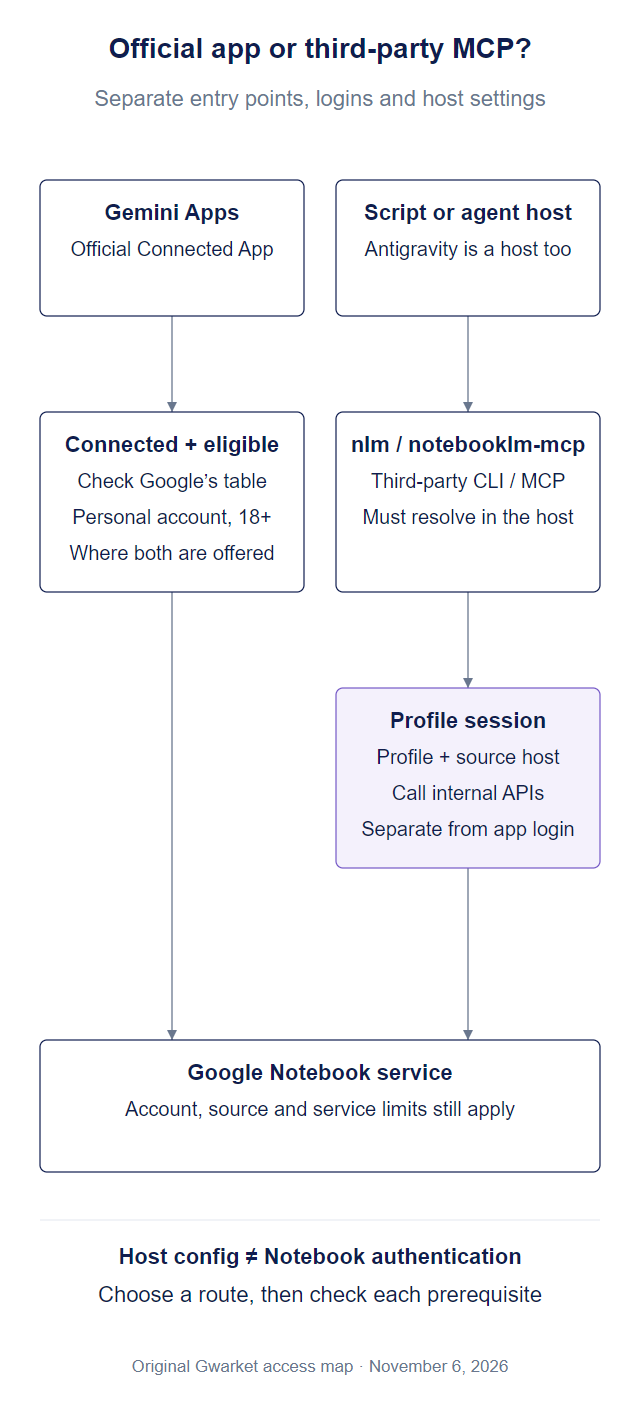
Original Gwarket relationship diagram, November 6, 2026, based on Google's app documentation and pinned upstream code. It is an access map, not a product screenshot or a claim that every account or host is connected.
What it can automate
One package supplies the nlm CLI for commands and scripts and notebooklm-mcp for agent tool calls. The recommended server registration name, gemini-notebook-mcp, is a separate configuration identifier. (Getting Started)
| Work | Upstream route | Check separately |
|---|---|---|
| Inspect notebooks, sources and questions | Notebook/source/query tools | Active profile, notebook identity and source content; queries can persist in web UI history, so check the operation's settings |
| Add URLs, text, Drive or files | nlm source add / source_add |
Rights, processing state and service limits |
| Generate and download Studio artifacts | Studio/download tools | Account eligibility, task completion and output content |
| Batch and multiple-notebook work | Batch/cross-notebook/pipeline | Selected targets, scope and differing sources |
| Revise slide decks or use interactive reports | Slides/report routes | Specific artifact support, not lossless editing of arbitrary files |
Sources: feature table, MCP reference. The documentation lists 55 tools. Exposure still depends on group/individual settings, and experimental source_search is disabled by default; the documented total is not a promise that all tools are enabled in every connection. (Experimental-search scope)
Installation entry points
The pinned package requires Python 3.11+. The author recommends uv; these are documented entry examples, not a workflow requiring Claude Code first. (Package requirements, installation)
uv tool install "notebooklm-mcp-cli==0.16.0"
nlm login
nlm setup
nlm login establishes its browser-session authentication; nlm setup handles the agent's MCP/skill wiring. New profiles offer a storage choice, while upgrading existing file-mode logins does not encrypt them automatically. Protected mode encrypts credentials with a key in the OS keystore. It does not replace sign-in, and copying files to another machine does not establish decryptability. (Protected storage)
Distinguish this project's old server name from a different Notebook MCP implementation. Its wizard can rename its own legacy entry while retaining settings; another server with overlapping tools can confuse the agent. Inspect the command and configuration origin rather than deleting notebooks or replacing the entire MCP file to fix a name. (Upstream migration guide)
What does Antigravity CLI change here?
Google's consumer Gemini CLI/Code Assist change concerns specified Google products and sign-in eligibility; it is not an instruction that renames or removes this independent Python package. Notebook sessions, MCP transport and the agent's model authentication are different layers. Readiness of one does not establish readiness of the others. (Google's consumer scope, third-party authentication)
The directly verifiable difference is the configuration path:
| Source | Path written or loaded in the checked documentation |
|---|---|
Third-party v0.16.0 nlm setup add gemini |
~/.gemini/settings.json, still labeled Gemini CLI |
Third-party v0.16.0 nlm setup add antigravity |
~/.gemini/antigravity/mcp_config.json, described as Antigravity IDE |
| Google's current Antigravity CLI guide | Global ~/.gemini/config/mcp_config.json; workspace <workspace>/.agents/mcp_config.json |
Third-party paths come from pinned setup.py, and current paths from Google's MCP documentation. That page's IDE section also names the new paths: the upstream IDE label does not establish continued use of its old path by every current IDE.
After a helper reports success, identify which file the actual running host loads. Google's current local stdio schema can describe this executable. The following shows one entry's shape, not replacement contents for your whole configuration:
{
  "mcpServers": {
    "gemini-notebook-mcp": {
      "command": "notebooklm-mcp",
      "args": []
    }
  }
}
The command must resolve in that host's environment. If an absolute path is needed, use the executable location provided by the actual installation and retain other servers and credentials. A documented configuration shape does not establish a successful Google session or tool call on a particular machine. This example is not a compatibility claim for every remote transport. (Google stdio schema, upstream generic configuration)
Why this needs a fallback
The upstream uses undocumented internal APIs and Google browser sessions. Changes to the website, login or RPC can break the third-party workflow. Protected storage can reduce plaintext-credential exposure; it does not create a Google stability guarantee for those APIs. (README scope, authentication)
For the Gemini Notebook rebrand, upstream records the host accepting each profile and routes requests accordingly. Do not replace every domain simply because a URL changed. With multiple accounts, check the active profile rather than treating a general Google login as sufficient. (Host/profile rules)
Minimum safe validation
Judgment 2: separate configuration, authentication, correct data and artifact quality. Basic connection checks do not require creating or deleting content. Start with a known, non-sensitive notebook you may process, using read operations.
- Configuration loaded: the host lists the right server and executable, rather than merely finding an old settings file.
- Authentication usable: distinguish documented stale and unverified reports with
nlm doctor/auth checks. Unverified means the live check did not complete, so inspect network and related causes rather than assuming another login is required. A cached file alone does not establish validity. - Correct data: CLI
nlm notebook listor MCPnotebook_listshould correspond to the selected profile. Inspect source and notebook identity before batch or sharing operations. - Deliverable output: later generation/download work still needs task-state, citation, content and actual-file checks. A tool response is not quality certification.
This sequence is our interpretation of official setup and diagnostics. Earlier community issues #156 and #171 both reported Antigravity EOF, but with different versions and causes; both are now closed. The same error string does not establish the same cause in v0.16.0.
Plans and deployment limits
The main code is MIT-licensed; Google plans and limits, agent usage and material rights remain separate. Old approximate daily-query figures are not carried forward, and open source does not make every Google plan free. (LICENSE)
Enterprise support remains experimental. The author's documented confirmed scope is a project-qualified notebook.cloud.google.com deployment in global. It requires the organization's project, location, host and access; it does not establish support for every Workspace account. Keep this separate from Google's personal-account Connected App conditions. (Enterprise scope)
A remote connector is another deployment problem. Upstream explicitly describes this as lacking turnkey secure multi-user hosting: public MCP endpoint protection and the Google session are separate authentication tasks. Local stdio readiness does not establish a working phone or web connector. (Remote MCP boundary)
Next steps
- AI Output Is Not Knowledge: define which generated results need human acceptance and retained sources before automating them.
- Six decisions before building a RAG pipeline: clarify data, index and retrieval responsibilities if your need exceeds notebook automation.
Source and license
Verified November 6, 2026. Original upstream jacob-bd/gemini-notebook-mcp-cli, stable v0.16.0 / 01940941ae23b1f499b5e51b3977e7cf2250b45d, MIT. Google documentation was checked separately as available that day. The access diagram, entry-point choice and four readiness checks are original Gwarket work; upstream examples and community reports are not presented as our product operation.