CC Switch is a third-party desktop application for managing provider and model settings across Claude Code, Codex and other AI coding tools. Its v4.0.25 README lists 12 supported tools, alongside MCP, Skills, prompts and usage management. It is most useful when you regularly switch configurations; a single official account with stable settings may not need another manager.
Official downloads: GitHub Releases v4.0.26 or ccswitch.io. Additional check: November 6, 2026. Version 4.0.26 was released November 5 at 15:25 UTC. The support table and Codex quota explanation retain their explicitly versioned v4.0.25 documentation basis; see the source-section addendum for related v4.0.26 changes.
What CC Switch manages
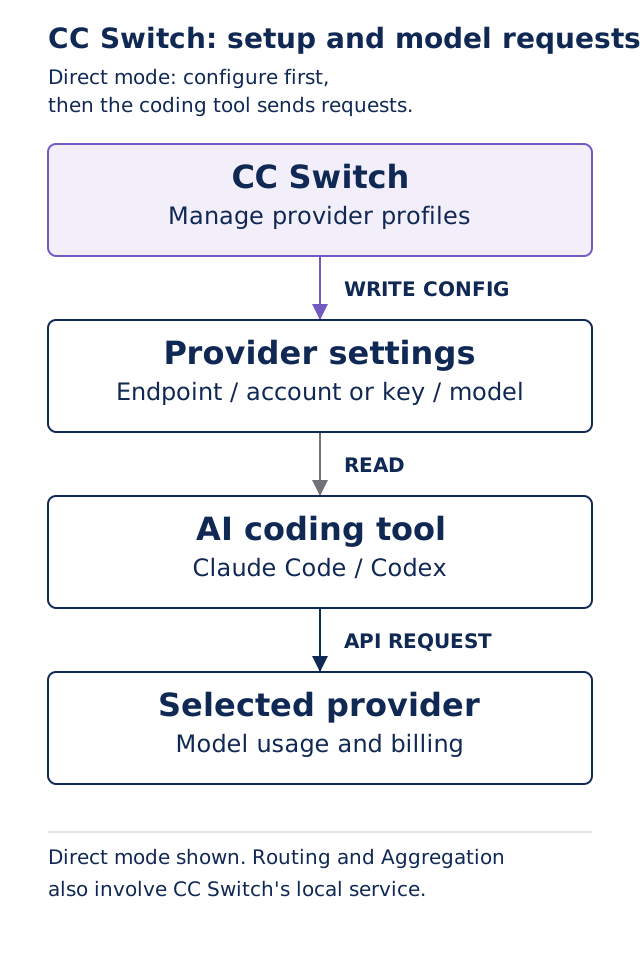
In Direct mode, CC Switch writes the chosen connection settings into the coding tool. The tool then makes the model request. Switching replaces key fields such as the endpoint, credentials and model; other settings are generally shared. Separate provider cards should therefore not be treated as fully isolated work environments. Provider switching · Configuration editing
Two questions help decide whether it fits:
- What repetition are you removing? Central management can reduce repeated changes to endpoints, models and provider profiles. Adding a switcher does not, by itself, improve a model's answers.
- Can you identify the active configuration? Check the account, endpoint, model ID and billing destination together. An enabled badge alone does not establish all four; use the CC Switch setup guide for the verification sequence.
Which tools does it support?
The same-version README lists the following 12 tools. Support for a tool does not mean that every feature, sign-in method or connection mode works identically. Consult the per-tool feature matrix for the relevant capability.
| Configuration behavior | Tools listed in the README |
|---|---|
| A currently active provider | Claude Code, Claude Desktop, Codex, Gemini CLI, Grok Build |
| Several provider configurations can coexist | OpenCode, OpenClaw, Hermes, Pi, MiniMax Code, Kimi Code, Oh My Pi |
Coexisting configurations are not the same as concurrent paid accounts. Account sign-in, saved provider cards and actual request routing need separate checks. Coexist apps
Download and installation options
Use the official website or release page, then match the package to your operating system and CPU. The upstream installation guide warns that similarly named sites requesting top-ups are not official download channels. Installation guide
| System | Official starting options | Check first |
|---|---|---|
| Windows 10 or later | MSI installer or Portable ZIP | x64 and ARM64 use different packages |
| macOS 12 or later | DMG or ZIP; Homebrew is also documented | The official build supports Intel and Apple Silicon |
| Linux | DEB, RPM or AppImage for the distribution | glibc 2.35+ and WebKitGTK 4.1 are required |
Installing the manager does not configure a model service for you. Start with one coding tool and one provider you are authorized to use. Routing and Aggregation can wait. The first provider-switch guide covers configuration, request verification and returning to the previous setup.
Direct, Routing and Aggregation
| Mode | Request path | When to consider it |
|---|---|---|
| Direct | The coding tool connects to its selected provider | Establish one identifiable endpoint, account and model first |
| Routing | Requests pass through CC Switch's local service before reaching the upstream | You need the documented format conversion or routing functions |
| Aggregation | Models from several providers share a model list; the chosen model determines the provider | You need several providers in Claude Code or Codex |
Aggregation does not provide failover, combine provider licenses or create a shared bill. Codex also needs a full restart after the aggregated model list changes. Understanding the Direct configuration before adding a local service leaves fewer layers to diagnose. Connection modes · Aggregation and its limits
Account switching has a defined scope
The official settings manual labels Accounts as Beta. It describes managing GitHub Copilot, ChatGPT/Codex and xAI sign-ins, including choosing a default among multiple accounts. The same-version README separately documents multiple official Kimi Code accounts. These descriptions do not establish interchangeable sign-in support for every tool. Accounts manual · README
The manual also warns that some account-backed reverse proxies use reverse-engineered OAuth integrations, may be unsupported by the upstream provider, and carry account or terms-of-service risks. Ordinary API-profile management does not require enabling every account-backed route. For company or customer work, establish the allowed endpoint and authentication method first. Official risk notice
What v4.0.25 adds for Codex quotas
Released on November 2, 2026, v4.0.25 adds an optional official-quota protection setting under Settings → App config → Codex App Enhancements. It pauses new official requests when either configured usage threshold is reached; the defaults are 95% for the five-hour quota and 98% for the weekly quota. v4.0.25 release
- It is off by default and applies only to official Codex requests passing through CC Switch's local routing.
- If quota information cannot be read, requests are allowed through.
- A paused request returns an error rather than entering another provider's failover queue. The feature does not automatically switch accounts or add subscription capacity.
The release also adds MCP connectivity checks and fixes Windows provider-form flicker and duplicate usage accounting under Codex model mapping. Connection and usage displays are useful diagnostic signals; they do not replace checking the provider's own configuration and billing records. English release notes
Costs and upgrades to keep separate
CC Switch's source is MIT-licensed. Model subscriptions, API usage and third-party provider charges remain separate decisions. The v4.0.25 usage page can fetch exchange rates, but costs remain recorded in US dollars; conversion changes the display, not the provider's rates. License · Exchange-rate display
When upgrading from 3.x, reinstalling the older application is not a complete recovery plan. The v4.0 upgrade notes identify database schema 20 and warn that older applications may reject a newer database. Keep the pre-upgrade database and configuration backup before changing versions. v4.0 upgrade notes
Next steps
- Ready to configure one provider? Read CC Switch Setup: Verify a Provider Change and Switch Back.
- Clarifying what Codex can access? Read Codex permissions.
- Preserving an existing work environment? Read Codex backup and restore.
Sources and verification date
Checked November 5, 2026. Primary version: CC Switch v4.0.25, released November 2, 2026; tag commit a3eafa408ae679db2e3401fca767ed2b89d9a2b2.
Version addendum, November 6, 2026: v4.0.26 points to f621d4216189ef06bcc6acd3588c84937b9794e1. It adds account-plan labels and other changes. Its updated non-Codex Kimi preset model must not be applied automatically to the Codex cards used in our setup guide. The relevant Kimi For Coding/Global and DeepSeek Codex presets are unchanged from v4.0.25. Endpoint, credential and billing checks belong in the existing setup guide, without creating another update page.
- v4.0.25 README: supported tools, feature matrix and basic workflow.
- Installation guide: packages and system requirements.
- Provider switching and configuration editing: modes, activation and shared settings.
- Accounts: account scope and risk notice.
- Aggregation: restart requirements and limits.
- v4.0.25 release and English notes: quota protection and fixes.
- v4.0 upgrade notes: database compatibility.