Everyday text chat on the ChatGPT free plan is now unlimited, subject only to abuse safeguards. What actually stops you is four other things. Tool limits: free users can upload 3 files per day, and image generation, data analysis, voice and Deep Research each have their own limits (OpenAI does not publish an image count). Chat length: the free plan's total Instant context window is 27K, roughly 12 pages of input, and a full chat means starting a new one. Missing features: audio uploads, voice with video and scheduled tasks. Peak hours: free response times are limited by bandwidth and availability, and upload limits may be lowered.
For questions, short edits and the occasional image, the free plan is enough. If you keep running out of uploads or want longer chats, look at Go. If you want to pick advanced models, use Deep Research fully or avoid ads, you need Plus. A full chat is not the same as a used-up quota: you can start a new chat right away without waiting or paying.
This page is based on OpenAI's help center and the ChatGPT pricing page, as of 2026-11-29, and we will update it when OpenAI changes them. We did not test a free account, and we do not give numbers OpenAI has not published.
ChatGPT Free vs Go vs Plus
Every cell comes from the official page in the last column, checked 2026-11-29. "Limited" and "Expanded" are OpenAI's own labels; no figures are given.
| Item | Free | Go | Plus | Official source |
|---|---|---|---|---|
| Everyday text chat | Unlimited, subject to abuse safeguards | Same | Same | Pricing, Free tier FAQ |
| File and image uploads | 3 files per day; pricing page says "Limited" | "Yes"; Go article says more than Free | "Yes" | Uploads, Go |
| Audio uploads | Not available | "Eligible paid subscriptions" (plans not listed one by one) | Same as Go | Uploads |
| Files per project | Up to 5 | Up to 25 | Up to 25 | Uploads |
| Image generation | "Limited", count not published | "Yes", more images than Free | "Yes", plus image generation with Thinking | Pricing |
| Data analysis | "Limited" | "Yes" | "Yes" | Pricing |
| Voice | "Yes", separate limits | Pricing says "Expanded"; Go article says "same usage limits as the Free tier" | "Expanded" | Pricing, Go |
| Voice with video | No | Yes | Yes | Pricing |
| Deep Research | "Limited" | "Limited" | "Yes" | Pricing |
| Instant total context window | 27K, ~12 pages of input | 54K, ~40 pages | 54K, ~40 pages | Pricing |
| Reasoning total context window | "Varies" | 256K, ~320 pages | 256K, ~320 pages | Pricing |
| Model | OpenAI's pages disagree; see below | Same as Free; Think uses GPT-5.6 Luna, no GPT-5.6 Sol | Adds GPT-6 Sol, GPT-6 Astra, GPT-5.6 Sol and Medium/High thinking | Models, Pricing |
| Scheduled tasks | No | Yes | Yes | Pricing |
| Response times | Limited by bandwidth and availability | Same | Fast | Pricing |
| Ads | May appear in some regions | Being tested in select regions | None | Ads |
| Create a new GPT | No (existing GPTs still usable) | No | No | Free tier FAQ |
| How to choose | Questions and short edits, under 3 uploads a day | You hit the 3-file cap or fill chats quickly, but don't need advanced models | You want advanced models, regular Deep Research, video voice or no ads | Our judgment; see "Wait, Go or Plus?" below |
For prices see our AI subscription comparison of ChatGPT, Claude and Gemini.
Chat length: what "Context window full" means
There is no fixed number of messages per chat. OpenAI says your messages and ChatGPT's replies both take up space, and a few long exchanges can fill it faster than many short ones. The pricing page lists a 27K total Instant context window for Free (about 12 pages of input) and 54K for Go and Plus; system instructions, memory and reasoning also use part of it.
When it fills up you see "Context window full" or "Chat memory full". It applies only to that chat; the original chat does not get a reset time, but you can start a new chat immediately. A summary carried into a new chat may drop earlier instructions, so paste the passage you want to keep working on. You can still read the old chat, and if the notice offers an upgrade, upgrading lets you continue in the same chat.
Upload and image generation limits
From Uploading files and audio to ChatGPT: the general cap is 80 files every 3 hours, and free users are limited to 3 file uploads per day; OpenAI may lower these at peak times. ChatGPT does not show how much of the upload quota is left, and failed attempts can count. Images are capped at 20 MB, documents at 512 MB and 2 million tokens, spreadsheets at about 50 MB. Audio uploads are not available on Free, and projects hold up to 5 files. The Free tier FAQ adds 512 MB of Library storage.
Image generation is "Limited" on Free, with no published count. When you hit the limit, ChatGPT shows when you can try again; text chat keeps working.
Voice, data analysis and Deep Research
All three are on the free plan with separate limits. Voice with video starts at Go. Deep Research is "Limited" on both Free and Go and only "Yes" on Plus.
Which model the free plan uses
On 2026-11-29 OpenAI's own pages disagreed, so we list both as written: the Free tier FAQ says "Free users have access to GPT-5.6 Luna", while the pricing table marks "GPT-6 Luna" Yes and "GPT-5.6 Luna" No for Free. The models article matches the FAQ and adds that Luna cannot be selected in standard chats; the system assigns it.
Which message means what
| What you see | What it means | What to do | Source |
|---|---|---|---|
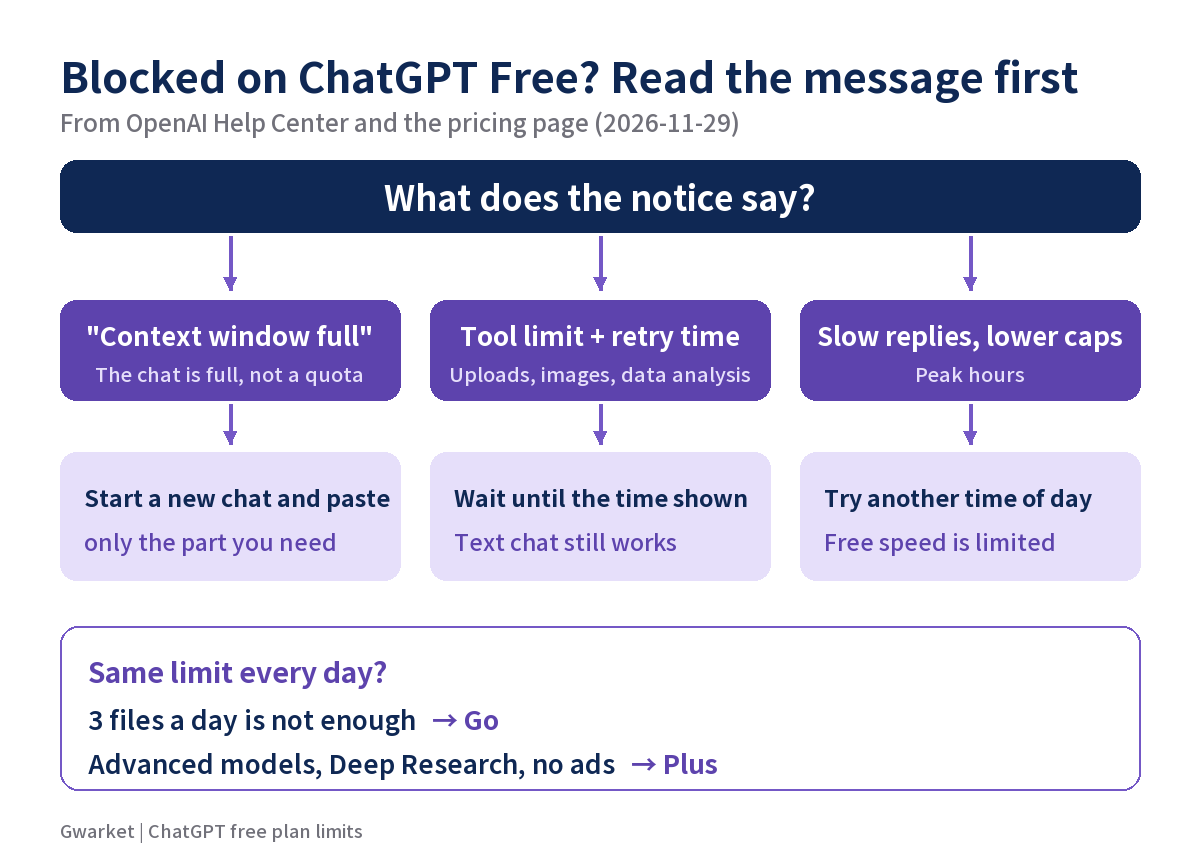
| "Context window full" / "Chat memory full" | This chat is full, not your quota | Start a new chat and paste only what you need | Free tier FAQ |
| A tool limit with a retry time (uploads, images, data analysis, GPTs) | That tool's limit is used up; text chat is unaffected | Wait for the time shown, or upgrade (Plus, Pro or Business resets the limit) | Free tier FAQ |
| "Upload limit reached" after few uploads | 3 files a day on Free; failed attempts can count; peak-time caps | Check the account, wait for the retry time, check OpenAI Status | Uploads |
| A brand-new chat fills after one short message | Possibly an incident | Check OpenAI Status, then try a private window | Free tier FAQ |
| Audio file won't upload | Not available on Free | Use voice mode, or a paid plan | Uploads |
OpenAI Support does not reset usage limits.
Going ad-free lowers your limits
Ads may appear on Free and Go; Plus and higher have none, and under-18 accounts and Temporary Chats don't show ads. On Free you can switch to an ad-free mode, but it comes with lower message limits and some tools removed, such as image generation and Deep Research. OpenAI's user-facing page does not list countries, so we don't say whether accounts in Taiwan see ads; the Ads Manager country list covers advertisers, not users. If your settings show "Ads controls", your region has or will soon have ads.
Wait, Go or Plus?
Our judgment based on the official specs: if chats fill up, start a new one before paying. If 3 uploads a day or 5 files per project is too few, Go is enough. Go still may show ads, keeps Deep Research "Limited" and has no selectable advanced model, so if those matter, go to Plus. Plus is not unlimited either: from December, advanced-model chat shares one allowance with Codex and Work, covered in ChatGPT usage limits in December. This page is about the free plan; that one is about paid plans.
Compared with Claude and Gemini free plans
ChatGPT Free does not cap text chat but limits uploads, images and chat length. Claude Free has 5-hour and weekly limits (Claude free plan limits). Gemini Free is compute-based, resetting every 5 hours up to a weekly cap (Gemini free plan limits).
FAQ
How many images can ChatGPT Free generate per day?
OpenAI does not publish a number. The pricing page only marks image generation "Limited" on Free, and ChatGPT shows when you can try again after hitting the limit.
How many files can I upload on ChatGPT Free?
Up to 3 files per day, possibly lower at peak times. Images can be up to 20 MB and documents up to 512 MB. Audio uploads are not available, and projects hold up to 5 files.
Is there a message limit per chat on the free plan?
No fixed count. The free Instant context window is 27K, about 12 pages of input. When it fills, start a new chat; there is nothing to wait for.
How we wrote this
Based on OpenAI's help center articles ChatGPT Free Tier FAQ, Uploading files and audio to ChatGPT, GPT-6 and other models in ChatGPT, What is ChatGPT Go?, Ads in ChatGPT and Ads Manager Availability, plus the ChatGPT pricing page. Data as of 2026-11-29. Not tested on a free account. Where OpenAI's pages disagree we show both; "how to choose" and the upgrade advice are our judgment.