The Gemini free plan (Google's help center calls it "without an AI plan") has no fixed daily message count. Usage is compute-based: it refreshes every 5 hours until you reach a weekly limit, and complex prompts, long chats and heavy features use it up faster. Paid plans are described only as multiples: Google AI Plus is 2x the standard limit, Google AI Pro is 4x, and Google AI Ultra is 5x or 20x the Pro limit.
For questions, editing and the occasional document, the free plan is enough: Canvas, Deep Research, slide generation and image generation with Nano Banana 2 are all included. It stops being enough in two cases. If you need video generation, scheduled actions or the daily brief, the free plan does not have them, so waiting will not help. If you keep running Deep Research, uploading large files or editing in one long chat, that is a usage problem: change how you use it first, and upgrade only if you still hit the limit.
This page is based on Google's Gemini help center, as of 2026-11-28, and we will update it when Google changes the rules. We did not test usage on a free account, and Google does not publish a message count, so there are no "about N prompts" figures here.
Gemini free vs AI Plus, AI Pro and Ultra
Every cell comes from the official page in the last column, checked 2026-11-28.
| Item | Free (no plan) | Google AI Plus | Google AI Pro | Google AI Ultra | Official source |
|---|---|---|---|---|---|
| Usage limit | Standard limits | 2x standard | 4x standard | 5x or 20x AI Pro, depending on subscription | Limits article |
| Refresh | Every 5 hours until the weekly limit | Same | Same | Same | Limits article |
| Context window | 32k tokens | 128k tokens | 1 million tokens | 1 million tokens | Limits article |
| Models | Auto only: most prompts go to Flash-Lite; deeper reasoning may go to Flash or Pro | Flash-Lite, Flash | Flash-Lite, Flash, Pro | Flash-Lite, Flash, Pro | Model access changes |
| Canvas, Skills, Connected apps, Slide generation | ✓ | ✓ | ✓ | ✓ | Limits article feature table |
| Deep Research | ✓ (may be unavailable at peak demand) | ✓ | ✓ | ✓ | Same |
| Image generation with Nano Banana 2, Music generation | ✓ | ✓ | ✓ | ✓ | Same |
| Redo images with Nano Banana Pro | ✗ | ✓ | ✓ | ✓ | Same |
| Video generation | ✗ | ✓ | ✓ | ✓ | Same |
| Scheduled actions, Daily brief | ✗ | ✓ | ✓ | ✓ | Same |
| After you hit the limit | Wait or upgrade | Wait, upgrade, or continue with Flash-Lite | Same as Plus, plus buy AI credits | Same as Pro | Limits article |
| How to choose | Everyday questions and editing, occasional slides or images, Deep Research a few times a week | You want twice the usage, video generation, or longer chats and files | You often hand it long documents or code, use Deep Research a lot, or want to pick Pro | You use it most of the day and 4x is not enough | Our judgment; see "Which uses cost the most" below |
For prices we do not repeat the numbers here; see our AI subscription comparison of ChatGPT, Claude and Gemini. Students in Taiwan should check the AI student plans comparison first.
How the 5-hour and weekly limits work
Google says usage is compute-based and lists four factors: prompt complexity, the model, the features you use, and chat length. The limit refreshes every 5 hours until you reach your weekly limit. Google does not publish the size of the free limit; it calls it "standard limits" and describes other plans as multiples of it.
What the help center does say:
- Gemini notifies you when you are close to the limit, and again when you reach it, with the time it will refresh.
- You can check your usage at gemini.google.com under Settings, then Usage Limits.
- When capacity is tight, users without a plan are limited before subscribers, and features like Deep Research may be unavailable during high demand.
- Limits may change without notice.
- This applies to personal accounts; work and school accounts follow different rules.
Which models the free plan gets since October 9
Google's model access changes page says that from October 9, 2026, personal accounts without a plan get only "Auto". Most prompts go to Flash-Lite; prompts that need deeper reasoning may go to Flash or Pro. If you turn smart model selection off, every response uses Flash-Lite. So "free users only get Flash-Lite" is half right: you cannot pick Flash or Pro yourself, but Auto may still use them. Each model also has low, medium and high effort levels; higher effort gives fuller answers and uses more of your limit.
Which uses cost the most
Google's help center has a relative usage cost table. Sorted from most to least:
| Google's category | Relative cost | What you might be doing | How to use less |
|---|---|---|---|
| Video generation | High (usually the most) | Making short video clips | Not available on the free plan anyway |
| Deep Research | High | Market research, full reports | Clarify the question in normal chat first |
| Large file analysis | Medium | A 100-page PDF, a full spreadsheet or codebase | Upload only the parts you need; the free 32k-token window cannot read very large files in full |
| Ongoing conversations | Medium, rising with length | Editing the same text or code in one long chat | Start a new chat for a new topic (Google's own tip) |
| Simple conversation | Very low | Short questions with no follow-up | No need to save |
The model access page also names media generation, Deep Research, the Pro model, and extended thinking and Deep Think as things that reach the limit faster. The practical takeaway: on the free plan, long chats often cost more than many short questions, because Gemini re-reads the whole history every turn.
Are "N prompts per day" figures still valid?
No. Google's model access page says that from May 17, 2026 (July 24, 2026 for users under 18), Gemini moved to compute-based limits that refresh every 5 hours until a weekly limit. Fixed daily counts you still see in search results come from the old system or from third-party estimates. If an article does not mention "5 hours" and "weekly", it is probably out of date.
What to do when you hit the limit
- No plan: Google gives two options: wait for the refresh, or upgrade to a plan with higher limits.
- Any Google AI plan: you can also continue the conversation with Flash-Lite. This option is for subscribers only.
- AI Pro or Ultra: you can also buy AI credits, deducted at the model's standard API price and the request's complexity.
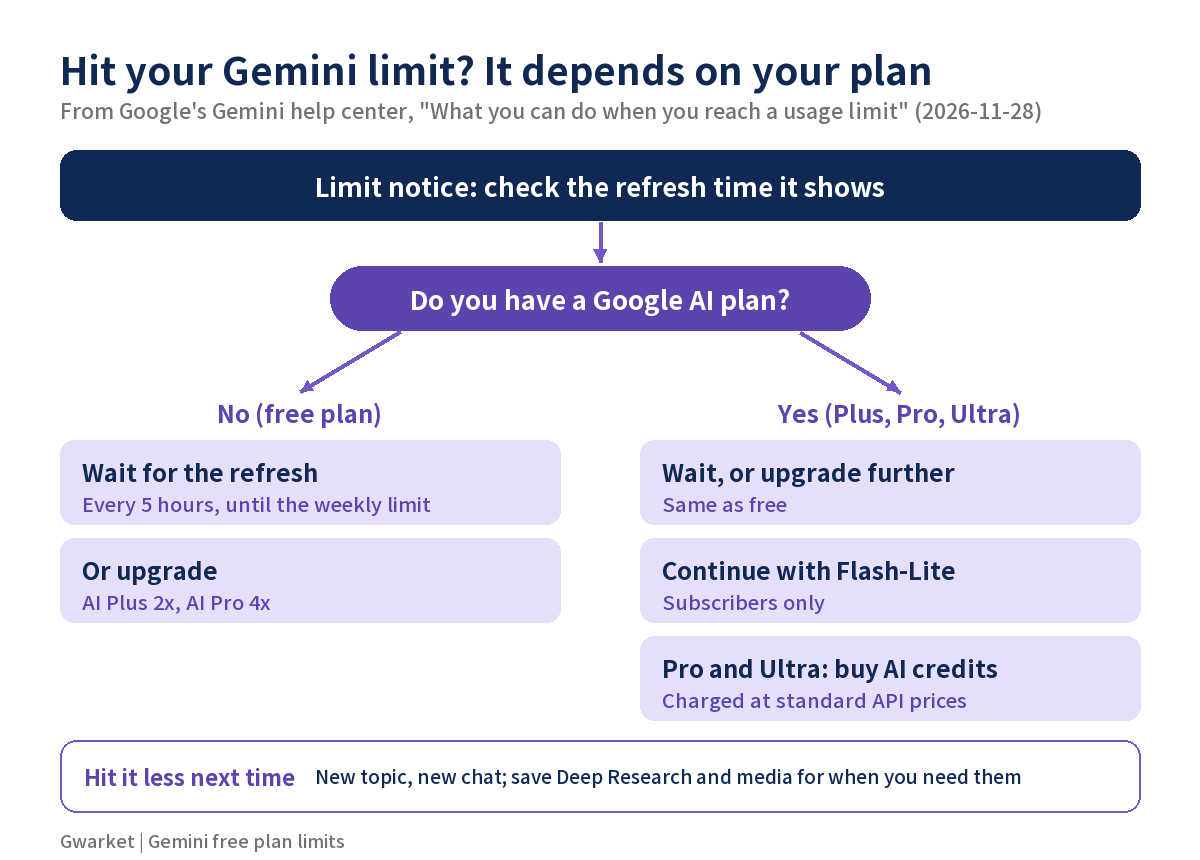
While you wait, check what used up the limit: a long chat, a large file, or Deep Research. If you still hit the weekly limit several days in a row after changing habits, upgrade.
Coming from Claude's free plan
Both free plans use 5-hour plus weekly limits and publish no fixed count, but features and models differ. Compare with our Claude free plan limits table before assuming your habits carry over.
FAQ
Can the Gemini free plan generate videos?
No. In the help center's feature table, video generation is ✗ without a Google AI plan and available from Google AI Plus up. Google also says video usually uses the most usage.
Can the Gemini free plan generate images?
Yes. Image generation with Nano Banana 2 is ✓ on the free plan; redoing images with Nano Banana Pro needs Google AI Plus or higher. Media generation uses your limit faster than chat.
How often do Gemini limits reset?
Every 5 hours, until you reach the weekly limit. When you hit a limit, Gemini tells you when it will refresh, and you can check under Settings, then Usage Limits.
How we wrote this
Based on Google's Gemini help center articles Gemini Apps limits & feature availability and Changes to Gemini model access and limits, read in English and Traditional Chinese. Data as of 2026-11-28; we will update the page when Google changes it. Not tested: we did not measure usage on a free account. The ranking of uses comes from Google's relative cost table; the example uses and "how to choose" are our judgment.