Gemini Gems to Skills: What to Save Before November 17
For people aged 18 and over with personal Google Accounts, Gems transition to Skills and the old Gems become read-only on November 17, 2026; on December 17, Gems are removed from Gemini Apps. Only supported files transfer automatically: GitHub files, audio, video, legacy Office files and archives stay behind. Save the instructions of every important Gem now and download a copy of its knowledge files. Google's transition guide
Check the account before the deadline
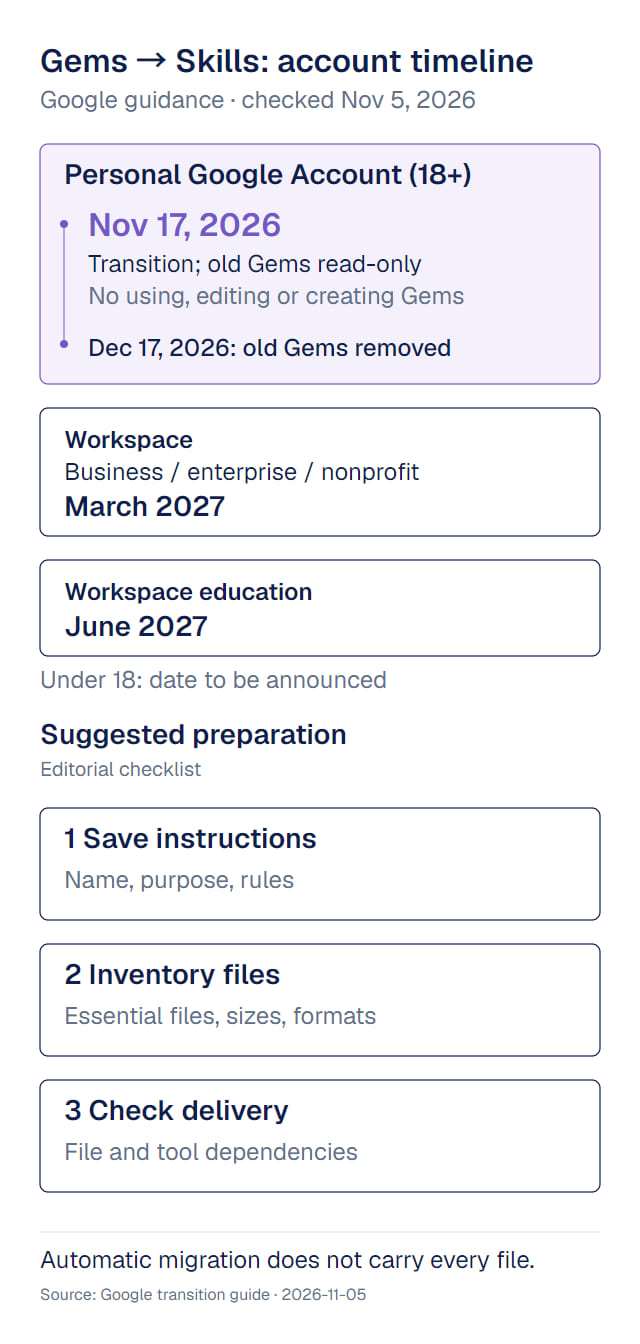
| Account | Google's published timeline |
|---|---|
| Personal Google Account, age 18 or over | November 17, 2026: Gems transition to Skills and become read-only; you can still view them but cannot use or edit them or create new ones. December 17, 2026: Gems are removed from Gemini Apps |
| Workspace business, enterprise, nonprofit | March 2027 |
| Workspace education | June 2027 |
| Personal account under 18 | A later date, to be announced |
The account you sign in with determines the timeline. If you use a personal account for office work, the November 17 date applies to you. Account-specific dates
Save the instructions, files, and acceptance criteria
For each important Gem, keep a short record of:
- Its name, purpose, full instructions, and the date you recorded them.
- Every reference file: name, type, size, and why it is needed. Keep a separate copy of anything important.
- The result you rely on: required sections, terminology, tone, and decisions that remain yours.
The third item tells you whether the work still gets delivered, not just whether the settings moved. A migrated meeting-summary instruction can still produce a well-formatted summary with the wrong terms if the project glossary is missing.
Google's manual route: open the Gem from Gems in the sidebar, click Edit, and download each Knowledge file. Create a local folder named after the skill (lowercase, with hyphens) and move the files into it. Then go to Customize → Skills, create a skill manually, and paste in the Gem's name, description and instructions. If the skill needs files, download its .zip from More options, move the SKILL.md into your folder, and use Replace skill to upload the folder; the folder name must match the skill name. Official manual transition steps
You don't need to rebuild every Gem by hand before November 17. Start with the Gems you use often, that carry many files, or that a deliverable depends on; check the rest after the automatic transition.
Review the attachments first
Skills have a 100MB total file limit. If a Gem exceeds it, Google removes the largest files first until it fits. The following content does not carry over: File-transition limits
- GitHub files
- Audio files
- Video files
- Legacy Microsoft Office formats: .doc, .xls, .ppt
- Archives and compressed formats: .zip, .tar, .7z, .rar, .gz, .tgz
Personal account holders can download these files before the December 17 removal. Inventory Gems with many attachments first; names and descriptions can wait.
The automatic transition removes files by size, not by importance, so classify your materials as essential, useful, or already available elsewhere. A small terminology file may matter more than a large historical report. Legacy Office files can be re-saved in current formats first; .docx, .xlsx and .pptx are on the list of file types Skills support. Supported file types for Skills
Check the materials before handing over the work
Compare the new Skill against your inventory, then identify any dependency on specific tools. According to Google's transition guide, Skills do not yet work with features such as Canvas and Deep Research, and most default Gem tools, including Create video, Create music and Guided learning, are not supported; Connected Apps such as Workspace apps do work. Current compatibility notes
For a recurring summary format, preserving the rules and reference terms is enough. For work that depends on a particular tool or account connection, confirm the new Skill can handle that dependency before scheduling an important delivery.
Next steps
- Decide which work is worth turning into a Skill before rebuilding your Gems.
- Test whether a skill or workflow is reliable after the transition.
- Manage versions of your instructions and files so you can compare before and after.
Sources and verification date
Verified November 6, 2026. Recheck the current official guidance before relying on a transition date.
- Google: About the transition from Gems to skills: account timelines, manual transition steps, file types that don't transfer, and compatibility limits; living Help documentation without a fixed product version.
- Google: Create and manage skills: creation and import mechanics and supported file types, cross-checked on the same date.