From a Python Script to a Small Project You Can Rerun
Turning a Python script into a small project you can rerun requires five things to be explicit: the entry point, the input, the processing responsibility, the persisted result, and the rerun instructions. More files do not make a project better by themselves. What matters is whether a fresh process can tell where to start, which data to read, which logic to call, where the result is written, and how to reproduce the expected outcome.
The previous article, How Does a Python Program Process Data?, traced data flow inside one program. This article extends that model across two Python files, then adds JSON persistence, import, a class, and a README. If you are still unsure which Python interpreter is running or what your working directory is, start with Where Does Python Actually Run?.
The stopping point here is narrow: read, modify, and rerun a small project with two Python files. Packaging, deployment, Git, HTTP, databases, and large application architecture are outside this article.
Contents
- What are the five minimum pieces a rerunnable project needs?
- How does data survive after the program stops?
- How should main.py and helpers.py split responsibilities?
- What does import actually do?
- Why is object state not the same as persistence?
- When something fails, identify the layer first
- What should a README explain so someone else can rerun the project?
- How do you verify that you actually understand the project?
- Stopping point and technical sources
What are the five minimum pieces a rerunnable project needs?
Start with the answer:
| What must be explicit | This example |
|---|---|
| Entry point | main.py |
| Input | data/notes.json |
| Processing responsibility | NoteSelector in helpers.py |
| Persisted result | output/selected.json |
| Rerun instructions | Python version, required files, command, and expected result in the README |
The project structure is deliberately small:
note-project/
├── main.py
├── helpers.py
├── data/
│   └── notes.json
├── README.md
└── output/
    └── selected.json   # created after a successful run
There is no services/, controllers/, or other empty architecture layer. If you cannot explain why a file needs to exist, adding it just to make the project look larger does not improve reproducibility.
How does data survive after the program stops?
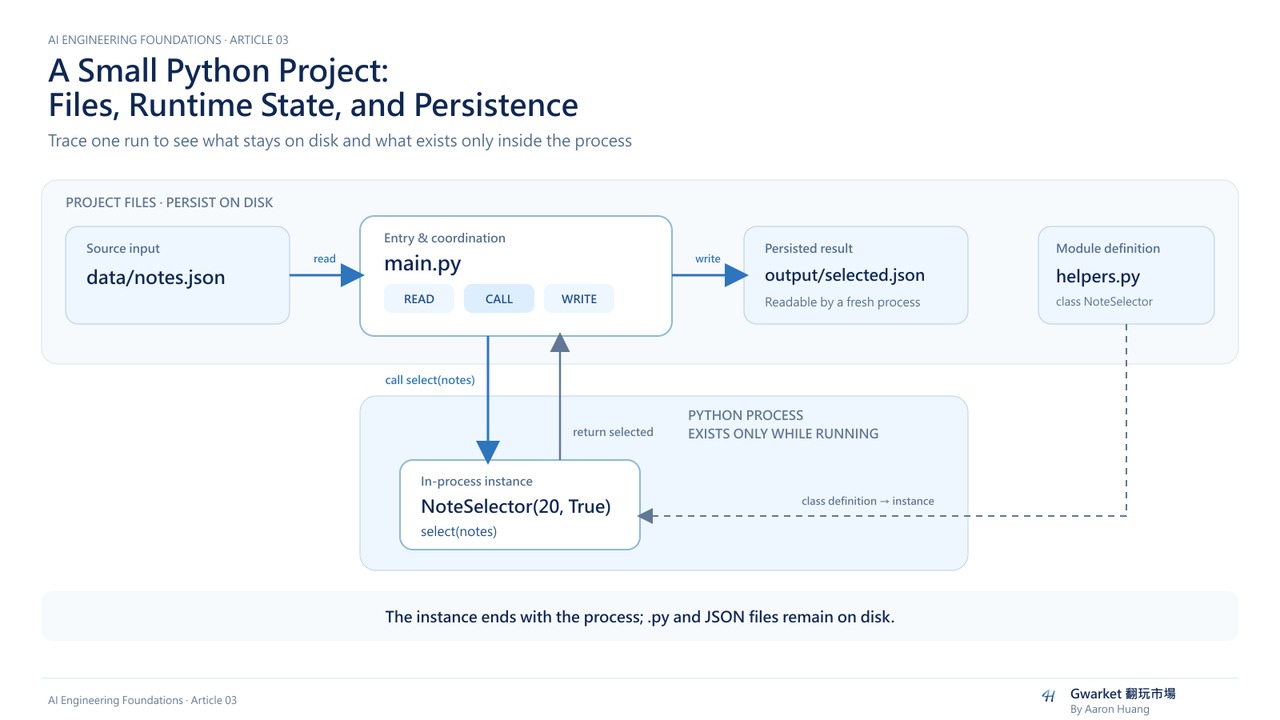
A Python list, dictionary, or class instance belongs to the current process's in-memory state. When that process ends, a new Python process does not automatically receive those objects.
To keep data across processes, this example uses the simplest mechanism: write it to disk.
| Thing | After Python exits | Role in this article |
|---|---|---|
| list / dict / instance | Not automatically preserved | In-process computation and configuration |
| JSON file | Remains on disk | Stores input and generated results |
| README | Remains on disk | Stores rerun conditions and steps |
The data path is:
JSON file
→ json.load()
→ Python data
→ NoteSelector processing
→ json.dump()
→ new JSON file
File modes also have different consequences:
| Mode | Core behavior |
|---|---|
r |
Read an existing file |
w |
Truncate an existing file when opened, then write |
a |
Append at the end of an existing file |
That is why source input and rebuildable output should be separate. Writing a result with w is not an automatic safe replacement strategy: if a later write fails, the previous content does not restore itself. The example also specifies UTF-8 explicitly instead of assuming every operating system uses the same default text encoding.
How should main.py and helpers.py split responsibilities?
The exercise uses four synthetic notes:
[
  {"title": "Organize Python paths", "minutes": 25, "done": true},
  {"title": "Review return", "minutes": 10, "done": true},
  {"title": "Practice JSON I/O", "minutes": 30, "done": false},
  {"title": "Verify README rerun", "minutes": 20, "done": true}
]
There are only two selection rules:
done = trueminutes >= 20
So the expected result contains “Organize Python paths” and “Verify README rerun.”
helpers.py owns only the filtering logic:
class NoteSelector:
    def __init__(self, min_minutes, done_only=True):
        self.min_minutes = min_minutes
        self.done_only = done_only

    def select(self, notes):
        selected = []
        for note in notes:
            if self.done_only and not note["done"]:
                continue
            if note["minutes"] >= self.min_minutes:
                selected.append({
                    "title": note["title"],
                    "minutes": note["minutes"],
                })
        return selected
A minimal main.py connects the steps:
import json
from pathlib import Path
from helpers import NoteSelector

ROOT = Path(__file__).resolve().parent
INPUT = ROOT / "data" / "notes.json"
OUTPUT = ROOT / "output" / "selected.json"


def main():
    with INPUT.open("r", encoding="utf-8") as file:
        notes = json.load(file)

    selector = NoteSelector(20, True)
    selected = selector.select(notes)

    OUTPUT.parent.mkdir(parents=True, exist_ok=True)
    with OUTPUT.open("w", encoding="utf-8") as file:
        json.dump(selected, file, ensure_ascii=False, indent=2)

    print(f"read={len(notes)} selected={len(selected)}")


if __name__ == "__main__":
    main()
This minimal example uses the same execution model explained below: running main.py directly calls the main flow, while import main does not create the output.
After the first python main.py run, do not stop at “there was no error.” Check at least three things:
- The terminal prints
read=4 selected=2. - The original
data/notes.jsonstill contains four items. output/selected.jsoncontains only the two predicted items.
Then end that Python process, start a new one, and read output/selected.json again. If that works, you have direct evidence that the result was persisted on disk rather than surviving only in the previous process's variables.
What does import actually do?
from helpers import NoteSelector does not mean “paste the text from another file into main.py.”
A useful mental model is:
- Python finds the
helpersmodule. - The module has its own namespace: a mapping between names and objects.
- When the module is first loaded, its top-level statements are processed.
from helpers import NoteSelectorbinds the nameNoteSelectorinto the current module's usable namespace.
If you write import helpers instead, you later use helpers.NoteSelector(...). The difference is how the name enters the current program, not whether Python creates a different class definition.
At the bottom of main.py, if __name__ == "__main__": main() controls whether the main flow is called. It does not mean the entire file stops being processed during import.
If helpers.py exists but Python still cannot import it, do not start by modifying sys.path or installing an unrelated package. First check where you launched Python, then inspect helpers.__file__ to see which file was actually loaded.
One controlled failure is enough. From inside note-project, run python -c "import helpers; print(helpers.__file__)" and confirm that it points to this project. Then move to the parent directory and run python -c "import helpers". If there is no other module with that name, the expected failure is ModuleNotFoundError. Return to note-project, and the same import should work again. That sequence—fail, inspect the search context, return to the correct location—is the import diagnosis this article needs.
Why is object state not the same as persistence?
NoteSelector is a class definition. NoteSelector(20, True) creates an instance.
When an instance is created, Python passes the new object as self to __init__(). The values 20 and True become configuration stored on that specific instance.
The same class can create two objects:
normal = NoteSelector(20, True)strict = NoteSelector(25, True)
Given the same notes, normal should keep two items while strict should keep only one.
When you call normal.select(notes), normal becomes self inside the method, while notes is the data you explicitly pass in.
If you write NoteSelector(), the required min_minutes argument is missing, so Python raises a TypeError at the call boundary. The smallest fix is to supply the missing argument, not redesign the class.
But normal and strict still exist only in the current process. Once Python exits, their settings are not automatically persisted. The files on disk are what survive across processes in this example.
When something fails, identify the layer first
Do not rewrite the whole project because one error appeared. First identify which layer failed:
| Symptom | Layer | Check first | Smallest correction |
|---|---|---|---|
FileNotFoundError |
File location | The exact path in the traceback | Restore the filename or fix the path |
| JSON decode error | File format | Extra comma, missing bracket, malformed JSON | Fix the JSON syntax |
minutes is "20" |
Data contract | After confirming the outer array, inspect field types | Change it back to an integer |
ModuleNotFoundError |
Module search | Launch location and helpers.__file__ |
Return to the correct location / verify the loaded source |
TypeError from NoteSelector() |
Call arguments | Which required parameter is missing | Supply min_minutes |
Also remember that an old output file can survive a failed run. If a previous run succeeded and the next run fails while reading or parsing input, the old output/selected.json may still be there. An existing output file does not prove the current run succeeded. Verify that this process ended successfully and that the output matches the current input and configuration.
Separating input from output reduces one direct overwrite risk. It does not provide backups, version history, file locking, atomic writes, or production-grade data safety.
What should a README explain so someone else can rerun the project?
A README is useful when it removes assumptions that otherwise exist only in the author's head.
At minimum, it should answer:
| Question | This article's answer |
|---|---|
| What environment? | A working Python 3 environment |
| What must be installed? | No third-party packages |
| Which files are required? | main.py, helpers.py, data/notes.json |
| How do I start it? | python main.py |
| What is the input? | A UTF-8 JSON array of notes |
| What result should I expect? | 4 items read, 2 items written |
| What does the run modify? | Creates / overwrites output/selected.json |
| What are the limits? | No history, no file locking, not suitable for important data |
The most direct test is to close the original terminal, open a new one, and rerun the project using only the README.
The working-directory behavior also needs only one verification. This example builds data paths from Path(__file__).resolve().parent, so running the script from its parent directory should still read and write data inside the same project. If the failure is a module import problem instead, return to the helpers.__file__ diagnosis above rather than inventing a second troubleshooting model.
How do you verify that you actually understand the project?
Make three small changes. Predict the result before each run, then compare your prediction with evidence:
- Change
min_minutesfrom 20 to 25. Predict which note remains, then inspect the output JSON. - Add one synthetic record to
notes.json. Predict whether it should be selected, then verify that the original four items were not accidentally lost. - End the original process, open a new terminal, rerun using only the README, and read the output file again.
If you can trace:
entry point
→ module
→ file read
→ Python data
→ instance
→ method
→ file write
→ new process reads the file again
and explain who owns each step, you have reached the stopping point. When something fails, you should also be able to identify whether the first suspect is the file path, data format, import search, or call arguments, then make the smallest correction.
Stopping point and technical sources
This article is bounded to P05 + S01–S03 of AI Engineering Foundations v1.0:
- P05: files, encoding, and persistence
- S01: modules, imports, namespaces, module search, and entry points
- S02: classes, instances,
self,__init__, and object state - S03: README, data, dependencies, and reproducible steps
It does not cover packaging, deployment, Docker, database design, framework architecture, HTTP / external APIs, Git version control, or complex inheritance. The next article compares the roles of libraries, SDKs, frameworks, and APIs.
Technical details can be checked against the official Python documentation:
The note data in this article is synthetic teaching material, not evidence from an external production project.