How Does Python Process Data? From Variables and Containers to Conditions and Functions
When people first learn Python, it is easy to develop a misleading feeling:
You can understand each line on its own, but once several lines are connected, you no longer know where the data went.
For example, you see:
minutes = "30"
and know that a value is being stored.
You see:
if minutes >= 30:
    ...
and recognize a condition.
You see:
def filter_notes(...):
    ...
and recognize a function definition.
But the more useful skill is not naming the syntax. It is answering:
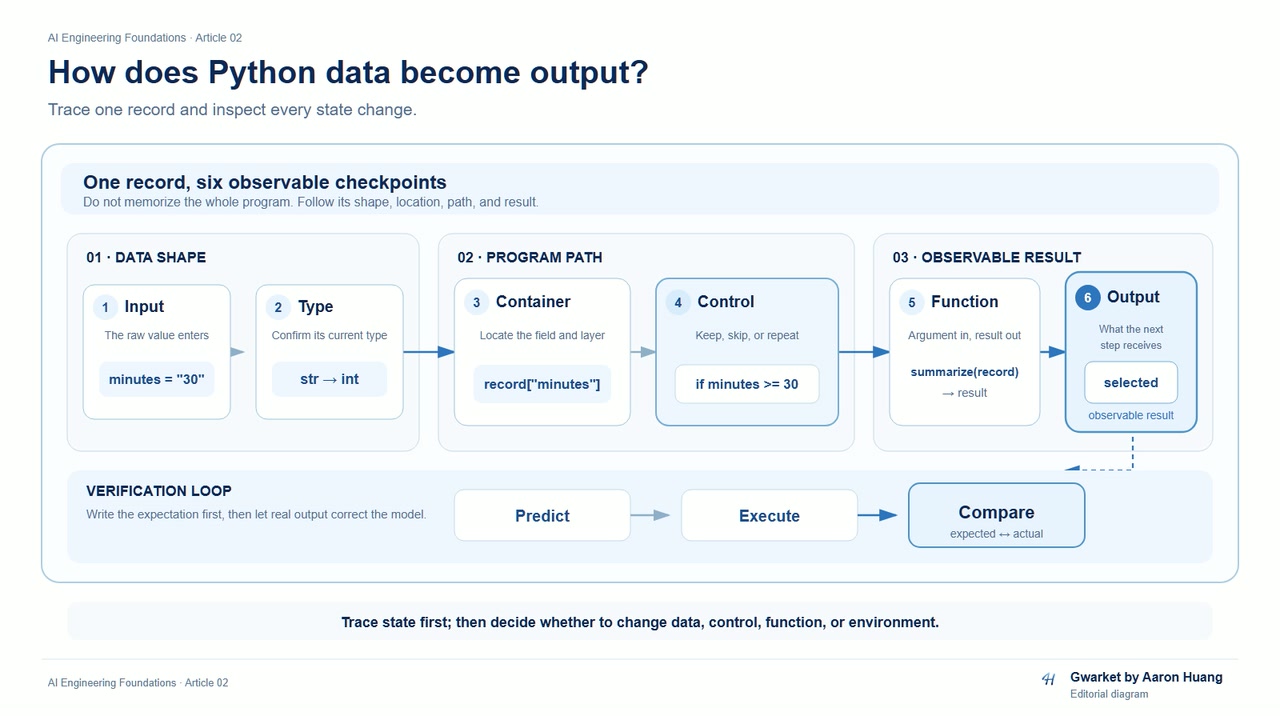
When one input enters the program, what happens to it step by step, and why does it eventually produce this output?
Article 02 focuses on that question.
This is not a complete Python syntax guide. Instead, we will build one traceable data-flow model:
Input
↓
Value and type
↓
Container
↓
Condition / loop
↓
Function
↓
Return value
↓
Output
Once you can follow this path, a larger program stops looking like an undifferentiated wall of Python syntax.
Start with the smallest unit: what does a variable refer to?
Consider two values:
a = "3"
b = 3
They both look like “3”.
But a program does not only care about visual appearance. It also cares about:
- what the value is
- what type the value has
- whether later operations accept that type
Inspect them directly:
a = "3"
b = 3

print(a)
print(type(a))

print(b)
print(type(b))
For now, keep four ideas connected:
Name
→ Value
→ Type
→ Later operation
a and b are names.
"3" and 3 are the values those names currently refer to.
Their types affect what later operations can do with those values.
So a variable does not need to be treated as a mysterious box. For this article, a practical first model is:
A program uses a name so later steps can refer to a value again.
Do not guess at type problems—trace the data
Suppose a user input arrives as text:
minutes_text = "30"
But a later step needs to treat it as a number.
That means the data flow now includes a conversion:
"30"
↓
Text
↓
Conversion
↓
30
↓
Number
For example:
minutes_text = "30"
minutes = int(minutes_text)

print(type(minutes_text))
print(type(minutes))
The important lesson is not memorizing int().
It is learning to ask:
What type should this value have at this step?
If the input changes to:
minutes_text = "thirty"
minutes = int(minutes_text)
the conversion fails.
At that point, distinguish at least two possibilities:
Invalid input data
vs.
A required conversion step is missing
For example:
minutes_text = "30"
can represent a number, but it is still text at this point.
By contrast:
minutes_text = "thirty"
is invalid input if your rule requires a numeric value.
That distinction matters. Otherwise, it is easy to see an error and immediately rewrite code without first deciding whether the data is wrong or the processing step is wrong.
The second layer: why do multiple values need containers?
A single value is easy to trace.
Real programs quickly need to handle multiple pieces of data.
Consider three study notes:
notes = [
    {"title": "Python", "minutes": 30, "done": True},
    {"title": "Git", "minutes": 20, "done": False},
    {"title": "API", "minutes": 45, "done": False},
]
Do not read this as one large block of brackets.
Break it into layers:
Outer layer
notes
↓
list
↓
Each item
dict
↓
Fields
title / minutes / done
↓
Field values
"Python" / 30 / True
Nested data becomes easier to read when you first answer three questions:
- What is the outer container?
- What is one item inside it?
- Where is the field I want?
For example, to get the title of the first item:
print(notes[0]["title"])
Read that in two steps:
notes[0]
→ get the first dict

["title"]
→ get the title field from that dict
You do not need to understand the whole expression at once. You can retrieve one layer at a time.
list, dict, set, and tuple are not just four vocabulary words
The source material emphasizes four properties rather than memorizing names:
- order
- key-to-value mapping
- duplicate items
- mutability
A useful first decision model is:
| Container | First question to ask |
|---|---|
| list | Do I have a group of items I want to process in sequence? |
| dict | Do I want to find values by field name or key? |
| set | Do I care more about unique membership than position? |
| tuple | Do I want an ordered group that I do not intend to modify directly? |
You do not need to learn every method in this article.
The target is simpler:
Given a data requirement, can you explain why you chose this container?
The three study notes make sense as a list because we want to process multiple records in sequence.
Each record has fields such as title, minutes, and done, so a dict is a useful representation for one record.
If you only want to know which topics appeared and do not want duplicates, you might build a set.
Predict before you modify data
Now change the first item:
notes[0]["minutes"] = 35
Before running it, answer:
Which value will change?
“notes will change” is too vague.
Be more precise:
notes
└── first item
    └── minutes
        30 → 35
That is data-flow practice.
Before each modification, identify:
- which layer changes
- the old value
- the new value
- whether other fields should remain unchanged
That habit is more useful than learning many container methods at once.
Common container failures: which layer did you access incorrectly?
Suppose you write:
print(notes[10])
The list did not “break”.
You asked for a position that does not currently exist.
Or consider:
print(notes[0]["score"])
If the first record has no score key, the dict did not “break” either.
You assumed the data contained a field that is not actually there.
So when container access fails, do not start by rewriting everything. Ask:
What container do I currently have?
↓
Am I accessing it by position or by key?
↓
Does that position / key actually exist?
The third layer: conditions send data down different paths
Suppose the requirement is:
Keep notes that are unfinished and took at least 30 minutes.
Do not begin with a full block of code.
Break the rule into steps:
Each note
↓
Is done False?
↓
Are minutes at least 30?
↓
Both conditions are true
↓
Keep the note
Then write:
selected = []

for note in notes:
    if not note["done"] and note["minutes"] >= 30:
        selected.append(note)
The important part is not the appearance of for and if.
Trace each iteration:
Which item is being processed?
↓
Is the condition True or False?
↓
Did selected change?
Using the data above:
| Current item | done | minutes | Keep it? |
|---|---|---|---|
| Python | True | 35 | No |
| Git | False | 20 | No |
| API | False | 45 | Yes |
If you can predict this table before executing the code, you are beginning to read control flow rather than merely recognizing syntax.
What do for, while, break, and continue change?
This article does not need to turn control flow into a syntax encyclopedia.
Focus on how each construct changes what the program does next:
if
→ Should this branch run this time?

for
→ Process items one by one

while
→ Keep repeating while a condition remains true

continue
→ Skip the rest of this iteration and move to the next one

break
→ Exit the current loop
For example, skip records with no title:
for note in notes:
    if not note["title"]:
        continue

    print(note["title"])
If the requirement is instead:
Stop after finding the first matching record
you might use:
for note in notes:
    if note["minutes"] >= 30 and not note["done"]:
        print(note)
        break
The question is not which keyword is more advanced.
It is:
Can you explain where control flow moves next?
Loop failures often come from state not changing as expected
Consider a simple while loop:
count = 0

while count < 3:
    print(count)
    count += 1
You should be able to trace it manually:
count = 0
↓
0 < 3 → run
↓
count = 1

1 < 3 → run
↓
count = 2

2 < 3 → run
↓
count = 3

3 < 3 → False
↓
stop
If this line is missing:
count += 1
the real problem is not that while is inherently dangerous.
The problem is:
The state that controls loop termination is not being updated.
When a loop behaves incorrectly, trace at least three things:
- What is the initial state?
- What changes on each iteration?
- What condition eventually stops the loop?
Think about boundary values before the output looks wrong
Return to this condition:
note["minutes"] >= 30
Suppose a record is exactly:
{"title": "SQL", "minutes": 30, "done": False}
Should it be kept?
That depends on the requirement:
At least 30 minutes
→ >= 30
versus:
More than 30 minutes
→ > 30
So condition logic is not only about whether the program runs. It is also about whether the boundary matches the intended rule.
The fourth layer: functions package a data-flow step so it can be reused
Our filtering code currently looks like this:
selected = []

for note in notes:
    if not note["done"] and note["minutes"] >= 30:
        selected.append(note)
If the same operation will be used again, package it as a function:
def filter_notes(notes, min_minutes):
    selected = []

    for note in notes:
        if not note["done"] and note["minutes"] >= min_minutes:
            selected.append(note)

    return selected
Now the data flow becomes:
Caller
↓
Pass notes + min_minutes
↓
Function processes the data
↓
selected
↓
return
↓
Caller receives the result
Before executing:
result = filter_notes(notes, 30)
predict what result should contain.
Then run the code and compare.
This is the capability P04 is trying to build:
Read a function as a contract with inputs, processing, and an output.
The difference between print() and return is not simply whether something appears on screen
Compare these two functions:
def show_count(notes):
    print(len(notes))
and:
def get_count(notes):
    return len(notes)
The first function displays information.
The second sends a result back to the caller so later code can use it.
For example:
count = get_count(notes)
print(count + 1)
The data flow is:
notes
↓
get_count()
↓
returned count
↓
count + 1
↓
output
So when you ask:
“The function clearly calculated a value. Why can’t I use it outside?”
do not only look for a print().
Ask:
Did the value travel back to the caller through return?
Controlled failure: intentionally omit return
Consider this version:
def filter_notes(notes, min_minutes):
    selected = []

    for note in notes:
        if not note["done"] and note["minutes"] >= min_minutes:
            selected.append(note)

    print(selected)
You may see the filtered records printed on screen.
But if the caller writes:
result = filter_notes(notes, 30)
you should not assume result contains the filtered list simply because something was printed.
That is exactly why print() and return are easy to confuse.
The smallest repair is not rewriting the whole function.
First confirm the output contract:
Is this function supposed to hand selected back to its caller?
If yes, then the return path needs to exist.
A function may also change the data you passed into it
Compare two approaches.
The first modifies the supplied container:
def add_note(notes, note):
    notes.append(note)
The second can be designed to return a new list:
def add_note_copy(notes, note):
    updated = list(notes)
    updated.append(note)
    return updated
This article does not need to dive into Python's object implementation.
For now, establish one diagnostic question:
After this function call, can the original data change?
That question directly affects your ability to trace data flow.
If you do not know whether a function modifies external data, it becomes much harder to answer:
“Which step changed this value?”
Connect two functions and the data flow becomes visible
Separate filtering and counting:
def filter_notes(notes, min_minutes):
    selected = []

    for note in notes:
        if not note["done"] and note["minutes"] >= min_minutes:
            selected.append(note)

    return selected


def count_notes(notes):
    return len(notes)
Then call them:
selected = filter_notes(notes, 30)
count = count_notes(selected)

print(count)
Do not read this only as “calling two functions”.
Read it as:
Original notes
↓
filter_notes()
↓
selected
↓
count_notes()
↓
count
↓
print()
That is the core skill of Article 02.
As programs become longer, keep asking:
- What did this step receive?
- What did it change?
- What did it produce?
- Which result does the next step receive?
One complete exercise: predict first, then execute
Bring the article together with one small example:
notes = [
    {"title": "Python", "minutes": 35, "done": True},
    {"title": "Git", "minutes": 20, "done": False},
    {"title": "API", "minutes": 45, "done": False},
    {"title": "SQL", "minutes": 30, "done": False},
]


def filter_notes(notes, min_minutes):
    selected = []

    for note in notes:
        if not note["title"]:
            continue

        if note["done"]:
            continue

        if note["minutes"] >= min_minutes:
            selected.append(note)

    return selected


def get_titles(notes):
    titles = []

    for note in notes:
        titles.append(note["title"])

    return titles


selected = filter_notes(notes, 30)
titles = get_titles(selected)

print(titles)
Before running it, answer:
- How many records should
selectedcontain? - Which records will be skipped because of
done? - Does
minutes == 30pass the condition? - Does
get_titles()receive the originalnotesor the filtered result? - What should
titlescontain at the end?
Then execute the code.
If the result differs from your prediction, do not immediately modify the program.
Trace it step by step:
Original data
↓
Is the container structure what I expected?
↓
Do the conditions evaluate as expected?
↓
Does state change correctly on each iteration?
↓
Did the function receive the correct input?
↓
Did return hand the correct result back?
↓
Final output
The real acceptance test is not how much Python syntax you memorized
By the end of Article 02, given a small program, you should be able to:
- identify the starting value and type
- distinguish the outer container, one record, and a field value
- predict which branch an
ifstatement takes - manually trace state changes across
forandwhileiterations - explain what
breakandcontinuechange - describe what arguments a function receives and what value it returns
- distinguish displaying a result from returning a result to the caller
- locate the smallest relevant fix for a type, key/index, termination, or return problem
That is the stop line for this article.
The next article moves from one data flow to a small repeatable project
This article intentionally stops at a single small data flow.
It does not yet cover:
- files and persistence
- multiple
.pyfiles - modules / imports
- classes
- README files
- packaging
- deployment
Article 03 will answer the next question:
When data needs to persist, code needs to be split across files, and the same process needs to be run again later, how does one Python script become a small understandable and repeatable project?
So the conclusion of Article 02 is not “I have learned all of Python.”
It is:
I can now trace how one piece of data moves from input to output through values, containers, control flow, and functions.