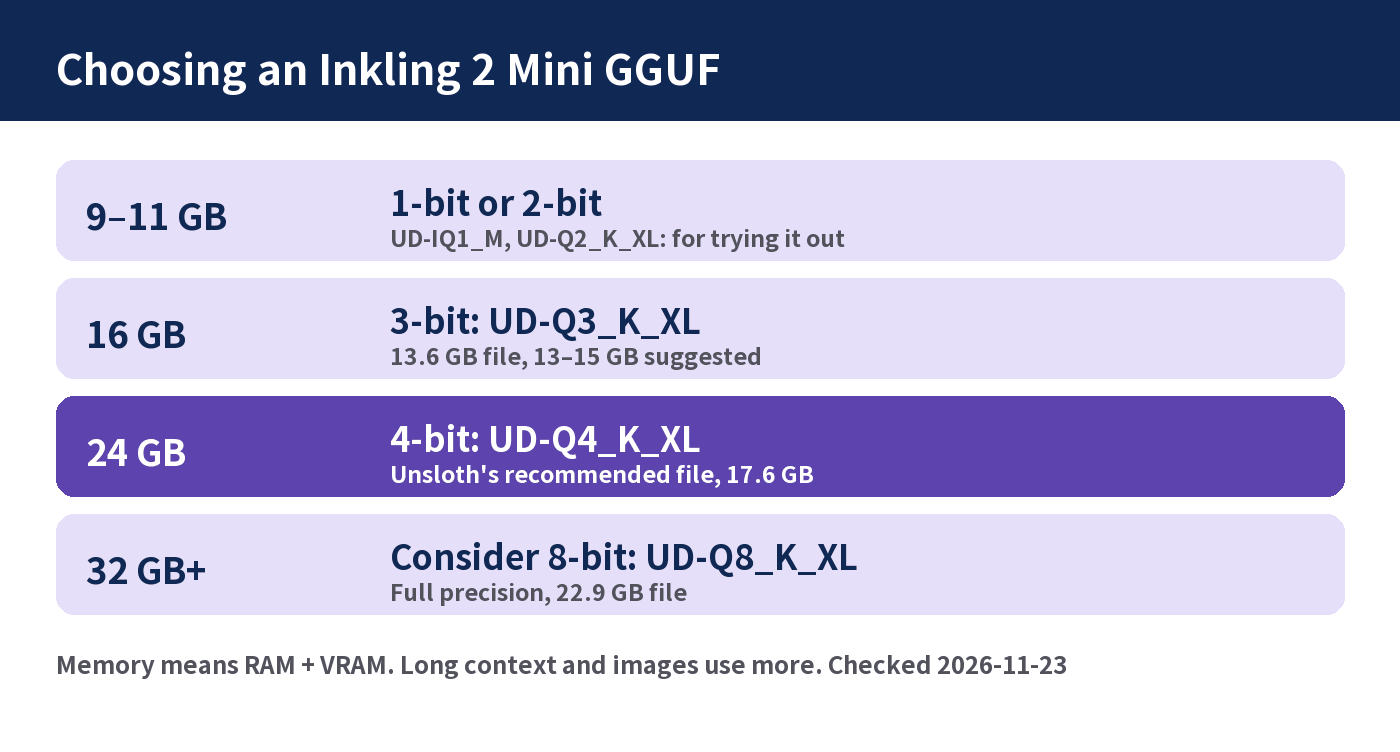
Pick an Inkling 2 Mini GGUF by your combined RAM and VRAM. With 16 GB, start with the 3-bit UD-Q3_K_XL. With 24 GB, use Unsloth's recommended 4-bit UD-Q4_K_XL. Consider the 8-bit UD-Q8_K_XL only at 32 GB or more. On Windows, Unsloth Desktop is the simplest route, and Unsloth's llama.cpp build gives you more control.
This guide is based on official pages from Thinking Machines, Unsloth and Ollama, checked on 2026-11-23. We have not run the model on Windows. If you need non-English output or plan to let it edit files, read the fit section first, because the model card lists limits for both.
Inkling 2 Mini GGUF versions and memory
Memory figures come from the Unsloth guide and count RAM plus VRAM, or unified memory on a Mac. File sizes come from Unsloth's Hugging Face file list.
| Bits | Suggested memory | Files | File size |
|---|---|---|---|
| 1-bit | 9 GB | UD-IQ1_S, UD-IQ1_M |
7.76 GB, 8.02 GB |
| 2-bit | 10–11 GB | UD-IQ2_XXS, UD-Q2_K_XL |
8.49 GB, 9.14 GB |
| 3-bit | 13–15 GB | UD-IQ3_XXS, UD-Q3_K_XL |
11.7 GB, 13.6 GB |
| 4-bit | 17–18 GB | UD-IQ4_XS, UD-Q4_K_M, UD-Q4_K_XL |
15.7 GB, 16.6 GB, 17.6 GB |
| 8-bit | 24 GB | UD-Q8_K_XL |
22.9 GB |
| How to choose | 16 GB: 3-bit. 24 GB: 4-bit | 8-bit only at 32 GB or more | Leave room for the OS and other apps |
Treat these as starting points. Longer context, image input and other open apps all use more memory, and the mmproj-F16.gguf vision file adds a 639 MB download. Since 24 GB is exactly the 8-bit figure, we suggest staying on 4-bit at that size.
Unsloth's Hugging Face page also recommends 32 GB or more of VRAM for other GPUs and platforms. The practical reading is that the table shows what can load, while 32 GB of VRAM is the comfortable GPU target. At 16 GB, expect limited speed and context.
Three Windows routes
The Ollama page currently lists Macs with 32 GB or more and DGX Spark, and does not mention Windows. On Windows, choose one of these routes and match the runtime to its GGUF files.
| Route | Files | Best for |
|---|---|---|
| Unsloth Desktop | GGUFs from the Unsloth repo | The quickest start |
Unsloth llama.cpp (b12631-mix-acc0843) |
GGUFs in the repo root | Custom flags and a local API |
| Mainline llama.cpp (with PR #32704) | .gguf_file files in Mainline_Support, renamed to .gguf after download |
Existing mainline workflows |
| How to choose | Unsure? Use Unsloth Desktop | Never pair root GGUFs with mainline llama.cpp |
Root GGUFs use Unsloth's looped-layer layout. Mainline llama.cpp reads a different layout, so the two sets are not interchangeable. A mainline build must include PR #32704, merged on 2026-11-21, because older builds produce wrong output. The Mainline_Support notes also say mainline does not support the DSpark drafter yet, so the --model-draft command below applies only to Unsloth's llama.cpp.
Start with Unsloth Desktop
Install it from PowerShell:
winget install --id UnslothAI.Unsloth -e
After installing, open Unsloth from the Start menu and wait for its first-run setup to finish, because that step installs the unsloth command. Then close and reopen PowerShell and run the 4-bit build. Unsloth's example uses backslash line breaks, which PowerShell does not accept, so it is on one line here:
unsloth run --model unsloth/Inkling-2-Mini-GGUF:UD-Q4_K_XL --temp 1.0 --top-p 1.0 --top-k 0 --min-p 0.0
When the model loads, the terminal prints an endpoint URL and API key for your client. With less than 24 GB, replace UD-Q4_K_XL with a smaller file from the table, such as UD-Q3_K_XL.
To skip the command line, open Unsloth Desktop, search for Inkling 2 Mini under Select model in Chat or in Model hub, choose unsloth/Inkling-2-Mini-GGUF, download a version that fits, and start chatting.
Run a local server with Unsloth llama.cpp
The guide's Windows example is the NVIDIA CUDA 12 build, so install the CUDA toolkit first:
curl.exe -L -o llama.zip https://github.com/unslothai/llama.cpp/releases/download/b12631-mix-acc0843/app-b12631-mix-acc0843-windows-x64-cuda12-portable.zip
Expand-Archive llama.zip -DestinationPath llama.cpp
.\llama.cpp\llama-server.exe --version
For CUDA 13, swap cuda12-portable for cuda13-portable. For AMD, use rocm-gfx120X or your GPU's build. Use vulkan for other GPUs and cpu for CPU only. The guide does not spell out every Windows file name, so check the release page before downloading.
Download the model, vision file and draft model:
pip install -U huggingface_hub
hf download unsloth/Inkling-2-Mini-GGUF Inkling-2-Mini-UD-Q4_K_XL.gguf mmproj-F16.gguf dspark-Inkling-2-Mini-Q8_0.gguf --local-dir Inkling-2-Mini-GGUF
Start the server:
.\llama.cpp\llama-server.exe `
    --model Inkling-2-Mini-GGUF/Inkling-2-Mini-UD-Q4_K_XL.gguf `
    --mmproj Inkling-2-Mini-GGUF/mmproj-F16.gguf `
    --model-draft Inkling-2-Mini-GGUF/dspark-Inkling-2-Mini-Q8_0.gguf `
    --spec-type draft-dspark --spec-draft-n-max 2 --n-gpu-layers-draft 99 `
    --temp 1.0 --top-p 1.0 --top-k 0 --min-p 0.0 `
    --host 127.0.0.1 --port 8080
Open http://127.0.0.1:8080 to chat or upload an image. For text only, skip mmproj-F16.gguf and remove the --mmproj line. If memory runs short, lower --ctx-size or --n-gpu-layers. For CPU only, set both --n-gpu-layers and --n-gpu-layers-draft to 0.
The model supports up to 1M tokens of context, but your memory decides how much you can use. For the tradeoffs, see how tokens, context windows and context engineering relate.
Is Inkling 2 Mini a good fit?
The official specs: Apache 2.0, 26.4B total parameters, 3.4B active, and about 5.4B effective active parameters per token because the middle layers loop three times. It takes text and images as input and produces text.
It suits people who want a fast small model on local hardware, mainly for English work. Thinking Machines also says it is not the strongest small model for multi-turn chat or instructions with many constraints.
Two limits matter before you adopt it:
- Non-English output: the model card says quality can drop outside English, and its Chinese testing showed clipped phrasing and mixed languages.
- Agent tasks: the model card warns it may delete or overwrite files without confirmation. Run agents in a sandbox and require approval for destructive actions. Our Codex permissions guide shows one way to think about those boundaries.
FAQ
Can Inkling 2 Mini run on 16 GB?
Unsloth lists 13–15 GB for 3-bit, so 16 GB can start with UD-Q3_K_XL. The OS and other apps need memory too, and long context or images make it tighter. If loading fails, try 2-bit or lower --ctx-size.
Can I use Ollama for Inkling 2 Mini on Windows?
Ollama's page lists Macs with 32 GB or more and DGX Spark. It does not mention Windows either way. The clearest documented Windows routes are Unsloth Desktop and Unsloth's llama.cpp build.
What is the difference between UD-Q4_K_XL and UD-Q4_K_M?
Both are 4-bit. UD-Q4_K_XL is 17.6 GB and UD-Q4_K_M is 16.6 GB. Unsloth's guide recommends UD-Q4_K_XL, while the Hugging Face snippet uses UD-Q4_K_M, so follow one source's commands from start to finish.
How we wrote this
Sources: the Thinking Machines announcement and model card, the official weights page, Unsloth's guide and file pages, and Ollama's model page.
The llama.cpp build is Unsloth's b12631-mix-acc0843, and sources were checked on 2026-11-23.
We did not run the model on Windows or compare speed or quality. Commands come from those official pages, with line breaks adjusted for PowerShell.