When Claude Code starts missing instructions or its answers get worse after a long conversation, first use /context to see what is consuming context. Continue the same task with /compact plus the details to retain; switch to an unrelated task with /clear. Put rules that must survive across conversations in CLAUDE.md, not only in chat history.
The context window includes the conversation, files read, command output, CLAUDE.md, memory, loaded Skills, and system instructions. Automatic compaction lets the conversation continue, but the official documentation does not promise every earlier detail is retained. Write important decisions back to project rules or files that can be read again. Claude Code: Context window
Start with /context, then choose clear, compact, or rewind
| Your situation | First choice | Why |
|---|---|---|
| The same task continues and earlier decisions matter | /compact focus on … |
Creates a structured summary around the focus you name. |
| You have moved to unrelated work | /clear |
Starts with a blank conversation while retaining project memory. |
| The last few turns went in the wrong direction | /rewind |
Returns to a checkpoint; its summary option can retain what is needed. |
| You need to read many files or logs next | Use a subagent | A subagent works in its own context window and returns a summary to the main task. |
/context shows current usage and the largest consumers; /context all expands the itemized detail. Inspect before acting: that is more reliable than repeatedly asking a model to “remember earlier.” Commands
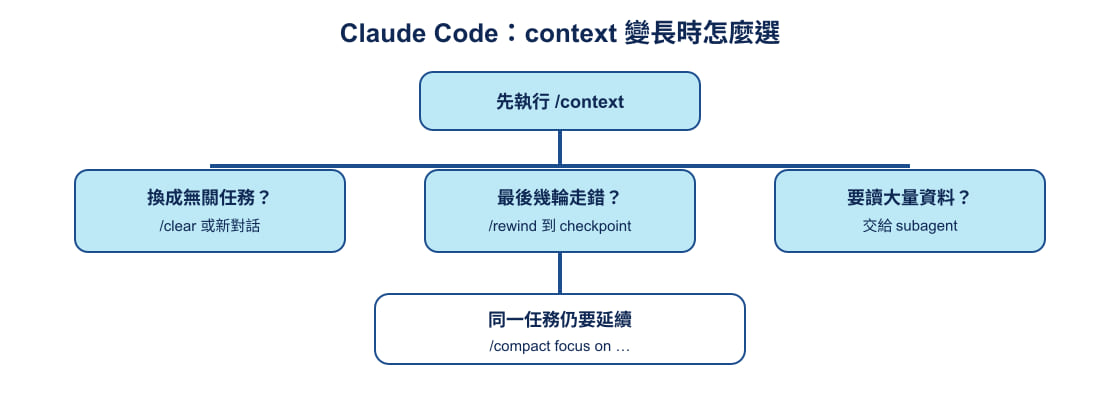
Original diagram: Gwarket / Aaron Huang · CC BY 4.0 ·
Why context fills up and how tokens are counted is explained in LLM Context Windows and Context Engineering Explained.
What /compact and automatic compaction actually retain
/compact replaces the current conversation with a structured summary. Add a focus, such as /compact focus on the auth bug, so the summary gives priority to the context needed for the next step. Claude Code may compact automatically near its context limit, but an automatic summary is not a complete verbatim backup.
The current documentation says that, after compaction, Claude Code re-injects the project-root CLAUDE.md, auto memory, recently modified files, and content from invoked Skills. Nested CLAUDE.md files and rules scoped with paths: load only when needed. Context added earlier by hooks is summarized with the conversation. This describes which sources are read again; it is not a guarantee every early detail is retained. What survives compaction
/autocompact adjusts the automatic-compaction threshold, and /autocompact auto restores the default. Available ranges, models, and thresholds can change with the version and model configuration, so check the current Model configuration.
A complete handoff example for a long conversation
This fictional project scenario is not a Claude Code execution or compaction record. A team is fixing tax calculation on a checkout page. The conversation has already read requirements, test output, and several files, and the task is still the same. First write decisions that cannot be automatically recovered from disk into a readable file; then compact the conversation.
Put stable rules that apply every time in the project-root CLAUDE.md:
# storefront-web

## Stable rules
- Tax is calculated in `src/tax/calculate.ts`; pass all amounts as integer cents.
- After a change, always run `pnpm test tax`; do not modify `vendor/` or `.env*`.
- If the source of a tax rate is unknown, stop and ask the product owner to confirm.

## Compact Instructions
When compacting, retain: the current goal, verified tests, approved decisions,
open questions, the next file, and boundaries that must not be changed.
Put information that changes with this task in HANDOFF.md, rather than in long-lived rules:
# Tax calculation handoff

## Goal
Fix tax being deducted twice when exempt items and discounts are used together.

## Verified facts
- `tests/tax/discounted-exempt.test.ts` reproduces the failure.
- The defect occurs when the exempt subtotal is deducted again from the taxable subtotal after discounts.

## Decided
- Keep integer cents; do not change the API response format.
- Fix `src/tax/calculate.ts` first; do not refactor the checkout UI.

## Unknown
- Whether mixed-rate products need the same deduction order awaits product confirmation.

## Relevant files and next step
- `src/tax/calculate.ts`
- `tests/tax/discounted-exempt.test.ts`
- Reproduce the current discounted-exempt failing test before proposing a minimal fix; add a mixed-rate test separately after that rule is confirmed.

## Do not touch
- `vendor/`, `.env*`, the checkout UI, or the API schema.
Then enter a specific focus rather than bare /compact:
/compact focus on preserving the checkout-tax objective, verified failing test,
approved cents-only decision, mixed-rate unknown, the two named files, next step to reproduce
the current discounted-exempt failure before a minimal fix, and do-not-touch boundaries. Keep the distinction between stable CLAUDE.md rules
and this task's HANDOFF.md state.
After compaction, check whether the summary still supports the next step: is the goal present; are verified facts separate from decisions; are unknowns explicit; are the files and next step actionable; and are do-not-touch boundaries preserved? If any is missing, do not guess. Re-read HANDOFF.md and the relevant files, then add the missing context.
/clear, /rewind, and /resume do different jobs
/clear (aliases /reset and /new) starts a blank-context conversation but does not remove project memory; use /resume to find an earlier conversation. It is for a genuine change of topic, not for clearing decisions before the same bug has converged. Commands
/clear resets conversation context. It does not delete working-directory files, Git changes, or HANDOFF.md. If the same tax task must continue in a clean conversation, read HANDOFF.md first, then enter:
First read HANDOFF.md and the two files named there. Report the actual work state you recovered under six headings: goal, verified facts, decisions, unknowns, next step, and do-not-touch boundaries. Do not start editing until all six can be tied to file contents.
The reported failing test, the two filenames, the mixed-rate unknown, and the do-not-touch boundaries must all be found in HANDOFF.md. Read only the relevant code and test first, then verify the current state using the prescribed test command; do not change code yet. Fill this template only with facts actually checked; mark a test not yet run as pending verification. This is more checkable than asking a model to remember a chat transcript.
/rewind (aliases /checkpoint and /undo) returns to an earlier checkpoint. You can choose to revert file changes too, or retain useful context through “summarize from here” or “summarize to here.” It is for removing a wrong turn, not a replacement for /compact whenever a long conversation needs organization. It is not a universal undo for side effects: whether files are reverted depends on the checkpointing-interface scope; external terminal operations, remote services, or other systems need their own recovery processes. Checkpointing
Put rules you must remember in CLAUDE.md
CLAUDE.md is Claude Code’s project-instruction file. A project-root version is re-injected in new sessions and after compaction. Use it for stable project context, acceptance rules, do-not-touch boundaries, and common commands—not progress that will quickly become stale. The official guidance is to keep a single file under 200 lines; nested rules and rules with paths: scope load when relevant files are handled, reducing unrelated context. Memory
For shared rules, use the official @path import or supported rules mechanism. A relative path written as ordinary text does not load automatically. An import only organizes material: its content still enters context. Memory
Do not blame MCP too quickly: tool content is loaded on demand
Claude Code loads MCP tools on demand: it does not place every full tool definition into context at startup, but finds tools when needed. That does not mean MCP has no cost. When a long conversation gets worse, checking the files, logs, and history actually loaded is usually more direct than removing every MCP server first. How Claude Code works
Next steps
- What is an AI Skill, and which work is worth packaging?
- How should prompts, Skills, Tools, and subagents divide work?
- What is MCP, and how does it connect external tools and data?
Sources and verification date
Verified: 2026-11-08.