An AI does not know when to read a file just because you saved it in a folder. Useful long-term memory needs a retrieval mechanism: narrow the scope, find relevant and current information, and place only that information into the context for this answer.
Saving a discussion as Markdown in Obsidian or a project folder is more reliable than leaving it inside an old chat. But more files create a new problem: which file applies to the current question? Which version is authoritative? Should every conversation load the entire knowledge base?
Storage answers whether information survives. Memory answers whether the right information can be retrieved at the right time.
This method is not limited to Claude. It can be used with ChatGPT Projects, Gemini Notebook, Obsidian, Notion, or a custom RAG system. The important distinction is that not every underlying model has built-in long-term memory. A product or external knowledge system often retrieves information first, then adds it to the context the model can use.
Practice files: download the AI Memory Router Starter. It contains a Router, one example note, and retrieval tests. It does not connect to an AI service, read other files, or include private data.
On this page
Models directly use only the current context
When a generative AI produces an answer, it directly references the context supplied for that request. Context may include the current conversation, system instructions, attachments, search results, or information retrieved by tools. Anthropic describes the context window as working memory and warns that more context is not automatically better; recall and accuracy can degrade as the input grows.
A note in Obsidian or a PDF in an AI Project cannot affect an answer from outside the context. The system must select the file and send either the full document or relevant passages into the request.
- Inside context: information the model can use for this answer.
- Outside context: durable information that may be searched, selected, or loaded later.
Saving information outside context completes only the first step.
Training, product memory, and external knowledge differ
“The AI remembers” often combines several mechanisms. Model training learns general language and patterns. Product memory may preserve preferences, conversations, or project state for later use. External retrieval searches documents or databases and adds relevant material to the current context.
| Mechanism | What changes | User control |
|---|---|---|
| Training or fine-tuning | Model parameters or behavioral patterns | A normal chat user cannot directly change them by saying “remember this” |
| Product Memory or Project memory | Personal or project context the product may provide later | Depends on the product's view, disable, edit, and delete controls |
| External knowledge or RAG | Documents that can be searched when a question arrives | Sources, scope, permissions, and versions can be managed; retrieval still needs testing |
| Current context | Information available to this specific answer | Indirectly controlled through prompts, files, Projects, or tools |
A useful discussion normally does not retrain the base model. What you can control is where the result is stored and how a future system retrieves it.
Long-term memory needs five conditions
- Persistence: the information survives the conversation.
- Location: the system can find it through a topic, keyword, metadata field, or link.
- Invocation rules: it knows when the memory applies and when it does not.
- Selective retrieval: only relevant information enters the current context.
- Version maintenance: incorrect or outdated knowledge can be updated, superseded, or archived.
A folder that provides only persistence is a storage system, not a complete memory system. A vector database without version rules can still retrieve a semantically similar but obsolete document.
Why more files can produce worse answers
| Failure point | Visible symptom | Underlying problem |
|---|---|---|
| Scope | The system searches the entire vault | Project, topic, or permission boundaries were not applied first |
| Recall | The relevant file is missing | Names, terms, links, or semantic indexing are insufficient |
| Ranking | An old version outranks the current one | No current, superseded, or canonical rule |
| Context composition | Relevant files are loaded, but the answer conflicts with itself | Too much content or unclear source roles and instructions |
Embedding every file is not the end of the problem. Semantic similarity does not prove that a document belongs to this task, is permitted, or is current. A Router adds understandable scope and version rules before and after search.
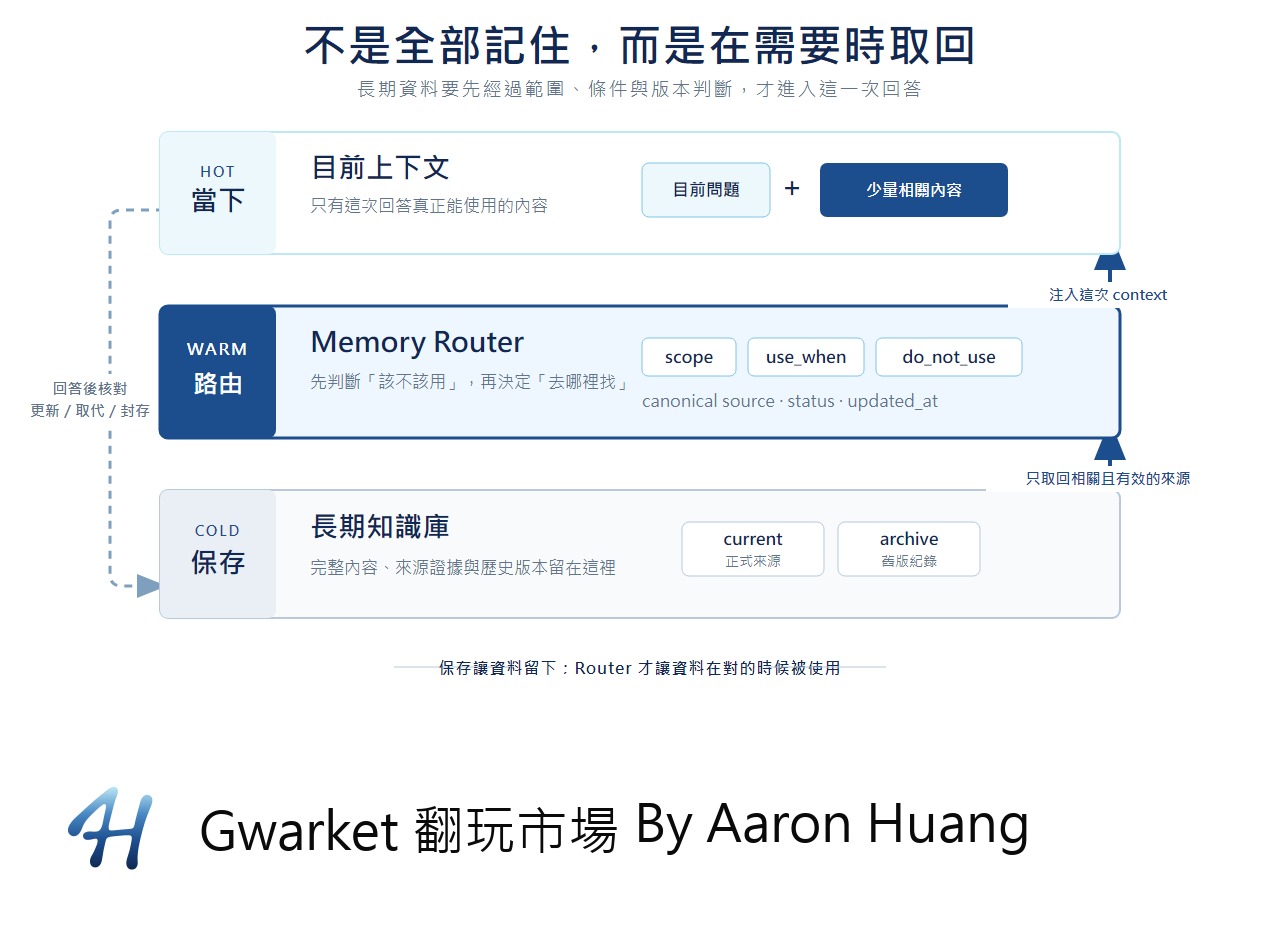
Use hot, warm, and cold layers
| Layer | Contents | Role |
|---|---|---|
| Hot: current context | The question, required instructions, and a few relevant passages | Directly affects this answer and stays small enough to verify |
| Warm: Memory Router | Topic, scope, use and exclusion rules, status, and canonical source location | Decides where to look without copying the full article |
| Cold: knowledge base | Complete notes, sources, evidence, handoffs, and previous versions | Loaded only when the Router finds a match |
The Router should remain small. It is a library catalog, not another copy of every book.
How a memory enters one answer
User question
→ restrict the searchable scope
→ find candidates with keywords, semantics, or links
→ rank by applicability, status, and date
→ retrieve a few passages or named files
→ compose the current context
→ generate the answer
→ verify against the source
Keyword search works well for exact names and identifiers. Semantic search can connect different wording with similar meaning. Links and metadata express relationships such as “this file supersedes that file” or “only use this in one project.” A system can combine these methods, depending on its capabilities.
Beginners do not need a vector database first. Scope, clear filenames, invocation rules, status, and one canonical source prevent many common failures. Add semantic retrieval only after manual search becomes a demonstrated bottleneck.
Obsidian is useful, but not sufficient alone
Obsidian is a portable cold knowledge base for Markdown, links, and metadata. It does not automatically tell every AI which note to read. You must select notes manually or provide a connector, plugin, MCP service, or local agent that can search the permitted vault.
| Option | Good fit | Main limitation |
|---|---|---|
| Claude or ChatGPT Projects | Keep chats, files, and instructions inside one work scope with little setup | Retrieval decisions and false matches may not be fully visible |
| Gemini Notebook | Research or learning grounded in a defined source collection | The user must select the correct notebook and sources |
| Obsidian or Notion | Own the content, links, fields, permissions, and portability | Needs an additional AI search or connection layer |
| Custom RAG | Needs metadata filtering, permissions, ranking, versioning, and observability | Highest technical and maintenance cost |
These products can reduce the search scope, but none replaces source and version governance.
Build a small Memory Router
A Router can begin as one YAML or Markdown index:
id: ai-memory-context
topic: AI long-term memory and context
scope: AI beginner course / Unit 6
use_when:
  - a new conversation must continue previous learning
  - the question concerns memory, RAG, knowledge bases, or context
do_not_use_when:
  - only summarize the current conversation
  - the question concerns backup or account migration
canonical_source: notes/ai-memory-context.md
status: current
updated_at: 2026-09-10
use_when translates a topic into situations. do_not_use_when prevents false matches. canonical_source points to one current complete source; every other copy is only an index, snapshot, or archived version.
Before answering a long-running work question, compare the Router's
scope, use_when, and do_not_use_when. Retrieve at most three records
and read only their canonical_source. If nothing matches, say so.
Do not load the entire knowledge base or treat non-current sources
as the present answer.
This rule helps only when the product can search the external material. If the AI cannot access Obsidian, use the Router yourself and attach the selected note.
Build the minimum viable memory system
The earlier lesson on AI context, memory, and version management preserves goals, decisions, and next steps. This lesson places that handoff inside a system with invocation and retirement rules.
ai-memory-starter/
  README.md
  memory-router.yaml
  notes/
    ai-memory-context.md
  tests/
    retrieval-tests.md
The Router points to sources. The notes folder contains current complete knowledge. Tests record expected hits, non-hits, and version conflicts. README explains the authoritative source and how to use the files with different AI products.
1. Save only reusable knowledge
- Will the same kind of problem appear again?
- Is re-deriving the answer or getting it wrong costly enough?
- Can you state the source, scope, and current status?
If all three answers are no, chat history is enough. The objective is valuable future retrieval, not a high save rate.
2. Create one canonical note
# AI long-term memory and context

status: current
updated_at: 2026-09-10
scope: AI beginner course / Unit 6
supersedes: none

## Current understanding
## Conditions
## Sources
## Still unknown
Only one note remains current. When the understanding changes, mark the previous note as superseded and move it to an archive.
3. Choose the invocation path
- Plain chat: a person checks the Router and attaches the selected note.
- Project or Notebook: place the Router, current notes, and retrieval rules inside one restricted scope.
- Obsidian or Notion connection: permit search over selected pages and require the answer to identify retrieved sources.
- Custom RAG: filter scope and status before keyword or semantic ranking.
All four approaches can share the same canonical note and Router. Do not duplicate the complete knowledge for every AI platform.
Test retrieval in a new conversation
- Expected hit: “Why did our earlier AI memory lesson require a Router?” The current source should be retrieved.
- Expected non-hit: “How do I back up AI chats before changing computers?” Similar words should not override the exclusion rule.
- Version conflict: mark an old explanation as superseded, then ask for the current method. The current source should win or the conflict should be disclosed.
Record the searched index, retrieved source, context range, and version used. If the product hides retrieval details, ask the answer to name the filename and update date, then verify them yourself.
Diagnose the failed layer
| Result | Likely cause | First repair |
|---|---|---|
| A relevant question misses | Scope is too narrow or the Router lacks the use case and synonyms | Improve use_when or select the correct Project; do not duplicate files |
| An unrelated question hits | Rules are broad and depend only on similar words | Add do_not_use_when and reduce scope |
| An obsolete version wins | Several files are current or the index points to an old path | Repair canonical and superseded relationships |
| The source is correct but the answer is wrong | The passage lacks conditions, instructions conflict, or the model misreads it | Inspect the retrieved passage and answer instead of blaming search alone |
A plausible answer does not prove correct retrieval. The model may have guessed from general knowledge.
Keep sensitive material out
Long-term retrievability also creates long-term exposure. Credentials, API keys, unauthorized company information, customer data, private health information, and one-time sensitive conversations should not enter cross-conversation memory or a shared knowledge base merely for convenience.
Every memory should define who may read it, where it may be used, whether it may be sent to a cloud model, and when it should be deleted. If those boundaries are unclear, leave the content in its controlled source. The Router may record that restricted information exists and explain the access procedure without copying the sensitive content.
Update, supersede, and archive memory
Each canonical source should expose a status such as current, pending, or superseded, plus its last update date. Change the canonical source first, then update the Router. Keep historical versions outside the current index.
Across tools, store full knowledge once. Obsidian may remain the authority while a Project or product memory keeps only the necessary preference, scope, or pointer.
A usable long-term memory system meets five tests: you can find it, know when to use it, load only what is necessary, verify the source, and change it when it expires.
Frequently asked questions
Does Obsidian provide AI long-term memory by itself?
No. It stores and links information. The AI still needs access, retrieval tools, and invocation rules, or a person must provide the selected notes.
Can I place the entire knowledge base in one AI Project?
You can add permitted material, but more information does not guarantee a better answer. Split Projects by work scope, preserve one canonical source, and test false matches and obsolete versions.
Does a Memory Router require a vector database?
No. Start with Markdown or YAML plus explicit use, exclusion, and canonical-source fields. Consider custom RAG only after the scale and frequency prove that the manual method is insufficient.
References and scope
Product documentation checked September 10, 2026: Anthropic: Context windows, Anthropic: RAG for projects, Anthropic: Claude chat search and memory, OpenAI: Projects in ChatGPT, Google: Create a notebook in Gemini Notebook, and Notion: Enterprise Search. The Memory Router, three-layer architecture, and invocation fields are original methods for this tutorial, not claims about any vendor's internal implementation.