To cancel a ChatGPT subscription, go back to where you paid. If you subscribed on chatgpt.com, cancel in ChatGPT under Settings → Billing. If you subscribed in the iPhone or iPad app, cancel in your Apple subscriptions. If you subscribed in the Android app, cancel in Google Play. The three paths don't share controls, so looking in the wrong place is the usual reason the cancel button seems to be missing. If you're not sure which one you used, check who sent the receipt.
Canceling only stops the next renewal. It doesn't refund the current charge, and paid features stay until the billing period ends. Refunds are a separate request with strict conditions: for web subscriptions, generally only within 7 days of the charge and without substantial use. Your chats are not deleted when you cancel; Projects, GPTs, and memory are covered in the table below.
This guide is compiled from the official OpenAI Help Center, Apple Support, and Google Play Help pages, checked on 2026-11-26. We did not cancel a subscription or request a refund ourselves, so there are no screenshots. Error messages come from user reports on OpenAI's official community forum and are labeled as such.
First, find out where you paid
OpenAI's Help Center says to cancel through the platform where you bought the subscription. A chatgpt.com subscription doesn't appear in Apple or Google Play, and the reverse is also true. The fastest check is your receipt.
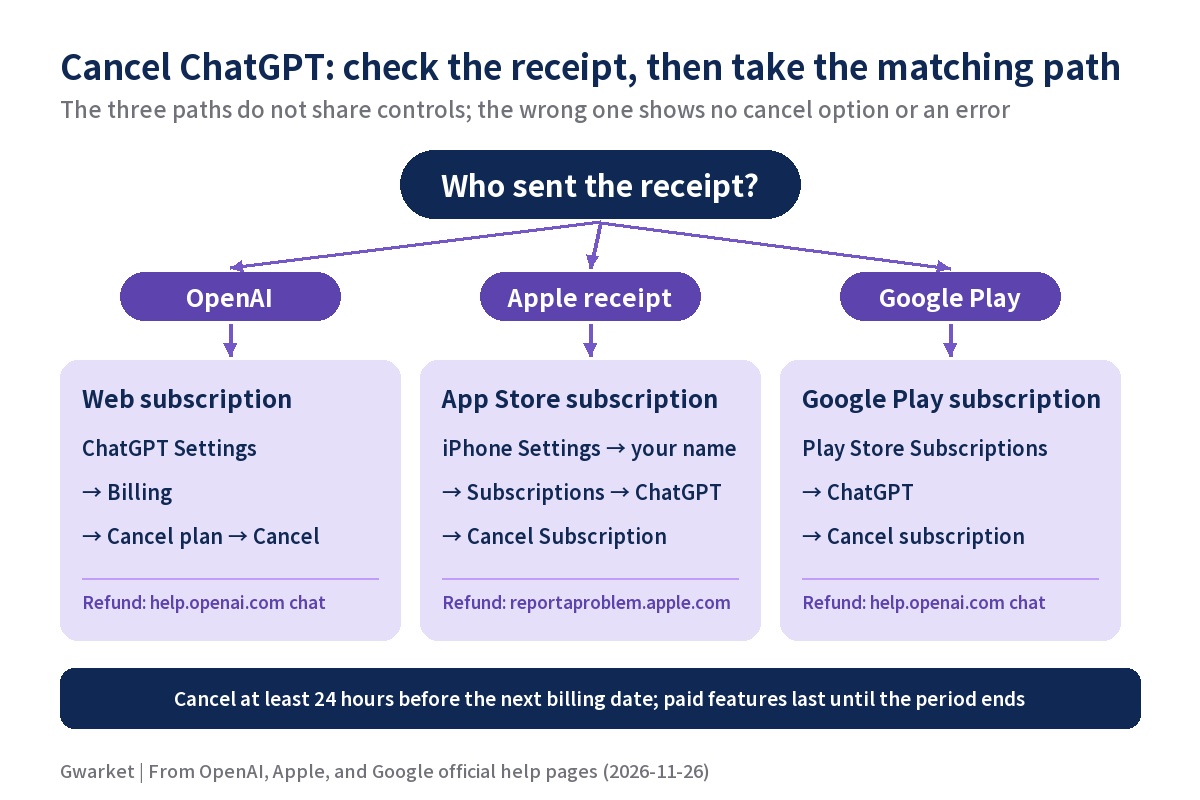
| Web (chatgpt.com) | Apple App Store (iPhone, iPad) | Google Play (Android) | |
|---|---|---|---|
| How to recognize it | Receipt from OpenAI | An Apple receipt or invoice in your email | Receipt from Google Play |
| Where to cancel | ChatGPT Settings → Billing | iPhone Settings → your name → Subscriptions | Play Store Subscriptions or the Google Play website |
| Who handles refunds | OpenAI Help Center chat | Apple (reportaproblem.apple.com) | OpenAI Help Center chat |
| Refund timing | 5–7 business days if eligible (OpenAI) | Update within 24–48 hours of the request (Apple) | 10 business days if eligible (OpenAI) |
| Does deleting your ChatGPT account stop billing? | Yes | No, cancel with Apple first | No, cancel in Google Play first |
| How to choose | Receipt from OpenAI: use this path | Apple receipt: use this path; ChatGPT settings can't cancel it | Google Play receipt: use this path; ChatGPT settings can't cancel it |
If you find receipts from two sources, you may be subscribed twice. OpenAI suggests checking your other ChatGPT, Apple, and Google accounts and canceling the unwanted one where it was billed.
How to cancel on the web
- Sign in to ChatGPT with the account that paid, open the account menu, and select Settings.
- Select Billing.
- Under Cancel plan, select Cancel and confirm.
If the billing controls are missing, OpenAI suggests signing in to the same account from a different browser. If you joined through a promotion, OpenAI's promotions page notes that a free promotion may end immediately on cancellation, a discount promotion runs to the end of the paid cycle, and resubscribing won't restore the promotional price.
Self-service ChatGPT Business is canceled by the workspace owner under Workspace settings → Billing → Manage plan → Cancel subscription. Enterprise and Edu are out of scope here.
How to cancel on iPhone or iPad
Subscriptions bought in the ChatGPT iOS app are managed by Apple. Per Apple Support:
- Open Settings and tap your name.
- Tap Subscriptions.
- Tap ChatGPT.
- Tap Cancel Subscription (you may need to scroll) and confirm.
If there's no cancel button and you see an expiration date in red, Apple says the subscription is already canceled. If ChatGPT isn't listed, it was probably bought with another Apple Account, or by a family member who must cancel it themselves. You can also cancel at account.apple.com.
How to cancel on Android
Subscriptions bought in the ChatGPT Android app are managed by Google Play:
- Open the Play Store and go to Subscriptions.
- Select ChatGPT.
- Tap Cancel subscription and follow the prompts.
On a computer, sign in to the Google Play subscriptions page with the Google account that made the purchase, select Manage next to ChatGPT, then Cancel subscription. Google notes that uninstalling the app does not cancel the subscription.
When to cancel to avoid the next charge
OpenAI recommends canceling at least 24 hours before your next billing date. Paid features last until the end of the current period, then the account moves to the Free plan. If you cancel within 24 hours of renewal, the charge may already have gone through.
Will you see a discount when you cancel?
No OpenAI Help Center article describes a retention offer in the cancel flow. We searched the Help Center and OpenAI's community forum for "cancellation offer discount," "cancel free month offer," "retention offer cancel," "cancel 50% off," and "cancel half price," plus the Chinese terms 取消訂閱 優惠 and 取消訂閱 半價 挽留, and the Help Center documents nothing.
The first-hand report we found is a December 2025 forum post from a user who was offered a free month after canceling Pro. We could not find an original source for the widely mentioned 50%-off offer, so its terms and who sees it are unconfirmed. Treat it as something some people report and not every account gets, and read each button before you click: keep the plan, or confirm the cancellation.
If you accept a discount, OpenAI's promotions page says the subscription renews at the standard rate when the promotion ends, canceling during a discount promotion keeps access for the paid cycle, a canceled promo code can't be reused, and resubscribing won't restore the promotional price. OpenAI doesn't say whether cancel-flow offers follow exactly these rules, so check the term and renewal price on screen first.
Can you get a refund?
OpenAI's refund article opens with "Payments are generally non-refundable," and canceling alone doesn't make you eligible.
For individual web and Google Play subscriptions:
- A discretionary refund may be available if you ask within 7 days of the charge and haven't used the subscription substantially. It must be for the current billing period, with limits on repeat refunds and no active payment dispute.
- After 7 days there's no automatic prorated refund. Accidental purchases, forgetting to cancel, dissatisfaction, or plan changes don't qualify on their own.
- Verified billing errors, unauthorized charges, or a documented OpenAI service or access failure may qualify.
- Access covered by a refunded charge normally ends.
To request one, sign in to chatgpt.com with the charged account, then open the chat widget at help.openai.com. Google Play refunds go through the same chat; include the original paid order's date and amount. For Apple, sign in at reportaproblem.apple.com, choose I'd like to → Request a refund, pick a reason, select the ChatGPT subscription, and submit.
OpenAI lists special rules for the EU, UK, and Turkey (prorated refund within 14 days of purchase), Korea, and Brazil. Outside those regions, the general 7-day rule applies, so if you know right after a charge that you don't want it, cancel and ask the same day.
Will you lose your data after canceling?
Canceling is not deleting your account. Here is what OpenAI's Help Center says for each type of data:
| Data | After canceling and moving to Free | What OpenAI says | What we suggest |
|---|---|---|---|
| Chats and archived chats | Kept | Chats stay in your account until you delete them | Nothing to do |
| Projects | Free can use Projects with a lower file limit | Free: 5 files per project; Go and Plus: 25. OpenAI doesn't say what happens to existing projects over the limit | Save key files and conclusions from projects with more than 5 files first |
| Project files | Kept until the project or file is deleted | Stated in the retention article | Same as above |
| Custom GPTs | Existing GPTs still usable; personal accounts can no longer create new ones | Custom GPTs are scheduled to retire on Dec 11, 2026; past GPT conversations stay accessible | Retirement applies regardless of your plan; follow the in-product migration notice |
| Library files | Kept | Files saved to Library stay until you delete them; deleting a chat doesn't remove them unless you choose to delete its files | Nothing to do |
| Custom instructions | Available on Free with a lower limit | Free and Go: up to 1,500 characters; Plus and Pro: up to 5,000. OpenAI doesn't say what happens to longer existing text | Copy long instructions before canceling |
| Memory | Not documented | Memory features "can vary by plan, region, platform, and workspace settings" | Review your saved memories before canceling |
| The account | Kept, on the Free plan | Canceling only stops renewal; deleting the account is permanent and data is deleted within 30 days | Don't delete the account just to stop billing |
The safest step is to export your data first: Settings → Data controls → Export data → Export → Confirm export. Free and Plus can both export. OpenAI says exports can take up to 7 days and the download link expires 24 hours after you receive it. If a project seems to be gone after canceling, check the account and workspace before assuming it was deleted; our ChatGPT Projects guide walks through it, and Organize ChatGPT Chats and Projects helps you tidy up before you cancel.
Errors when canceling
Except where marked as the OpenAI Help Center, the error text and fixes below come from user reports on OpenAI's official community forum, not confirmed causes. We did not reproduce them.
| Error text or symptom | Likely cause | What to try | Source |
|---|---|---|---|
Something went wrong while canceling your subscription. |
The payment platform differs from where you're canceling; some reporters succeeded only after canceling in Google Play | OpenAI_Support replied in September 2026: cancel on the platform you subscribed through, and contact Support if it still fails on the correct account | OpenAI community thread |
| No cancel button, empty billing page | Not a web subscription, or wrong account | Try another browser with the same account; check your receipt (OpenAI Help Center) | Canceling your ChatGPT subscription |
| No Cancel Subscription on iPhone, only an expiration date | Already canceled | Nothing to do (Apple Support) | Apple Support |
| Charged after canceling | Canceled within 24 hours of renewal | Check refund eligibility and look for duplicate subscriptions (OpenAI Help Center) | Canceling your ChatGPT subscription |
| Can't sign in to cancel | Lost account access | For web subscriptions, contact OpenAI Support with the account email and two billing details, never a full card number; for Apple or Google, recover that store account first (OpenAI Help Center) | Canceling your ChatGPT subscription |
Don't use a bank dispute instead of canceling: OpenAI says it won't process a separate refund while a dispute is active.
FAQ
Does deleting the ChatGPT app cancel my subscription?
No. Both OpenAI and Google Play say uninstalling the app doesn't cancel the subscription, and renewals continue. Cancel through the platform you paid on.
How long can I use ChatGPT Plus after canceling?
Until the end of the current billing period, after which the account moves to Free. A free promotional plan is the exception: access may end immediately when you cancel.
Does deleting my ChatGPT account cancel the subscription?
Only for web subscriptions. Apple and Google Play subscriptions keep billing until you cancel them in the store. For how data access differs across accounts and plans, see How ChatGPT data access changes across personal accounts, managed accounts, and apps.
If I resubscribe later, are my chats and projects still there?
Your chats stay in the account the whole time, so resubscribing restores paid features. If you originally subscribed through a promotion, resubscribing won't bring back the promotional price.
How we wrote this
Based on the OpenAI Help Center articles Canceling your ChatGPT subscription, How do I request a refund for my ChatGPT subscription?, ChatGPT Plus promotions and referrals, Chat and file retention, Projects in ChatGPT, Creating and editing GPTs, Custom GPT retirement and migration FAQ, Memory in ChatGPT, Exporting your ChatGPT history and data, ChatGPT Custom Instructions, and Deleting your ChatGPT account; Apple Support on canceling subscriptions and requesting refunds; and Google Play Help on canceling subscriptions and its refund policy. Checked on 2026-11-26. Not tested: we did not cancel a subscription or request a refund. Error messages and the cancel-offer report come from user posts on OpenAI's community forum. OpenAI's Help Center doesn't say how Projects over the Free file limit or memory are handled after a downgrade, so we mark those as not documented.