Codex Tutorial for Beginners: From Choosing an Interface to Finishing Your First Task
Product information checked on October 22, 2026.
Codex is an AI agent that can read materials, create or edit files, and run checks in a specified working environment. It is particularly strong at software development, but can also help with research, documents, and other knowledge work. What it can do depends on its tools, environment, and permissions. Official product overview
If you work in project management, operations, or administration and want to try using Codex with your files, start here. We will choose an interface, prepare a folder, and work through two fictional customer-support files. The task is to produce a handoff table, identify missing or conflicting information, then change the column order while keeping the previous version.
You do not need to buy API access, configure MCP, or connect company data for this exercise. You do need to understand the source material well enough to judge the result. If you have already chosen Codex, skip to section 4 for setup. If you are still deciding, start with the comparison below.
This guide focuses on desktop Codex working with a local folder. Other interfaces are covered only to help you choose. The accompanying materials, answer key, and translated outputs from the verified Chinese run give you something to check against. Section 6 explains how the files were produced and what was checked.
1. What Codex does and which tasks to try
When you use Codex, specify which materials it should read, which files it should deliver, and what it must leave alone. It works through the available tools and reports the result. A clear task is easier to check.
You do not have to write code to describe a useful deliverable or decide whether it is correct. For example, you may not know how to write a data-processing script, but you know that the same support issue should not be counted twice, missing deadlines should not be guessed, and source references should be retained. Those rules belong in both the task instructions and your acceptance checklist.
Start with a small part of one of these jobs:
Table: scroll sideways to read all columns.
| Your work | A small task for Codex | What you still need to check |
|---|---|---|
| Project management | Extract dates, action items, and conflicting information from specified documents | Whether owners, deadlines, and commitments are supported by the sources |
| Operations and support | Clean exported records, categorize feedback, and create a handoff file | Merge rules, omissions, and incorrect categories |
| Document preparation | Draft a report from supplied materials or standardize its formatting | Numbers, arguments, references, and wording intended for others |
| Small internal tools | Build a simple data-conversion or validation tool | Whether it actually works with your own test data |
| Learning to code | Explain a project, change a small feature, or add tests | The scope of changes, test results, and actual behavior |
Avoid making “take over the whole project” your first task. Choose something with limited input, an output you can open, a way to recover from mistakes, and no immediate effect on customers. An anonymized practice table is usually easier to evaluate than a change to a live website.
If the task requires expertise you do not have, such as deciding whether to sign a contract or choosing medical treatment, AI output cannot replace professional review. Even in ordinary work, it can misread a source, present an assumption as a fact, or create a file that looks finished but does not work. Check the output yourself.
If you are learning to code, the task-setting and review methods here still apply, but this article does not teach a programming language or test framework. If you already use a CLI or IDE, you can go straight to the task framework in section 5 and the checks in section 6 rather than repeating the desktop setup.
2. Choosing between Chat, ChatGPT Work, and Codex
If you already have ChatGPT, do you also need Codex? That depends on whether you need to work directly with files and how much execution detail you want to see.
The current official guide presents Chat as a place for questions and discussion, Work as a way to carry more complete tasks through to reviewable deliverables, and Codex as an interface that exposes more development tools and technical detail. Their capabilities overlap: ChatGPT can also help with documents and other work. Official mode comparison
Table: scroll sideways to read all columns.
| What you need now | Consider first | Why |
|---|---|---|
| Understand a concept, compare options, or discuss wording | Chat | Use a conversation to work through the question |
| Produce a report, presentation, or analysis without as much technical detail | ChatGPT Work | Places more emphasis on deliverables and nontechnical explanations |
| Understand execution, inspect file changes, or develop software | Codex | Makes technical information and development work more accessible |
Work may be enough for ordinary document tasks. This guide uses Codex to practice working across local files and checking the resulting changes.
The Codex interface and the model selected behind it are separate choices. For your first exercise, use the default model currently available to your account and keep the task small. Reconsider the model if you encounter quality or usage problems. You do not need to change plans just to match a model name in someone else's example.
For more on choosing a working style, see Gwarket's guide to Chat, Work, and Codex (Chinese). You do not need to configure every feature before starting.
3. Interfaces, supported platforms, and cost
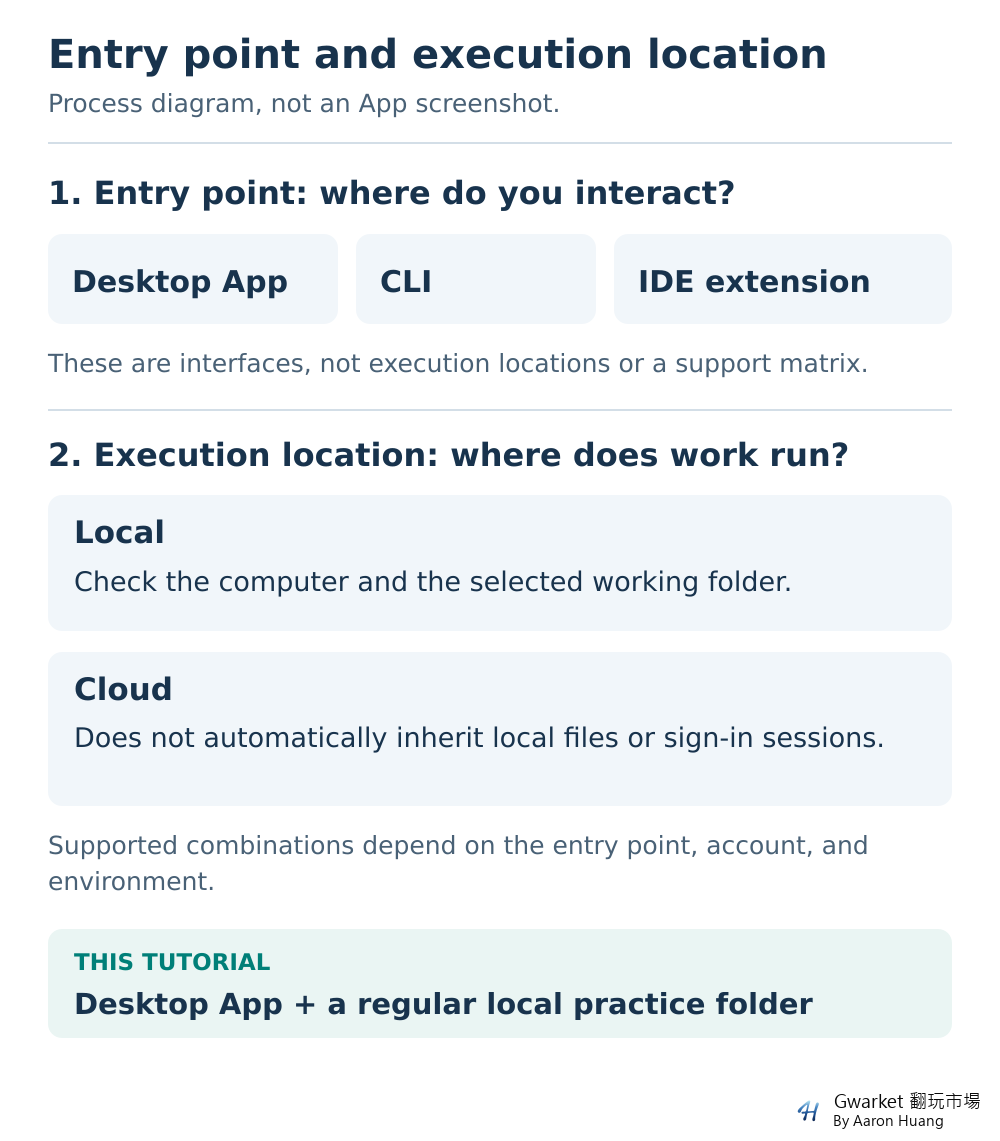
Choose an interface, then check where the work runs
For a first task involving files on your computer, the desktop app and a local folder are a reasonable starting point. If you already work comfortably in a terminal, code editor, or cloud environment, choose accordingly. Where you control a task and where its data is processed are separate questions.
Table: scroll sideways to read all columns.
| Interface | A suitable starting point | What beginners should know |
|---|---|---|
| Desktop app | You want a graphical interface for working with files and reviewing results | This guide's main route; first check system support, account access, and local-work availability |
| Web / Codex Cloud | You can already access a published Codex cloud environment | The cloud does not automatically gain access to folders or signed-in sessions on your computer |
| Codex CLI | You are comfortable entering commands in a terminal | You do not need to learn the command line on day one for this exercise |
| IDE extension | You already develop projects in a code editor | Fits an existing development workflow; not required here |
| Mobile | You want to review or continue work in the cloud or on a connected computer | Does not run a complete project locally on the phone |
See the official quickstart for interfaces and sign-in options, and the mobile guide for mobile requirements. The mobile documentation uses iOS examples; that does not establish that every Android account has the same options.
If you see Local, Worktree, and Cloud in the desktop environment, distinguish them this way: Local works on your computer. A Worktree is an isolated working tree of the same Git project, also on your computer, for projects that already use version control. Cloud requires access to a published environment. If none is available, one must be created and published separately or provided by an administrator; that setup is outside this guide. Local files, a VPN connection, and browser sign-ins do not automatically move to Cloud. Environment modes, Git worktrees
This exercise uses an ordinary folder. You do not need to set up Git or a worktree first.
Can you use Windows, macOS, or Linux?
The official documentation currently provides desktop guidance for macOS, Windows, and Linux. The main macOS download is labeled for Apple Silicon. Windows has native support; WSL2 is an alternative route, not a requirement for everyone. Linux is still labeled preview, so check the supported distribution and architecture. Open the installation page for your own operating system rather than copying instructions for a different one. Desktop downloads and guidance, Windows, Linux
Can you start for free, and do you need API access?
As of the information-check date above, the official pricing documentation lists Codex / Work benefits for Free, Go, Plus, Pro, Business, Edu, and Enterprise. That does not mean every plan supports every interface. Desktop GPT-6 Luna Standard access for Free and Go is still described as rolling out. Check whether the feature is available to your account as well as whether your plan is eligible. Official pricing and usage
To find out whether you can start for free, check whether your account already has the desktop Codex and local-work capabilities required here. If not, check the plan and rollout status. A missing feature does not necessarily mean installation failed, and it is not a reason to immediately buy a higher-tier plan.
Signing in with ChatGPT and using an API key are different billing routes. This guide uses ChatGPT sign-in, so you do not need to create an API key. API usage is billed separately; a subscription does not include a corresponding pot of API credits. Cloud uses ChatGPT sign-in, and organization accounts may also be restricted by administrator policies. Official authentication guide
Work and Codex share usage allowances. Consumption varies with the model, workload, and execution method, so there is no fixed number of tasks an allowance will cover. If you reach a limit, check the account's usage and reset information before deciding whether to change plans. Usage guidance
4. Preparing your first workspace
What you need
Check these three things before starting:
- A ChatGPT account with access to desktop Codex and local work, plus enough available usage for the exercise.
- A text editor that can open and save plain-text files, and a spreadsheet tool that can import CSV.
- A separate practice folder and a separate backup location. You will create the two fictional input files in section 6, or use the accompanying materials package.
You do not need a Git project, API purchase, a collection of plugins, or real customer data. Prepare the folder locations first, learn where to find the essential work information, then add the materials and start the task.
Download from the official source and check sign-in and location
Follow the official getting-started guidance:
- Open the official desktop guide and choose the version for your operating system. On a company computer, follow your organization's installation policy. Do not disable security controls to force an installation.
- Sign in with your own ChatGPT account and check whether you are in your personal or company workspace. A successful sign-in does not by itself confirm feature access or available usage.
- Select Codex in the product menu. If you do not see that option, use the troubleshooting section below rather than repeatedly downloading the app.
- Before starting, check that you have selected a local environment and the correct folder. Leave unfamiliar remote or cloud settings for another task.
If the menu labels differ, consult the official desktop quickstart and confirm that you are using Codex in a local working environment. Available options vary with the version, account, and rollout status.
Before sending a task, check the account, execution environment, and working folder.
Keep the originals outside the working scope
Create these three locations:
codex-practice-originals: untouched originals. Do not select this as the working folder.codex-practice/inputs: working copies of the originals. Codex reads from here.codex-practice/outputs: output files go here. Leave it empty at the start.
Select codex-practice as the working folder in Codex, not inputs and not codex-practice-originals. All references to inputs and outputs below are relative to that working root.
This is a backup arrangement for the exercise, not a product requirement. Copies make it easier to start over, but do not technically prevent access to the originals. Actual access depends on the environment and permissions. For your first task, do not select your entire desktop, Downloads folder, or company shared drive. Do not add passwords, real customer data, or internal documents you are not authorized to provide.
Check the permission settings. If Ask for approval is available, it is a reasonable starting point. It allows some operations within the workspace and requests approval when an operation needs to cross the relevant boundary; it does not ask before every file read. If you see different choices, understand them before continuing. Official permission guide
Do not send a file-reading task yet. Once the location and permissions are clear, use the next section to find the essential work information. In section 6, you will add the materials to inputs, read them, produce files, and check the result. The backup location is not the working folder for this task.
5. Understanding the work and the core controls
Find the working location and the results
You do not need to learn every panel when you first open Codex. Start by finding four kinds of information:
- Working scope: Which environment, project, or folder is this task using?
- Conversation: Which materials, goals, and restrictions did you provide? Did you later change the requirements?
- File output: What was actually created or changed? Where is it, and can you open it?
- Execution results: Which checks actually ran? Were there errors, unfinished steps, or skipped checks?
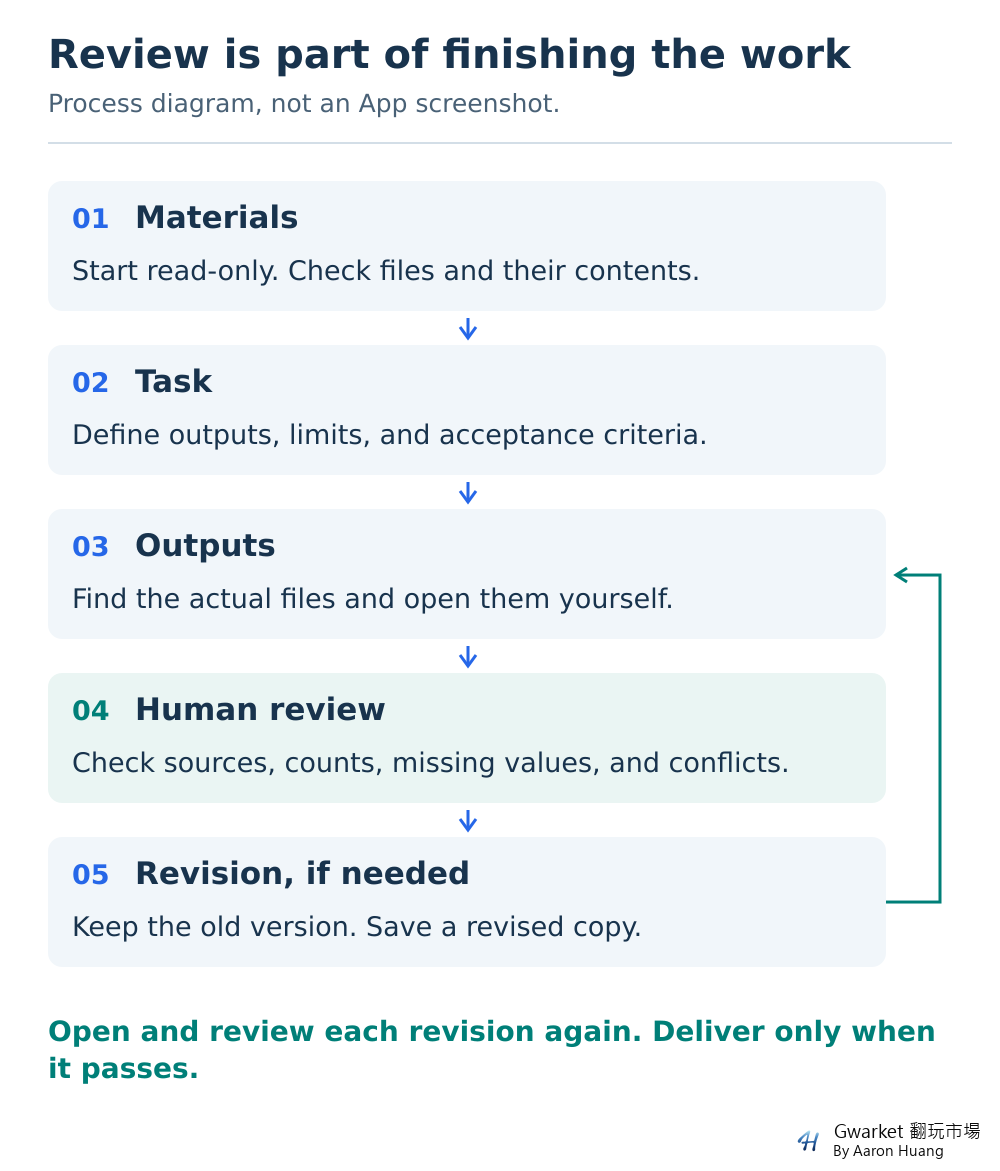
A neatly formatted table in the conversation does not prove that the requested CSV exists. “Checked” does not prove the source data was compared. Ask which file was checked, how it was checked, and what limitations were found, then inspect a sample yourself. You can review work this way without understanding every command that ran.
If you see Review or a diff panel, remember that it relies on a Git project and may include changes made before the task began. This ordinary-folder exercise does not use that panel as proof that the originals are unchanged. Official code-review guide
Include four things in your instructions
Specify where the materials are, what deliverable you want, what Codex must not do, and how the result should be checked.
“Organize these files” leaves too much open. It could mean writing a summary, removing duplicate data, or editing the originals. Be more specific: “Read the two text files in inputs and create a CSV plus a list of questions to confirm. Do not change the originals. Keep the source IDs for every record. Mark missing information as To confirm.”
If you are unsure about the output format, ask for two options and an explanation of the differences, then choose one before production. For a larger task, ask for a plan showing what will be read and changed before work begins. Review that plan too; tidy formatting is not a reason to approve everything in it.
Memories, Skills, Plugins, MCP, and subagents are not prerequisites for your first exercise. Complete a task you can inspect with the tools already available. Section 9 covers advanced features according to the recurring needs they address.
6. Practice: turn customer feedback into a handoff table
This exercise uses fictional customer-support materials to practice reading files, producing a handoff table, and checking the output. The materials package also includes an answer key and translations of the verified Chinese outputs. Try the task yourself before opening them. ChatGPT and Work can help with this kind of organization too; doing it in Codex lets you practice local, multi-file work and keep separate versions.
Imagine you coordinate operations and have received a batch of website feedback to pass to project colleagues. Your task is limited to a handoff table and a list of unresolved questions. Product priorities and customer replies are outside the scope.
Step 1: Create two small input files
Confirm that the selected working root is codex-practice, created in section 4. Use a plain-text editor to create the two files below in inputs, then copy their unchanged versions to codex-practice-originals, outside the working folder. If you use the accompanying package, take only its two inputs files. The reference folder contains the manual answer key and should stay outside the working scope. A .txt file is plain text; you do not need to write code. If your editor adds an extension automatically, make sure you do not end up with .txt.txt.
First, create feedback.txt:
Fictional website support feedback. Review date: 2026-10-20.
Use only the records below. Do not infer facts that are not stated.

R01 | 2026-10-19 | Case C101 | Login
The user still cannot sign in after resetting their password. Owner: Lin. Status: In progress. Due date: 2026-10-23.

R02 | 2026-10-20 | Case C101 | Login
Follow-up on the same case: the user still cannot sign in. Use the owner, status, and due date from R01.

R03 | 2026-10-20 | Case C102 | Shipping
The user asks when their order will ship. Owner: Zhou. Status: Awaiting reply. No due date provided.

R04 | 2026-10-19 | Case C103 | Invoice
The billing name on the invoice is incorrect. Owner: Lin. Status: Resolved. Due date: 2026-10-22.

R05 | 2026-10-20 | Case C103 | Invoice
The follow-up says "still awaiting correction." It does not explain why this differs from the Resolved status in R04. Use the other fields from R04.

R06 | 2026-10-20 | Case C104 | Feature request
The user would like to save products to favorites. No owner, status, or due date is specified.

R07 | 2026-10-20 | Case C105 | Mobile menu
The mobile menu will not expand. Owner: Chen. Status: Pending. Due date: 2026-10-24.

R08 | 2026-10-20 | Case C106 | Pricing question
The user asks about the differences between plans. Owner: Zhou. Status: Awaiting reply. Due date: 2026-10-21.
Next, create rules.txt:
1. Merge records with the same case ID into one row. Different dates do not make them separate cases.
2. Use only these issue types: Bug report, General inquiry, Feature request.
3. Classify login, invoice, and mobile-menu issues as Bug report; shipping and pricing questions as General inquiry; saving favorites as Feature request.
4. If an owner, due date, or status is missing, enter the exact value "To confirm". Do not assign an owner or estimate a date.
5. If the same case has conflicting statuses, enter "To confirm" for Status. Preserve both statements and their sources; do not simply overwrite one with the latest record.
6. Retain every source ID. Separate multiple IDs with semicolons.
7. Do not score or prioritize cases, send replies, or connect to real systems.
The materials deliberately include duplicates, gaps, and a conflict. A tidy table can still be wrong. There are few enough records to check each one without relying on an AI-generated accuracy claim.
Step 2: Confirm that Codex read the right files
Check that both materials are in inputs, outputs is still empty, and the backup copies are saved. Send this read-only instruction:
Read only the inputs folder in the current working folder. List the filenames you can read and describe each file in one sentence. Do not create, edit, move, or delete files. Do not install tools or connect to external services. First tell me the current working location and which materials, if any, you cannot read. Do not start producing the deliverables yet.
Then add: “Also check, without writing any files, the number of source records and distinct cases in feedback.txt, and identify which cases have more than one record.”
It should find feedback.txt and rules.txt and report eight source records and six distinct cases. No output files should exist yet. If it only says it can help, cannot read the files, or lists filenames that do not exist, check the location and materials before asking it to produce anything.
A read-only prompt is a task instruction, not a security lock. Check the actual operations and folder contents. Stop and investigate any unexpected changes.
If it reports eight cases, ask how it identified a case before proceeding. R01 and R02 both belong to C101; R04 and R05 both belong to C103. Reading both records does not guarantee that their relationship has been understood.
Step 3: Define the output and the decisions it must leave to you
Send the following instruction and review the plan first:
Using inputs/feedback.txt and inputs/rules.txt, plan how to turn the customer feedback into handoff materials. Explain how you will merge records, which files you will create, and which information does not support a definite conclusion. Do not write files yet.
After I confirm the plan, save two output files in outputs/v1: handoff.csv and questions.md. Use these CSV columns in this order: Case ID, Issue type, Issue summary, Owner, Due date, Status, Source IDs. Use one row per case, sorted by case ID. Mark gaps and conflicts as To confirm according to the rules. In questions.md, include each question, its case ID and sources, and what needs to be confirmed.
Do not modify inputs, delete files, install software, use the network or external services, assign priorities, send anything, or publish anything. If you cannot complete a step, explain why first. At the end, list the actual output paths, the checks performed, and unresolved items.
Look for three things in the plan: six merged cases, the invoice-status conflict preserved, and no invented owners or dates. Contacting customers, checking the order system, or choosing priorities would exceed the scope of this exercise.
If the plan is appropriate, say: “Carry out the plan above. Create only these two deliverables in outputs/v1, then stop so I can review them.” If an approval request appears, read the proposed operation. This instruction does not mean every later request should be approved.
Step 4: Open the files and compare them with the answer key
Find handoff.csv and questions.md in codex-practice/outputs/v1. When importing the CSV into a spreadsheet, choose UTF-8 and comma-separated fields, and keep the Due date column as text. You should see seven columns and six cases. Open questions.md in a plain-text editor. If the display is wrong, adjust the import options while keeping the original file.
Here is the exercise's answer key. Summary wording may vary, but the facts and sources must stay the same:
Table: scroll sideways to read all columns.
| Case | Type | Owner | Due date | Status | Sources |
|---|---|---|---|---|---|
| C101 | Bug report | Lin | 2026-10-23 | In progress | R01;R02 |
| C102 | General inquiry | Zhou | To confirm | Awaiting reply | R03 |
| C103 | Bug report | Lin | 2026-10-22 | To confirm | R04;R05 |
| C104 | Feature request | To confirm | To confirm | To confirm | R06 |
| C105 | Bug report | Chen | 2026-10-24 | Pending | R07 |
| C106 | General inquiry | Zhou | 2026-10-21 | Awaiting reply | R08 |
Check each of the following:
- Count: Six data rows plus one header row. There should not be eight cases, and general inquiries must not be omitted.
- Sources: Every source from R01 through R08 is represented, with no invented source IDs.
- Content: C103 must not be declared resolved or unresolved without confirmation. C104 must not be assigned to Lin or anyone else.
- Questions: Cover C102's missing due date, C103's conflicting status, and C104's missing owner, due date, and status. That is five fields or issues requiring confirmation. Three case-level sections are fine; five separate lines are not mandatory.
- Format: Every CSV row has seven fields, the text is readable, and the spreadsheet has not silently converted the dates incorrectly. A comma inside a summary must not push part of it into another column.
- Scope: The input materials are unchanged. No emails were sent, services connected, or unnecessary files created.
These inputs are short enough to open the backup and working copies of feedback.txt and rules.txt side by side and compare every part. Matching filenames or unchanged modification times do not by themselves prove matching content. If you cannot establish that the content is the same, keep the current folder and make a new practice copy from the backup. Do not claim the originals were verified unchanged.
Check the files yourself before asking Codex for an additional review. Asking “Did you get it right?” may only produce a restatement of its approach. Point to a specific case and discrepancy so the correction is actionable.
Step 5: Make one precise change and keep both versions
If your output marks C103 as Resolved, request this correction:
C103's status does not follow rule 5 in rules.txt. R04 and R05 conflict, so Status should be To confirm. Explain the error, keep v1, and save a corrected version in outputs/v2. Include both handoff.csv and questions.md in v2. Correct only this issue and the corresponding question-list entry, preserve all unchanged content, and recheck the six cases and every source ID.
If the first result is correct, practice changing the column order instead:
This is a requirements change, not an error correction. Keep v1 and create handoff.csv in outputs/v2 with Source IDs immediately after Issue summary. Leave all other columns and data unchanged. Copy questions.md to v2 unchanged, without adding or removing questions. Compare v1 and v2 and identify the only expected difference in the table.
Open v2 and compare it with v1. It should still contain six cases and every source ID. If you requested a correction, confirm that only C103's status and its corresponding question-list entry changed. If you requested a column reorder, confirm that only the position of Source IDs changed and questions.md stayed identical. In either case, verify all five fields requiring confirmation.
Once you have finished, you can try anonymized requirements documents, inventory exceptions, or planning feedback. Rewrite the classification, merging, and missing-data rules for the new task rather than reusing the support example's answers.
Compare the verified outputs
In a new Codex task, we provided only the two Chinese practice files and followed this section's instructions in separate turns: a read-only check, a plan, production of v1, and a column-order change saved as v2 while keeping v1. The files were processed in a Windows Codex task environment. No answer key, earlier output, or solution script was supplied in advance.
An independent file check confirmed that eight source records were merged into six cases, every source ID from R01 through R08 was retained, and all five fields requiring confirmation were listed. Version 2 changed only the position of Source IDs; all values stayed the same. The two questions.md files were byte-for-byte identical. Execution records also reported matching before-and-after hashes for the inputs and preserved v1 files.
This verified the file-processing workflow, not the desktop app's sign-in, folder picker, permission menus, or stop button. There are no app-operation screenshots. The earlier interface setup guidance follows official documentation. This is one fixed-input case, not a guarantee of identical results with other models, environments, or materials.
The English prompts, practice materials, output files, and figures are translations of the Chinese case. The English prompts were not run as a separate test. The English package also includes the original Chinese inputs and verified output files for comparison.
The figures below present translated file content, not app screenshots. The handoff figure shows the three cases requiring confirmation; the complete CSV contains all six. On a phone, open the original-size image or download the file to check it directly.
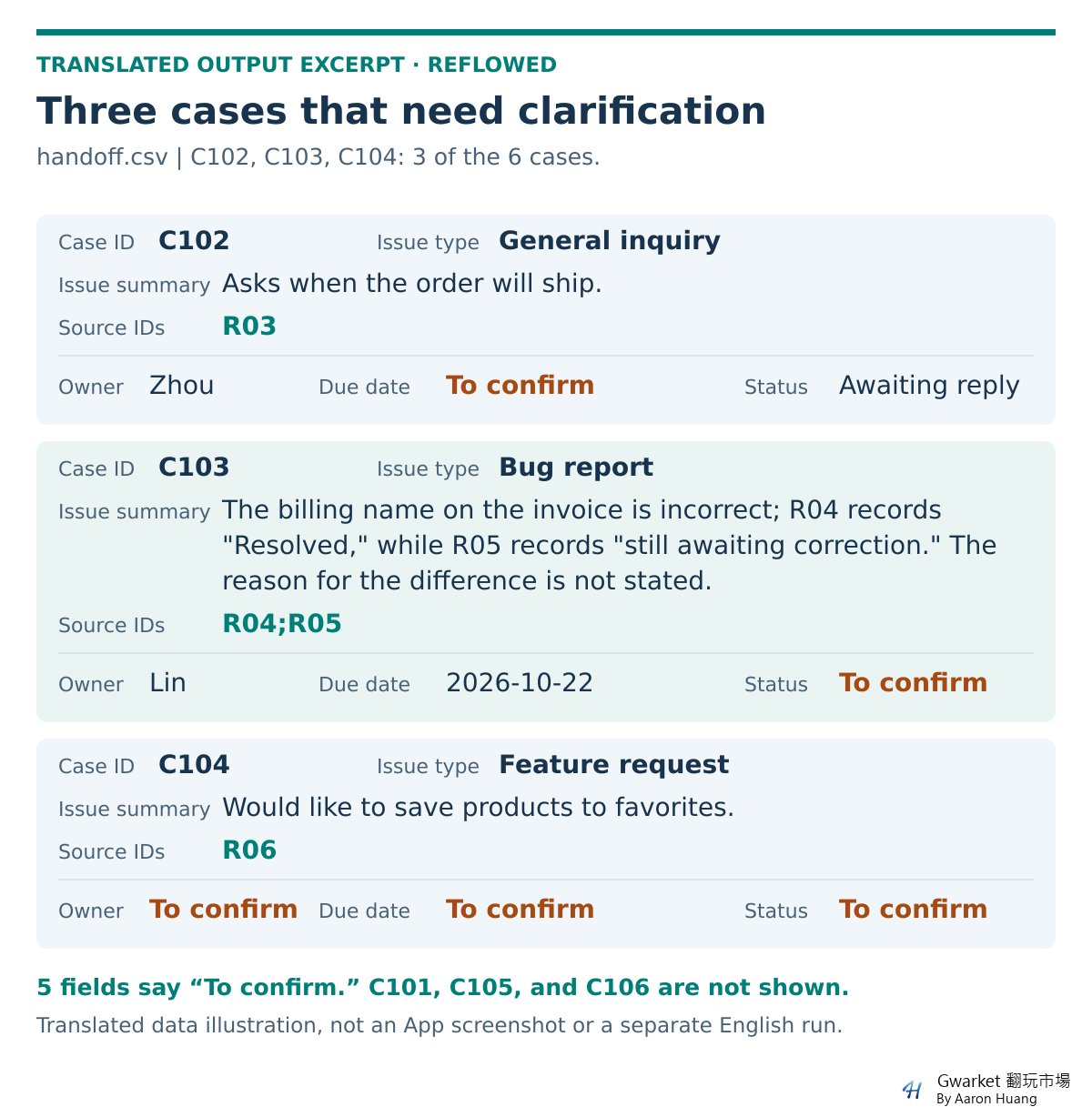
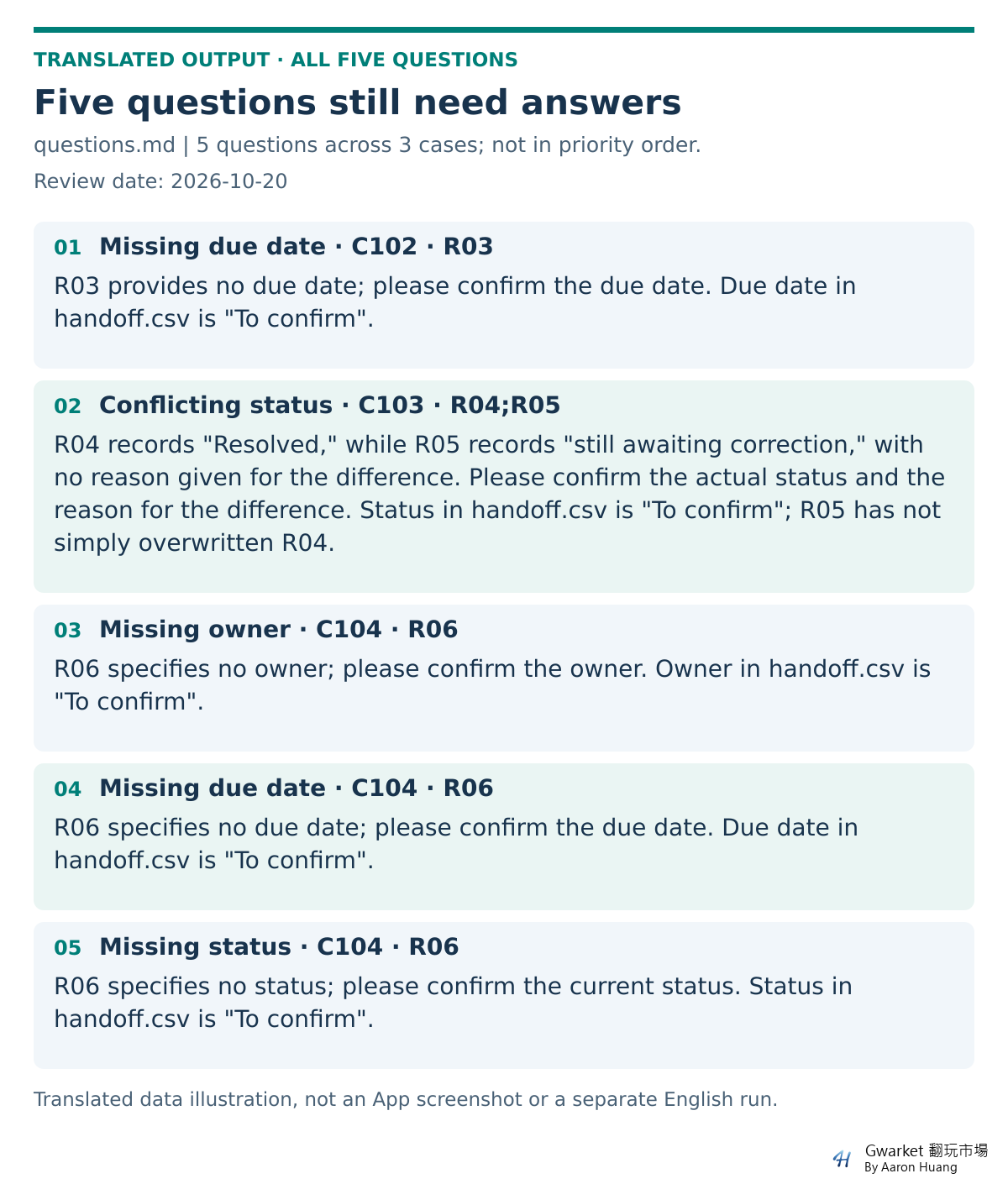
The English materials and verified-output translations package keeps inputs, reference, results/v1, results/v2, and the two output figures separate, with a method note and the original Chinese files. For your own attempt, copy only the two English inputs files into the working folder. Complete the task before opening reference and results for comparison. Do not feed the answer key or existing results into the task, and do not mistake the supplied files for the results of your own run.
7. Permissions, stopping work, and recovery
Read the proposed action before approving it
Permission settings concern both which files and network resources can be accessed and when a person or an automated system reviews an operation. Approve for me keeps the same workspace-write boundary as Ask for approval but sends eligible approval requests to automated review. Full access carries broader access risks. Available modes also depend on the version, environment, and organization requirements. Official permission modes
For this exercise, necessary actions are reading the specified copies, writing the requested output files, and checking their contents. If Codex unexpectedly asks to install an unfamiliar tool, read another private folder, upload materials, or send a message, decline or cancel that step and ask why it is needed. Do not grant maximum access simply to get past a blockage.
Local execution also does not mean data will always stay on the computer. When using AI services and external tools, decide what information you may provide according to the service, account, and organization policies. Fictional data lets you practice without also taking on the consequences of exposing real information.
Stopping does not undo changes
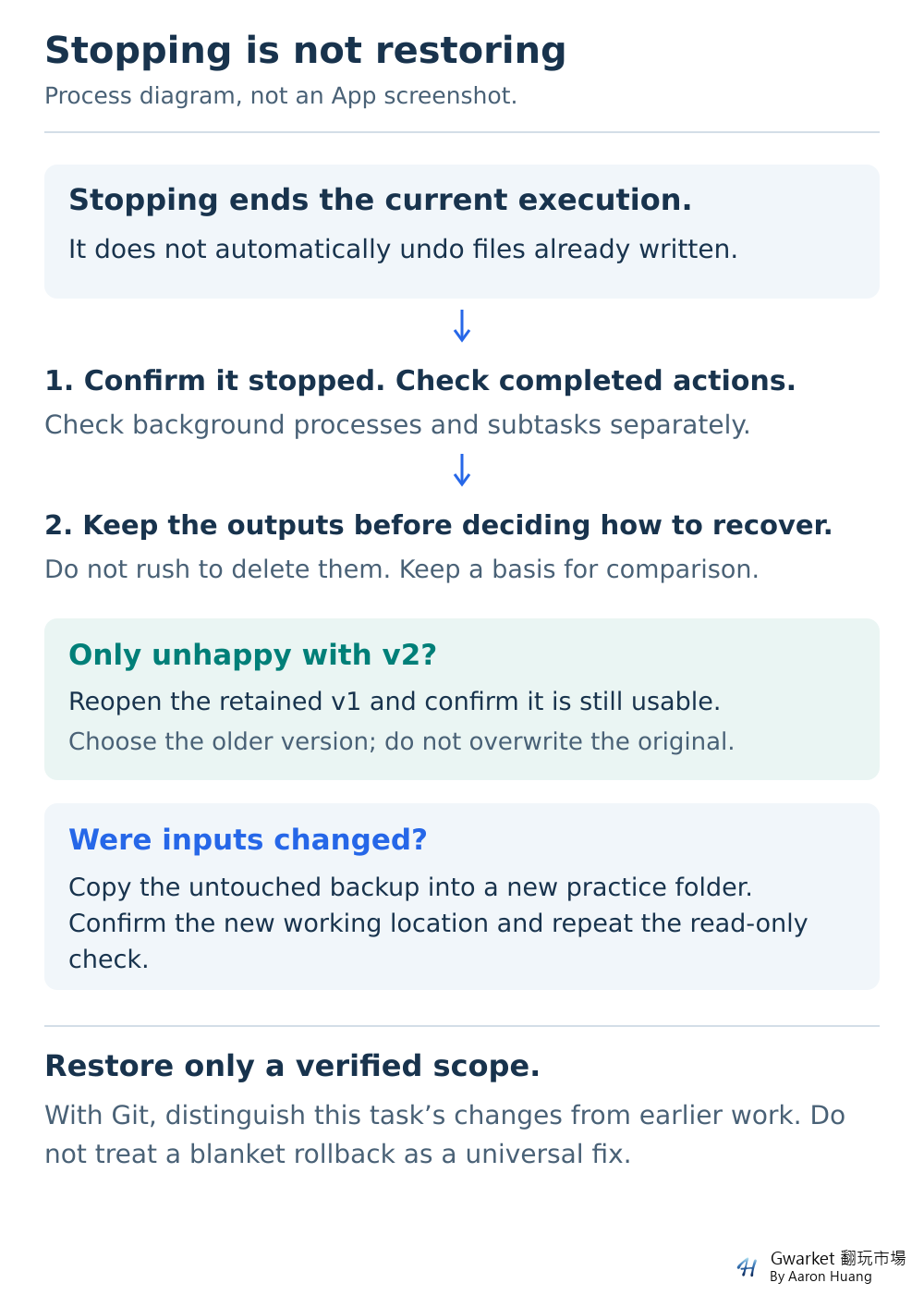
If Codex is reading the wrong folder, preparing to change an original, or acting outside the agreed plan, cancel the current work and inspect the operations and files already completed. The official guidance supports canceling a current run, but cancellation does not reverse content already written or remove all external effects. Official troubleshooting guide
If a task uses background processes, subtasks, or long-running goals, check their status separately. A main conversation that has stopped producing text is not enough. Goal has its own pause, resume, and clear controls; stopping behavior should not be assumed identical across interfaces. Long-running work
After canceling, confirm that the current task shows as stopped, then inspect completed operations and files. Deleting a conversation or closing a window is not a recovery method.
Start over safely in an ordinary folder
This exercise uses copies to preserve a way back, without requiring Git on the first day:
- Stop the work and confirm that it is no longer writing files.
- Keep the current
outputs, even if the result is wrong, so you can compare it later. Do not rush to delete it. - If you only dislike v2, reopen the saved v1 and confirm it is usable. You are choosing an earlier version, not overwriting the current files to simulate an undo.
- If
inputswas changed, copy the unchanged backup materials into a new practice folder, then check both filenames and contents. - Explicitly select the new working location and restart with the read-only check. Do not leave Codex to guess between the old and new folders.
Before restarting, open the originals and the saved earlier version yourself. Confirm the new working folder contains the right materials rather than relying on “restored” in the conversation.
If you already use Git, Review can help inspect and revert specific files or hunks. First distinguish this task's changes from any pre-existing uncommitted work. Revert all or a destructive bulk reset should not be a beginner's default recovery method. Official Review guide
For more preparation guidance, see Gwarket's backup and recovery guide and permission setup guide (both in Chinese).
8. Troubleshooting common problems
Record the symptom first, then change one condition at a time. Reinstalling, changing models, switching folders, and raising permissions together makes the cause harder to identify. Use this table to narrow the problem, and compare product errors with the official troubleshooting guide.
Table: scroll sideways to read all columns.
| Symptom | Check first | A safe next step |
|---|---|---|
| Codex or an option is missing | Account, workspace, version, plan, and rollout status | Check the official availability conditions; for a company account, check administrator policy |
| You are signed in but cannot start | Sign-in method and exact error text | Check that you have not confused API access with subscription sign-in; never share a password or key to get help |
| Local files cannot be found | Local / Cloud selection and the selected folder | Cancel the task in the wrong location and select the working folder containing the copies |
| Permission is denied | Whether the denied action is reading, writing, network access, or an external tool | Confirm that the action is necessary; do not expand access if the exercise can be completed within its existing scope |
| A tool or package is missing | Which step requires it and whether an existing tool can do the job | Ask for an alternative before installing an unfamiliar toolset for a small exercise |
| You receive text but no output file | Whether the prompt requested only advice, and whether the claimed path exists | Explicitly request a file; if writing is unavailable, ask for the limitation |
| Usage is exhausted or a model cannot be selected | Account usage and plan availability | Check reset information and reduce task size; buying API access is not a free workaround |
| The table is wrong | The specific case, field, and conflicting source | Keep the earlier version, identify the discrepancy, request a scoped correction, and check again |
| Text is garbled or columns are misaligned | CSV encoding, import options, and separator | Keep the original file, import as UTF-8, and ask for a field-count check on every row |
| Work seems stopped but actions continue | Background processes, subtasks, and long-running goal status | Check whether related work is still running before changing settings or overwriting output |
When asking for help, provide your operating system and app version, chosen interface, execution location, error text with sensitive information removed, expected result, and the smallest set of steps that reproduces the issue. Do not include an entire company folder or sign-in information.
If permission options have disappeared, see Gwarket's guide to unavailable permission modes (Chinese). Check the conditions instead of repeatedly switching settings and hoping one works.
9. What to learn next: from one task to a repeatable workflow
After completing the handoff table, do not rush to install more tools. Practice in three stages.
Stage 1: Set a task and review the result yourself
Finish the exercise in this guide. Look beyond the conversation summary and answer these questions: Where did the work run? Which materials did it use? Where are the output files? Which checks did you personally perform? If you start over, where are the originals and the previous version?
If you cannot yet answer them, return to the folder and complete the same task. For more task-setting practice, see Gwarket's first Codex task guide. To assess whether output is ready to share, see the work-delivery review guide (both in Chinese).
Stage 2: Try different materials and record the rules
Choose a small set of familiar materials with sensitive information removed, then repeat the workflow. Before asking Codex to work, define the categories, merging rules, missing-data handling, and output columns. Changing the filename while keeping unsuitable support-case rules is not enough.
Save the task instructions and acceptance checklist, and adapt them for the next set of materials. Rules you use repeatedly in the same project can become project guidance.
Stage 3: Add advanced features when a need repeats
When you repeatedly use the same method or keep needing the same external data source, choose a feature that addresses that need. You do not have to connect unnecessary services or create complex settings just to learn every feature. Before adding one, identify the repeated step it will save.
What Memories, Skills, Plugins, and MCP are for
Choose according to the problem you actually need to solve:
Table: scroll sideways to read all columns.
| Feature | What it helps with | When to consider it |
|---|---|---|
| Memories | Carry background context across conversations | When you keep repeating the same context; not as the only specification |
| AGENTS.md | Store working instructions for a project | When you keep working in the same folder and need consistent rules |
| Skills | Reuse a working method | When the same preparation, production, or checking process recurs |
| Plugins | Provide integrated tools and workflows | When a task needs an external service or packaged capability |
| MCP | Connect external tools and data | When you have a specific data or action requirement that the available options do not meet |
| Subagents | Split relatively independent work | When tasks can be divided without overwriting one another's output |
Do not treat memory as a rule that will always be followed. Local Codex memory and ChatGPT memory are separate. Put concrete project formats and restrictions in the task or an applicable AGENTS.md file, and consider a Skill for a reusable procedure. Memories, AGENTS.md, Skills
A Plugin can include Skills, MCP capabilities, and other components. MCP is a mechanism for connecting tools; the terms are not interchangeable. After installing a tool, you still need to know what it reads, what it can change, and where it sends data. The documentation at the information-check date says the IDE extension does not support plugins, so do not assume a desktop workflow transfers to every interface. Plugins, MCP
Subagents can help with independent pieces of work, such as checking two sets of materials separately before combining the findings. They are less suitable for uncoordinated edits to the same file. Delegation also consumes usage; more agents do not automatically mean better value. Subagents
If you want a structured sequence for learning AI work methods, you can review the Gwarket AI beginner course (Chinese) and decide whether it fits your next step. You can also practice this learning path independently. You do not need to buy a course or understand every advanced setting before starting.
Product information checked on October 22, 2026. Official documentation is linked to help readers check features and conditions. It does not imply OpenAI endorsement of this article, Gwarket, or its course.