Put a Codex skill used by one project in .agents/skills/<name>/SKILL.md inside that project. Put it in $HOME/.agents/skills only if you want it everywhere. For ready-made skills, start with the official openai/plugins repository, because the README of the older openai/skills repository marks it as deprecated. One codex debug prompt-input command then tells you whether Codex can see the skill.
If an instruction is only a project rule, or you need it less than once a week, AGENTS.md is enough. The loading results below come from our run on Windows with codex-cli 0.169.0. The recommendations come from the official repository and were not installed one by one. Checked 2026-11-24, when the latest official release was 0.172.0.
Recommended Codex skills by job
The six plugin rows come from the openai/plugins catalog, and we confirmed that each plugin contains a skills/ folder. A plugin usually brings several skills, so pick by job.
| Your job | Plugin in OpenAI's catalog | Example skills | Skills | Our check |
|---|---|---|---|---|
| Front-end web apps | build-web-apps |
frontend-app-builder, react-best-practices |
6 | Docs only |
| Planning, testing, debugging | superpowers (third-party author, listed in the catalog) |
systematic-debugging, test-driven-development |
14 | Docs only |
| Data analysis and reports | data-analytics |
build-dashboard, analyze-data-quality |
15 | Docs only |
| Product ideas and prototypes | product-design |
ideate, audit |
10 | Docs only |
| Code security review | codex-security |
deep-security-scan, fix-finding |
20 | Docs only |
| Building on the OpenAI API | openai-developers |
agents-sdk, openai-api-troubleshooting |
5 | Docs only |
| Your own repeated workflow | Write one | The check-skill example below |
1 | Loading tested |
| How to choose | Pick the one job you will do this week | Add a second after it has helped two or three times | For internal workflows, your own skill is usually a better fit |
Browse more options in the skills collection, or read what an AI skill is first.
Where Codex skills go
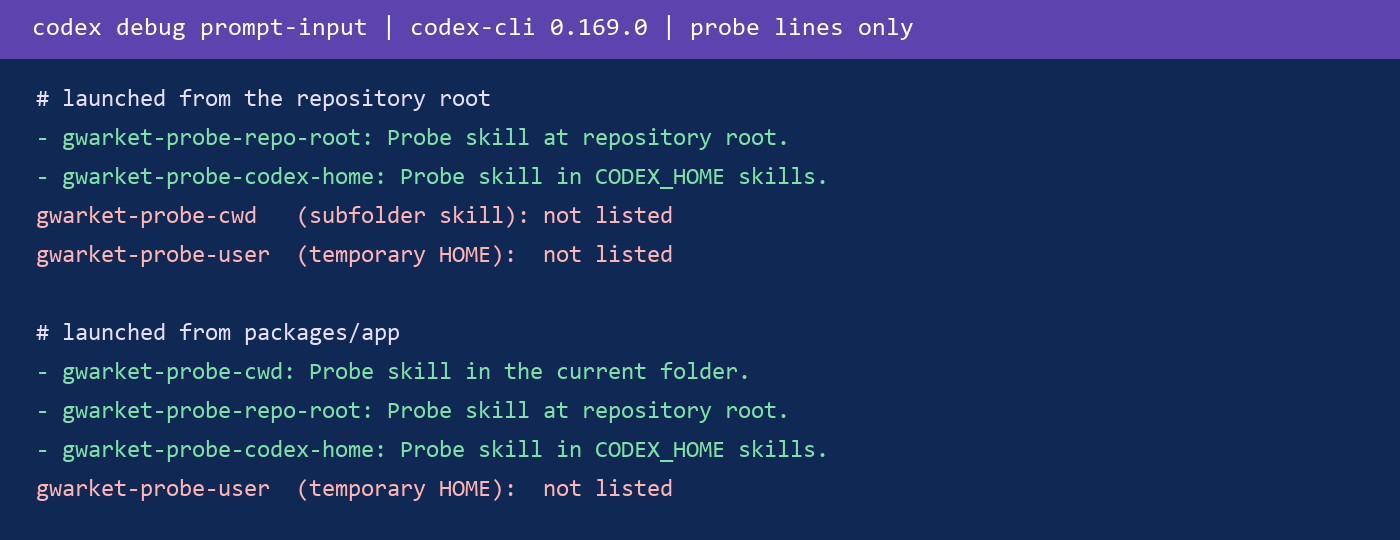
The docs say Codex scans .agents/skills from the current folder up to the repository root. We placed test skills in the repo root, a subfolder, a temporary user folder and a temporary CODEX_HOME, then launched Codex from both the root and the subfolder.
| Location | Use it for | Result |
|---|---|---|
$CWD/.agents/skills |
One subproject | Tested: loaded from that folder, not from the repo root |
$REPO_ROOT/.agents/skills |
The whole repository | Tested: loaded from the root and a subfolder |
$CWD/../.agents/skills |
A shared parent area | Docs only |
$HOME/.agents/skills |
Your personal skills | Docs only |
$CODEX_HOME/skills |
Where the built-in $skill-installer installs |
Tested: loaded from a temporary CODEX_HOME; not listed in the official location table |
/etc/codex/skills |
Machine or container skills | Docs only |
| How to choose | Repo root for a team, $HOME for just you |
When unsure, start in the project |
The built-in $skill-installer installs from openai/skills into $CODEX_HOME/skills by default, which is a different location from .agents/skills. Since that source is deprecated, we do not treat it as the first choice.
Install a project skill on Windows
Open PowerShell in your project and paste this. It creates a minimal skill and saves it as UTF-8 without a BOM.
New-Item -ItemType Directory -Force .agents\skills\check-skill | Out-Null
$text = @'
---
name: check-skill
description: Test whether Codex loads skills from this project.
---

Reply that the check-skill skill was loaded.
'@
[IO.File]::WriteAllText("$PWD\.agents\skills\check-skill\SKILL.md", $text, (New-Object Text.UTF8Encoding($false)))
name and description are required. Codex uses description to decide when the skill applies, so a real skill should say when to use it and when not to.
Confirm that a Codex skill loaded
From the same folder, run:
(codex debug prompt-input "test" 2>$null | Out-String) -match '\\n- check-skill:'
True means Codex sees it. False means it does not. The command prints the prompt Codex prepared, and it ran without a login in our test. After that, type /skills or $ in Codex CLI to select the skill.
Common errors
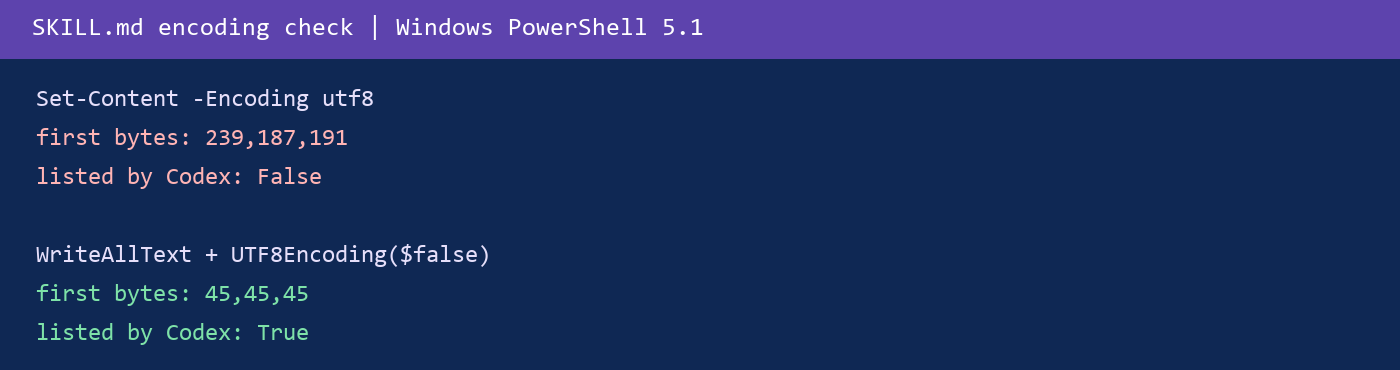
The check returns False. Look for a BOM. In Windows PowerShell 5.1, Set-Content -Encoding utf8 writes one at the start of the file (first bytes 239,187,191). A skill saved that way did not appear in the codex debug prompt-input output. The same kind of file saved without a BOM did. Check yours:
[IO.File]::ReadAllBytes("$PWD\.agents\skills\check-skill\SKILL.md")[0..2] -join ','
You want 45,45,45, the opening ---.
A skill in a subfolder is missing when you launch from the repo root. Codex looks upward from the current folder, not downward. Move shared skills to the root .agents/skills.
You tried to isolate user-level skills with environment variables. On this Windows machine with codex-cli 0.169.0, after pointing HOME and USERPROFILE to a temporary folder, the test skill in the temporary user folder did not load and the output still listed skills from the real user folder. For a clean test, check which skills the output lists.
A plugin's skills do not appear after install. The docs say to start a new chat or CLI session. Local skill changes are usually detected automatically. If one does not appear, restart Codex.
Install official plugins
Open the Plugins tab in the desktop app or on the web, or type /plugins in Codex CLI. The IDE extension does not support plugins. For how plugins differ from connectors and MCP, see plugins, connectors and MCP.
For a team source, the CLI manages marketplaces with codex plugin marketplace and its add, list, upgrade and remove subcommands. Skills can include scripts, so read SKILL.md and scripts/ before installing from a third party.
FAQ
Where should I install Codex skills?
Use .agents/skills for one project and $HOME/.agents/skills for personal skills across projects. Each skill is a folder with at least a SKILL.md file.
Which Codex skills should I install first?
Start with the job you repeat most this week. build-web-apps fits web work and superpowers fits debugging. For an internal workflow, your own project skill is usually a better fit.
Is openai/skills still usable?
The repository is still there and the built-in $skill-installer still points to it by default. Its README marks it as deprecated and sends users to openai/plugins, so start there for new installs.
How do I know Codex loaded my skill?
Run codex debug prompt-input in the project and look for the skill name. If the check returns False, verify the launch folder and the encoding of SKILL.md.
How we wrote this
Paths and usage come from OpenAI's Build skills and Plugins docs and the openai/plugins repository, checked 2026-11-24.
We tested on Windows with codex-cli 0.169.0 (latest at the time: 0.172.0), using a temporary project and CODEX_HOME to check project loading, CODEX_HOME loading, the BOM difference and the PowerShell commands here.
We did not test the recommended plugins and skills themselves, $skill-installer, installs in a real user folder, or macOS and Linux.