Prompt Is Not Magic: Structured Output, Tool Calling, and Nondeterminism
In the previous article, we looked at Transformer, Attention, and Embeddings.
Once you understand those mechanisms, the next practical question is straightforward:
If an LLM is fundamentally predicting the next token, how do we make it behave reliably enough to build real applications?
The first answer many people reach for is:
Write a better prompt.
That is not wrong. It is simply incomplete.
A prompt can influence model behavior, but it cannot turn a probabilistic model into a conventional deterministic program.
Once AI moves from a chat interface into an application, the real engineering problems become broader:
- How do we define the task and its constraints clearly?
- How do we make model outputs machine-readable?
- How should the model interact with external tools?
- Why can the same input produce different outputs?
- If outputs are inherently variable, how should we test the system?
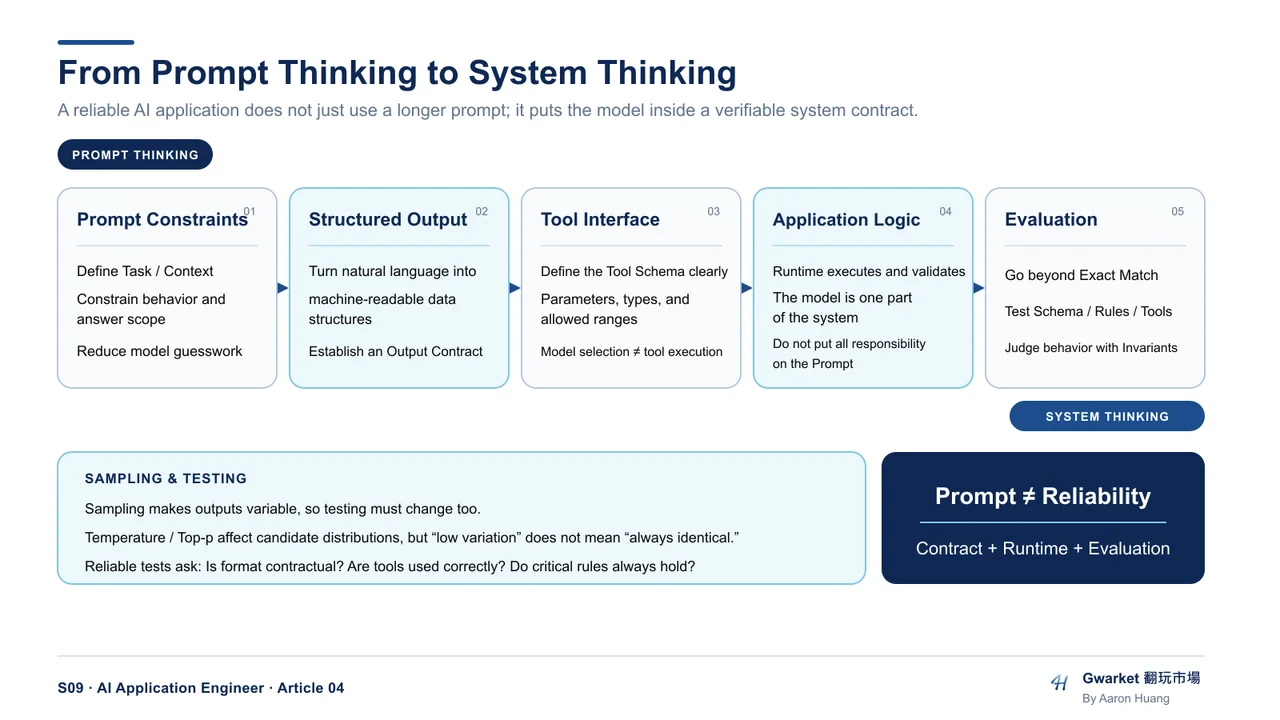
This is one of the key transitions from using an LLM to engineering an AI application.
1. What a Prompt Actually Does: It Narrows the Model's Choice Space
Prompt engineering is often presented like a collection of magic phrases.
Find the right wording, and the model suddenly becomes smarter.
From the model's perspective, however, the mechanism is much less mysterious.
At each step, an LLM estimates a probability distribution over possible next tokens based on the current context.
A prompt therefore provides additional conditions that make some outputs more plausible and others less plausible.
In other words:
A prompt is a mechanism for constraining the model's behavioral space.
Consider a vague instruction:
Analyze this product.
The model must infer almost everything:
- Market analysis or feature analysis?
- Competitor analysis?
- How detailed should the answer be?
- Who is the audience?
- Should it make recommendations?
- What should it do when information is missing?
Now compare it with:
You are a B2B Product Marketing Analyst. Based only on the product information below, analyze Target Customer, Pain Point, Value Proposition, and Competitive Differentiation. Give no more than three points per section. If the provided information is insufficient, return “insufficient information” instead of inventing an answer.
The second prompt leaves the model with a much smaller space of acceptable behavior.
Good prompts therefore tend to clarify four things.
Task
What exactly should the model do?
For example:
- summarize
- classify
- extract
- compare
- reason
- rewrite
- generate
Context
What information does the model need in order to perform the task?
This might include:
- background information
- user requirements
- documents
- previous outputs
- data returned by external systems
Constraints
What must the model do—or avoid doing?
For example:
- use only the supplied information
- return
unknownwhen evidence is missing - stay under 300 words
- use Traditional Chinese
- return only specific fields
Output Contract
What form must the result take?
This becomes critical when the next consumer is not a human.
If the model is writing for a person, “roughly correct” may sometimes be good enough.
If another program must parse the result, however:
“Close enough” is often a failure.
2. Structured Output: Turning Language into Data
Suppose you want an LLM to classify a customer-support ticket.
For a human reader, this output may be perfectly acceptable:
Category: Refund
Priority: High
Requires human review: Yes
But if another system needs to process the result automatically, it may expect something like:
{
  "category": "refund",
  "priority": "high",
  "requires_human": true
}
To a person, these two outputs communicate almost the same information.
To software, they are very different interfaces.
That is the problem Structured Output is designed to solve.
Natural Language Is a Poor API Interface
LLMs are excellent at natural language.
Natural language, however, is highly variable.
A model might return:
Priority: High
or:
This request appears to be high priority.
or even:
{
  "priority": "urgent"
}
If the downstream application only accepts:
{
  "priority": "high"
}
semantic similarity is not enough.
For this reason, AI applications often constrain model outputs using a schema.
For example:
{
  "category": "billing | technical | account",
  "priority": "low | medium | high",
  "requires_human": true
}
This creates a kind of:
Model Output Contract
The model is no longer merely answering a question.
It is generating data that another system must be able to consume reliably.
3. Structured Output Is Not the Same as Saying “Return JSON”
A common mistake is to put this in the prompt:
Please output JSON.
The model returns valid-looking JSON, and the problem appears solved.
But that only solves the first layer.
A production system may still need to reason about several different forms of correctness.
Syntax Validity
Is the response valid JSON?
Schema Validity
Are the required fields present?
Are the types correct?
For example:
{
  "requires_human": "yes"
}
is valid JSON.
But if the application expects a Boolean:
{
  "requires_human": true
}
the output is still invalid for that application.
Modern model APIs may provide schema-constrained Structured Outputs that enforce this layer directly for supported schemas and configurations. That is stronger than ordinary JSON mode, which only guarantees valid JSON.
Semantic Validity
Even a perfectly valid schema can contain the wrong answer.
For example:
{
  "priority": "low",
  "requires_human": false
}
may be structurally perfect.
But if the user said:
My account was hacked and my credit card is being charged right now.
the problem is no longer formatting.
The model made the wrong judgment.
So:
Valid structure does not imply valid meaning.
Structured Output improves interface reliability.
It does not eliminate the need to evaluate what the model actually decided.
4. Tool Calling: The Model Does Not Need to Do Everything Itself
Suppose a user asks:
Do I have a meeting at 3 PM today?
The model does not inherently know what is on the user's calendar.
Without access to an external source, it can only:
- use information already present in context, or
- guess.
A better system can let the model decide:
I need calendar data.
It might produce a tool request conceptually similar to:
{
  "tool": "get_calendar_events",
  "arguments": {
    "date": "2026-09-21",
    "time": "15:00"
  }
}
The application or tool runtime executes the request.
The result is returned to the model.
The model can then answer:
You have a Project Review at 3 PM.
That is the basic idea behind Tool Calling.
5. The LLM Is Often the Tool Decision Maker, Not the Tool Executor
This distinction matters.
Architecture diagrams are often simplified into:
LLM → Tool
which makes it look as if the model itself is executing an API.
For custom tools, the real control flow is usually closer to:
User
 ↓
Application
 ↓
LLM
 ↓
Tool Request
 ↓
Application / Runtime
 ↓
External Tool or API
 ↓
Tool Result
 ↓
Application
 ↓
LLM
 ↓
Final Response
The model decides which tool it wants to use and produces the required arguments.
The surrounding runtime decides whether and how that tool is actually executed.
Some modern platforms also provide built-in tools whose execution is handled by the provider's runtime rather than by your own application code. The implementation differs, but the architectural distinction remains useful:
tool selection and tool execution are not the same responsibility.
Tool Calling therefore does not mean the model suddenly gained direct access to the outside world.
It means the model has been inserted into a software control loop.
6. The Hard Part of Tool Calling Is Often the Interface
Imagine giving a model this tool:
search(query)
That interface leaves many decisions unspecified.
The model must infer:
- How specific should the query be?
- Which language should it use?
- Should it include a date?
- Is it searching the public web or internal data?
- How many results should it request?
Now compare it with:
search_documents(
  query: string,
  source: "internal" | "web",
  max_results: integer,
  date_after: date | null
)
The model's available choices are much clearer.
This follows the same principle as prompt constraints:
Do not rely on the model to guess correctly when the interface can encode the constraint directly.
Tool quality therefore depends on more than the model.
Tool names, descriptions, schemas, parameter definitions, and runtime validation all affect how reliably the system behaves.
7. Sampling: Why the Same Prompt May Not Produce the Same Answer
This introduces another major difference between LLM systems and conventional software:
generation is probabilistic.
At each token position, the model produces a probability distribution over candidate tokens.
Conceptually:
AI       0.38
model    0.21
system   0.17
agent    0.09
...
The generation process then needs a rule for selecting what comes next.
One option is to strongly favor the highest-probability token.
Another is to sample from multiple plausible candidates.
Once different tokens are selected early in the sequence, later generations may follow different paths.
That is one reason repeated runs can produce different outputs.
8. Temperature: Not a “Creativity Button”
Temperature is often explained as:
High temperature = creative
Low temperature = accurate
That is convenient, but imprecise.
A more useful interpretation is:
Temperature changes how concentrated the sampling distribution is.
Lower temperature tends to make high-probability candidates dominate more strongly.
Higher temperature makes lower-probability candidates relatively more likely to be selected.
Conceptually:
Lower temperature
→ narrower output distribution

Higher temperature
→ wider output distribution
This may look like “more conservative” versus “more diverse” behavior.
But temperature itself is not:
- a factuality control
- an intelligence control
- a creativity detector
It is a sampling parameter.
And even low-temperature generation should not automatically be treated as perfectly deterministic.
9. Top-p: Restricting the Candidate Set
Another common sampling control is Top-p, also known as nucleus sampling.
Instead of sampling from the entire vocabulary, the system first keeps only enough high-probability tokens to reach a target cumulative probability.
Suppose the distribution is:
A  0.50
B  0.25
C  0.15
D  0.06
E  0.04
With top_p = 0.9, the candidate set may effectively stop after:
A + B + C = 0.90
The lower-probability candidates are excluded from that sampling step.
So, conceptually:
- Temperature changes the shape of the sampling distribution.
- Top-p changes how much probability mass is included in the candidate set.
Both influence the range and stability of possible outputs.
10. Why Traditional Unit-Test Thinking Is Not Enough
Traditional software can often be tested like this:
assert add(2, 2) == 4
Same input.
Same expected output.
Now imagine testing:
Input:
Summarize this customer complaint.
One run might return:
Customer requests a refund because the product arrived damaged.
Another might return:
The customer received a damaged product and is asking for a refund.
Both answers can be correct.
But this test:
assert output == expected_output
would reject the second answer.
This leads to an important shift in AI application testing:
We often need to test expected behavior rather than exact wording.
11. Test the Contract, Not Just the Sentence
Consider a support-ticket classifier.
Instead of requiring one exact string, we can test multiple properties.
Schema
Does the output contain the required fields?
{
  "category": "...",
  "priority": "...",
  "requires_human": true
}
Allowed Values
Is category restricted to:
billing
technical
account
Business Rules
If the user reports account compromise:
requires_human == true
Grounding
If the source data contains no order number, the model must not invent one.
Tool Behavior
If the task requires current order status, did the system use the order lookup tool instead of guessing?
These properties are often much more important than whether the final wording matches a reference answer character for character.
12. From Exact Match to Invariants
The difference can be summarized like this.
Traditional program:
Input
↓
Expected Exact Output
LLM application:
Input
↓
Range of Acceptable Outputs
↓
Required Invariants
An invariant is a property that must remain true even when the wording changes.
For example:
Do not invent missing data.
Return a valid required schema.
Escalate critical incidents.
Do not call undefined tools.
Tool arguments must match the tool contract.
These are the properties the application actually depends on.
13. Prompt Engineering Is Only One Layer
Putting the pieces together, a reliable LLM application does not place all of its trust in the prompt.
A more complete architecture looks like:
Prompt
↓
Constraints
↓
Structured Output
↓
Schema / Contract Enforcement
↓
Tool Interface
↓
Application Logic
↓
Evaluation
The prompt tells the model:
What behavior is expected?
Structured Output defines:
What shape must the result have?
Tool Calling defines:
What external capabilities can the model request?
Sampling explains:
Why can valid outputs vary between runs?
Testing answers:
How do we determine whether the system is still behaving correctly despite that variability?
14. The Real Transition: From Prompt Thinking to System Thinking
This is one of the most important distinctions for an AI Application Engineer.
When a beginner sees a bad model response, the first reaction is often:
Change the prompt.
Sometimes that is exactly the right fix.
But once the system becomes more complex, the better diagnostic questions are:
Is this really a prompt problem?
Or is the context insufficient?

Is the output unstable?
Or is the schema underspecified?

Does the model lack information?
Or should it have called a tool?

Is this normal sampling variation?
Or an actual regression?

Did the model fail?
Or is the surrounding system poorly designed?
At this point, we are no longer simply “using a model.”
We are engineering:
a software system that contains a probabilistic model.
And that leads directly to the next question.
Even if the prompt is clear, the output schema is valid, and the tool call succeeds:
Does that mean the AI system is reliable in production?
Not necessarily.
Real systems must also deal with:
- model failure
- retrieval failure
- tool failure
- validation
- fallback behavior
- observability
- cost
- latency
- evaluation
Those are no longer just prompt-engineering problems.
They are Production AI Engineering problems.
That is where the next article begins.