Gwarket Newsletter · November 2–8, 2026
Try a background swap on one finished shot before booking a reshoot for another version of an ad. Play the original and the edit side by side. If the performance, product details and timing hold up, use the number of usable seconds, reruns and minutes of cleanup to price the rest of the edit.
In this issue
- Try a video background swap with Gemini
- Check an AI-generated GIF or SVG before handoff
- Build a workspace you can use again with Muse Spaces
- Image and video editing
- Model releases and research
- Assistants and local tools
- 3D scenes and motion
- Behavior and weather models
Three updates worth a closer look
Gemini Omni 1.2 Flash: try the hardest shot first
Gwarket’s take. An existing shot can save a reshoot when the original performance and product details survive the change. Start with a clip in which the actor turns or the product label is clearly visible. That gives you a chance to spot a problem before you commit to editing the rest.
On November 5, Google raised the maximum native clip length for generation and editing from 10 to 15 seconds. It supports successive edits to the same clip. The announced Gemini API rate for 720p video is US$0.07 per second, about 30% less than version 1.1. At that rate, one 15-second 720p output costs US$1.05 before retries.
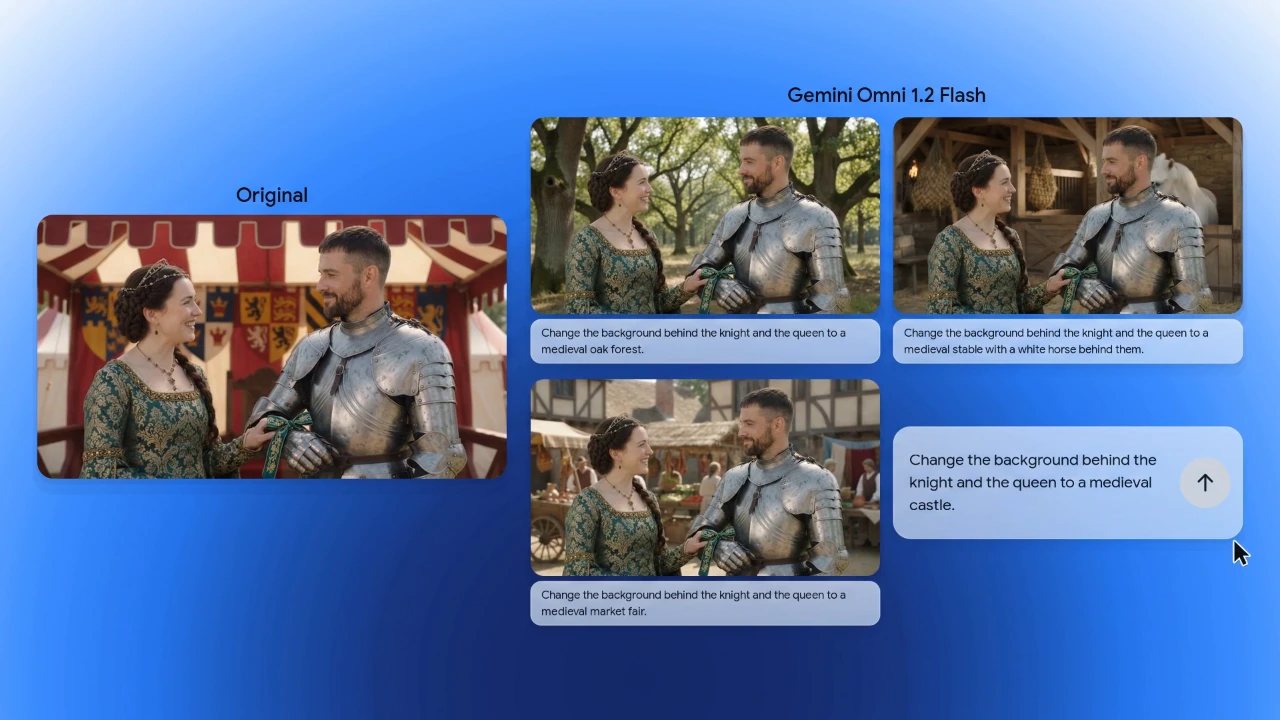
Google DeepMind’s demo. The generated starting clip is on the left. The forest, stable and market are background edits.
In the still, the actors stand in much the same positions, face the same directions and occupy about the same part of the frame. Play the full demo to check what happens as they turn or speak. A single frame cannot show whether the clothes flicker or the mouth stays in sync.
Give the editor one instruction to change the setting. Then watch the output alongside your original. Log the seconds you can keep, how many times you reran the edit and how long cleanup took. Those numbers are what you need to compare the cost of editing the remaining shots with another shoot.
Google’s release notes · Editing in Google Flow · Source video at 00:54
GPT Image 2.6: check the GIF seam and try editing the SVG
Gwarket’s take. Choose a GIF for a short social loop. If a designer needs to edit the image, try an SVG and make a change in the design app your team uses.
OpenAI added SVG output to the Images API. Projects with GIF preview access can set the frame count and the time per frame. The official GIF below uses nine frames at 200 milliseconds each for a 1.8-second loop.

A frame from the OpenAI developer guide. Open the animated example to see how the lantern moves back to the starting pose.
Watch the GIF for three loops and look for a jump as the hands and lantern return to the first frame. When you test your own character, lock the framing and starting pose so the join is easy to spot.
For an SVG, make one real change in the design app your team uses. Select one shape, change a brand color or replace a word. If the letters are already outlines, the next person may have to set the text again.
OpenAI’s image prompting guide · Release announcement · Source video at 00:34
Meta Muse Spaces: see whether a workspace is worth reopening
Gwarket’s take. Start with something you already do every week, such as checking releases for a few tools. The test comes when you reopen the space and need the latest information.
Describe the workspace you want and Muse can create a project board, a trip planner or another custom space. You can pin it to the main tabs or sidebar. Meta says connected apps can update a space in the background. The feature is available in markets Muse already serves.

Meta’s demo. The travel plan and its shortcut stay inside the Muse app.
The Scotland planner puts route, length of stay and suggested travel season in one view. The shortcut at the bottom returns you to the space.
For a release tracker, start with the date, the change and a link to the announcement. Come back the next day and verify one entry against its source. Keep the tracker if the source is easy to find and your notes are still there.
Meta’s Spaces announcement and demo · Source video at 01:19
25 more updates
Image and video editing
Archon puts a creator’s editing style into a shared editor
Gwarket’s take. Use the source footage from an ad you already delivered. Time the work still needed to choose shots, fix pacing and add captions to the rough cut.
Selendis says Archon learns a creator’s editing style and ships in a collaborative video editor. The product page gives no measurable edit success rate.
Selendis · Source video at 01:43
ElevenLabs Recast puts actor replacement in a template
Gwarket’s take. Use a likeness you have permission to use. Pick a short shot where the actor turns or passes behind an object and check the face and wardrobe when they reappear.
ElevenCreative lists Recast as a template for changing the lead character while retaining the original motion and camera work.
ElevenCreative template documentation · Source video at 02:35
RelayVSR upscales video from a few keyframes
Gwarket’s take. Try footage with a camera move or scrolling text. Watch for flicker in restored details and time the clip on the GPU you will use for the full job.
The method restores detail on selected frames and uses a lighter model to carry it through the clip. The authors report 29.29 FPS and 13.82 GB peak memory using keyframes on both sides of the frames they reconstruct. They ran the test on an A100 80 GB at 1080p with a keyframe every 15 frames.
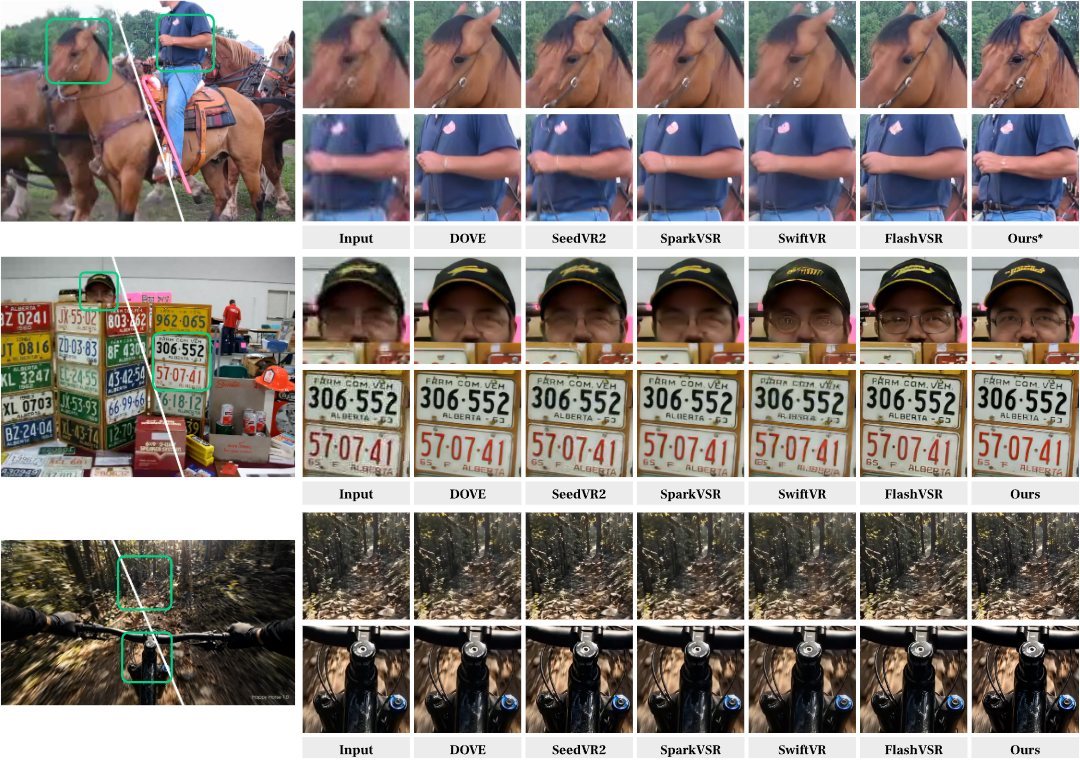
Figure 3 compares methods against the low-resolution input. Look at fine text, the horse’s mane and the license-plate edges.
RelayVSR project · Source video at 02:42
Pangram Image 1.0 flags suspect areas in a heat map
Gwarket’s take. Use the highlighted area to decide where to look first. Check the original file or an earlier version before drawing a conclusion about a disputed image.
Pangram extended synthetic-content detection to photos and video and offers heat maps for photos. One demo highlights a generated region inserted into a real photograph.
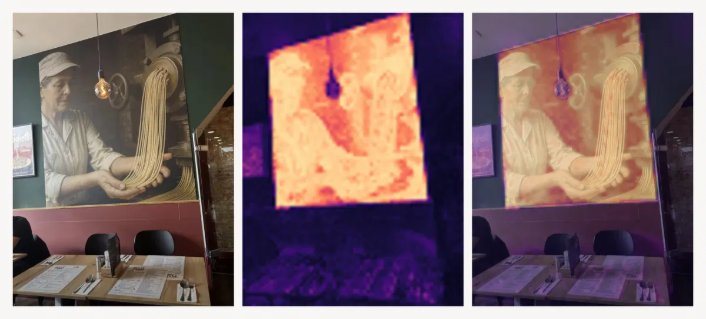
Pangram’s own example shows where the detector marks the inserted region.
Pangram’s announcement · Source video at 01:50
Model releases and research
The model behind the rumored Claude Fable 5.5 demos is unconfirmed
Gwarket’s take. If you have an animation due soon, use a model you can access. Run part of your script twice and check whether you can edit the generated code and recreate the result.
The video cites a social post about long coding sessions producing animations and 3D games. The original post was unavailable, so the model and the list of testers remain unconfirmed. After the week covered here, Anthropic announced Fable 5.2 and Mythos 5.2 on November 9.
Anthropic’s November 9 announcement · Social post cited in the video · Source video at 00:02
PSI publishes a proof of the Aaronson–Ambainis conjecture
Gwarket’s take. To gauge where AI helped, look for a record of which steps it handled: proposing an approach, writing the proof or checking the derivation.
PSI released the proof, paper and code on November 6. The result clarifies how large a query advantage a quantum algorithm can have on a class of inputs. The source video credits Claude Model 4 and says it took three days. PSI’s public account does not confirm either detail.
PSI’s research report · Source video at 00:15
METR estimates a faster rate of progress for Anthropic models
Gwarket’s take. Save a set of tasks your team already does in Claude. Rerunning them after model upgrades can show whether the benchmark progress changes what you can deliver.
METR estimates that after October 2025, Anthropic’s internal models improved about 1.9 times as fast on its chosen measures as before, with a 95% confidence interval of 1.5 to 2.8. The source video mentions superintelligence within four months. METR’s report gives no such deadline.
METR’s assessment · Source video at 00:24
A study uses GPT-6 Astra to edit a smaller model’s weights
Gwarket’s take. Look for gains on other tasks and count the compute used by repeated forward passes before comparing this with other ways to tune a model.
Researchers had GPT-6 Astra adjust Qwen3.5-0.8B without gradient-based training. With the largest compute budget, MATH-500 performance rose from 7.9% to 48.1%. The table also reports runs with smaller budgets.
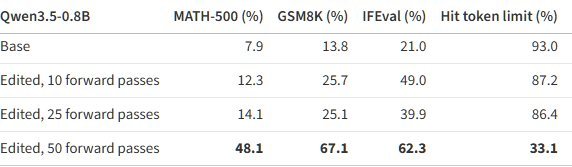
The study compares the base model with runs that allowed 10, 25 and 50 forward passes. The 50-pass run had the highest MATH-500 score.
Weight-space programming study · Source video at 00:46
Moonshot releases the full Kimi K3.1 Pro weights
Gwarket’s take. For a self-hosting trial, start with one explainer script. Compare how many outputs are usable and how long you spend fixing them, then add the compute cost.
Moonshot AI published the weights and model card on Hugging Face. The source video mentions code-generated explainer videos as one use.
Kimi K3.1 Pro model card · Source video at 01:00
Tencent releases Hy4-preview
Gwarket’s take. For Chinese document processing, run Hy4, DeepSeek and Kimi on the same table-heavy file. Count incorrect and missing fields for each.
Tencent lists the Hy4-preview model files and documentation on Hugging Face. The source video compares the Hunyuan model with DeepSeek and Kimi.
Hy4-preview model card · Source video at 01:07
Inkling 2 Small is available through Tinker first
Gwarket’s take. Have it build a small page with two or three controls, then revise one. Check whether the other controls still work after the edit.
Thinking Machines Lab announced access through the Tinker Playground, sampling and fine-tuning. It plans to release the weights under Apache 2.0 after safety testing. Its demo includes a city simulation made with Three.js.
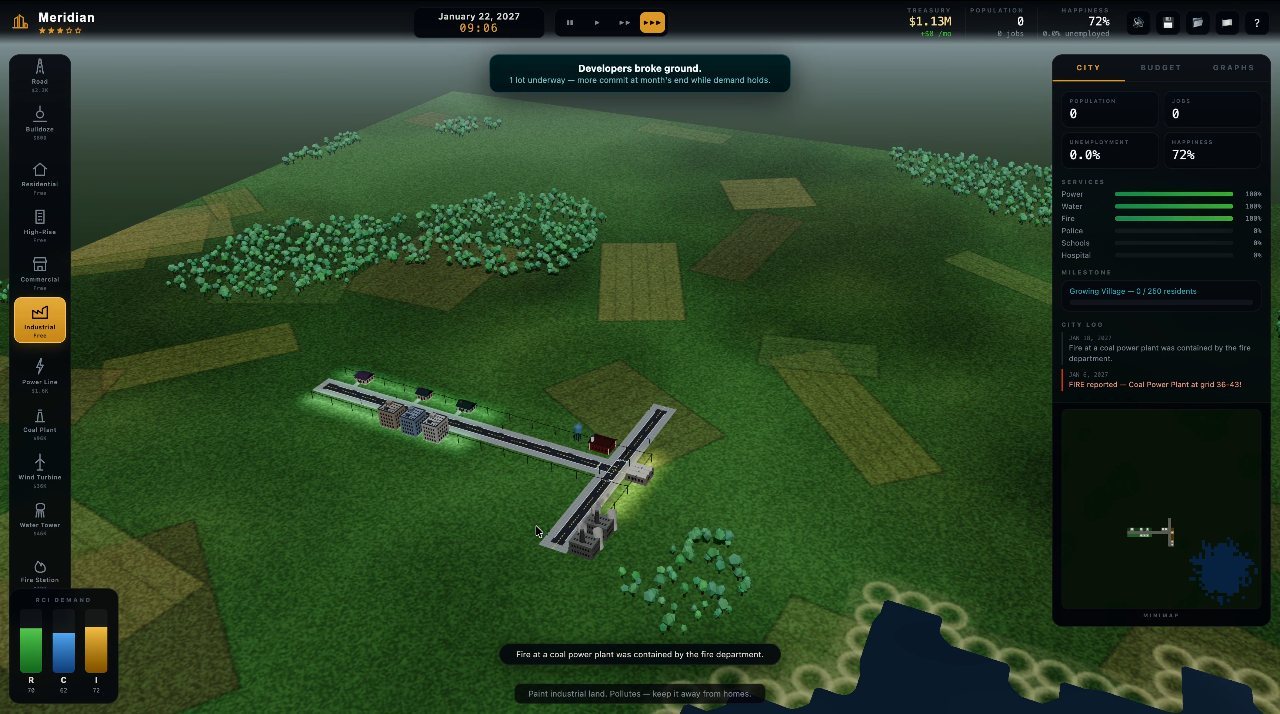
In Thinking Machines Lab’s demo, the street map and simulation controls sit side by side.
Inkling 2 Small announcement · Source video at 01:12
Assistants and local tools
hunch moves repeat classifications to the CPU
Gwarket’s take. Start with incoming support tickets. Recheck a sample when your categories change and compare any savings with the time spent correcting misrouted tickets.
The hunch proxy handles text. Its hunch.live library supports real-time multiple-choice questions on text and images. A small classifier learns from an upstream model’s answers and takes over once it clears the cross-validation threshold. The proxy still sends a sample of its answers to the upstream model for checking.
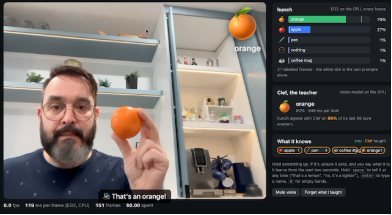
The project illustrates where the local classifier takes over from the upstream model.
hunch repository · Source video at 01:57
Aura Autopilot explores levels through repeated playtests
Gwarket’s take. Give it a route with a clear entrance and finish. A report that identifies the door or corner where it got stuck gives the team a bug it can reproduce.
Ramen’s Autopilot explores levels inside the game editor, improves through repeated runs and can report how it did on a specified task. The source video shows it fighting enemies.
Aura Autopilot · Source video at 02:01
Pagekin keeps novel notes, chapter outlines and drafts together
Gwarket’s take. Give it two chapters featuring the same character. Put one constraint in the first chapter and see whether the next draft preserves it.
Pagekin runs on Windows and macOS and covers worldbuilding, outlines, drafting, review and finalizing the manuscript. Projects stay local and you configure the model yourself.
Pagekin repository · Source video at 02:07
WeVisOne-VL reads text, finds objects and cuts out backgrounds
Gwarket’s take. Try a product photo of a clear bottle with small print. Count transcription errors and time the cleanup along the transparent edges against your current workflow.
Tencent’s WeChat vision team combined OCR, detection, segmentation and alpha matting in one model. The project includes a CPU option.
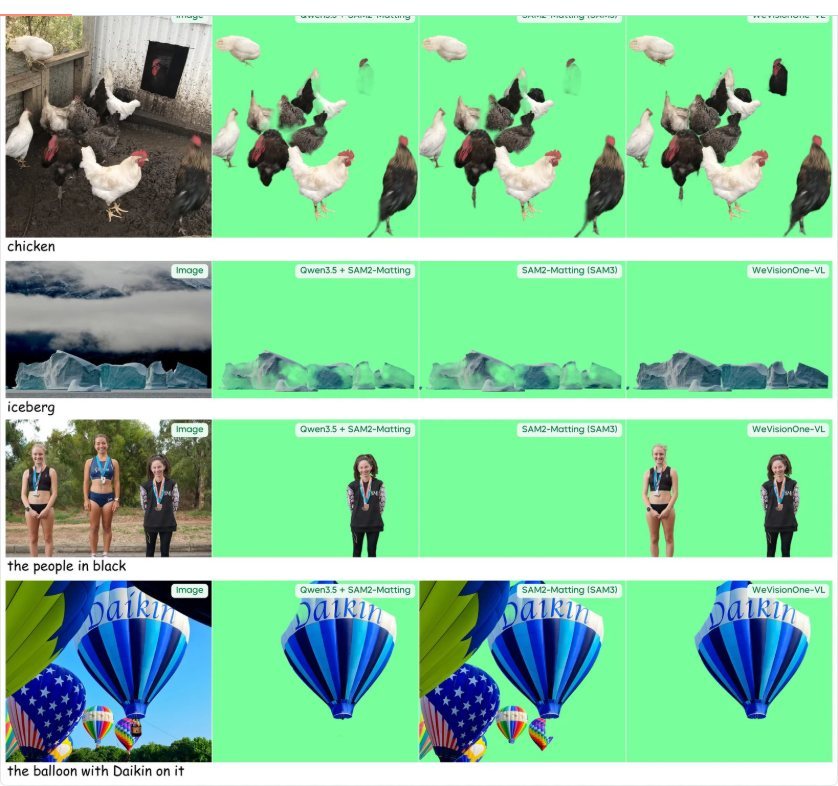
The team put the cutouts on green to show the edges and transparent areas.
WeVisOne-VL repository · Source video at 02:23
Mirage fits several on-device vision tasks in about 22 MB
Gwarket’s take. For a live camera feature, run it continuously on the target phone. Watch both latency and recognition as the device warms up.
Cactus lists object detection, text recognition and segmentation. It reports about 74 ms end to end on a Galaxy S26 NPU and 107 ms on its CPU. The 22 MB figure is for the 2-bit quantized build.
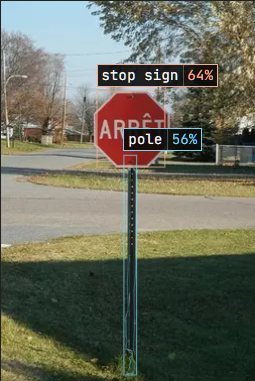
Cactus’s interactive example shows labels and confidence alongside the objects.
Cactus’s Mirage demo · Source video at 02:30
MOSS-Live 1.0 can hear you change your mind mid-reply
Gwarket’s take. Ask the assistant to look something up, then change the request halfway through. Check whether it drops the first task and returns the answer you asked for second.
The full-duplex demo shows the model responding to interruptions and sending longer jobs to a background agent. The API is in beta. The source video calls the model open source. Full weights and license terms still need checking.
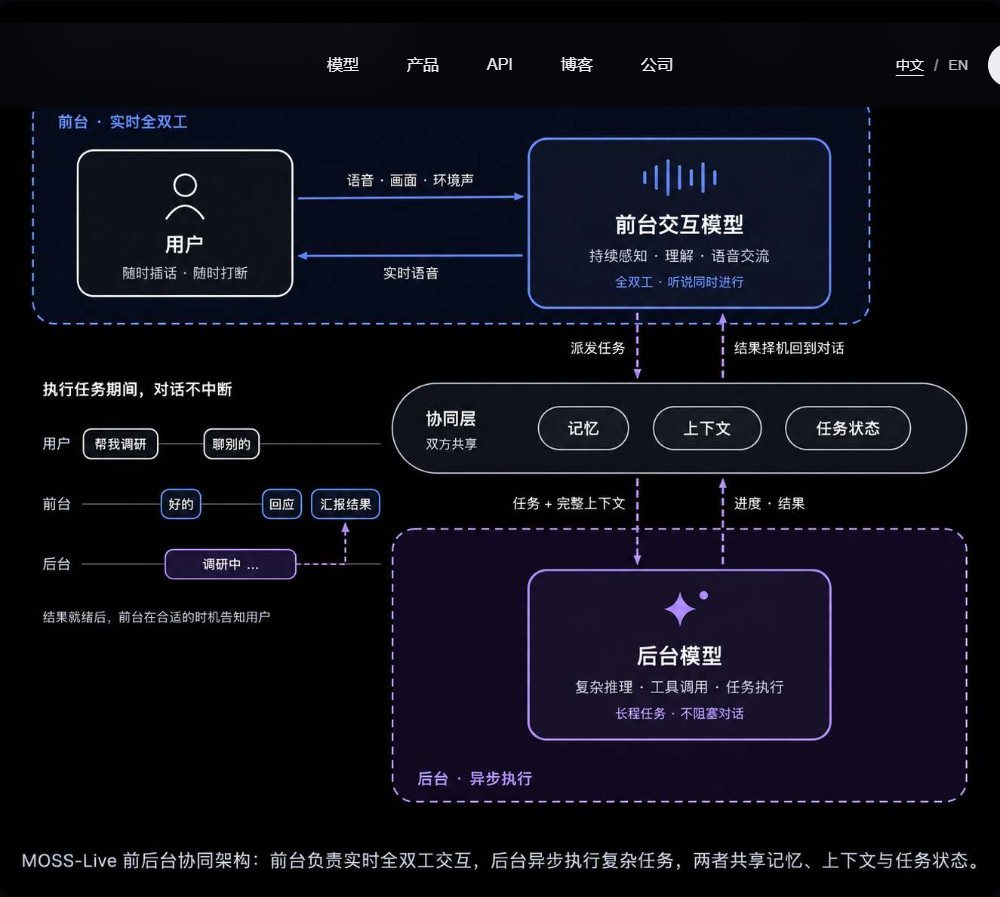
The official diagram shows which component handles live speech, tools and longer jobs.
MOSS-Live model · API documentation · Source video at 03:16
3D scenes and motion
Frameboy lets you look around a scene made from one image
Gwarket’s take. Explore a sample to discuss camera angles or layout. If a pitch depends on your own reference photo, check input access before committing to the tool.
World Labs uses Atlas to generate new viewpoints and streams them to the browser. Its research preview reaches up to 15 frames per second. Frameboy offers curated scenes. Viewfinder, which takes your own inputs, is in closed testing.
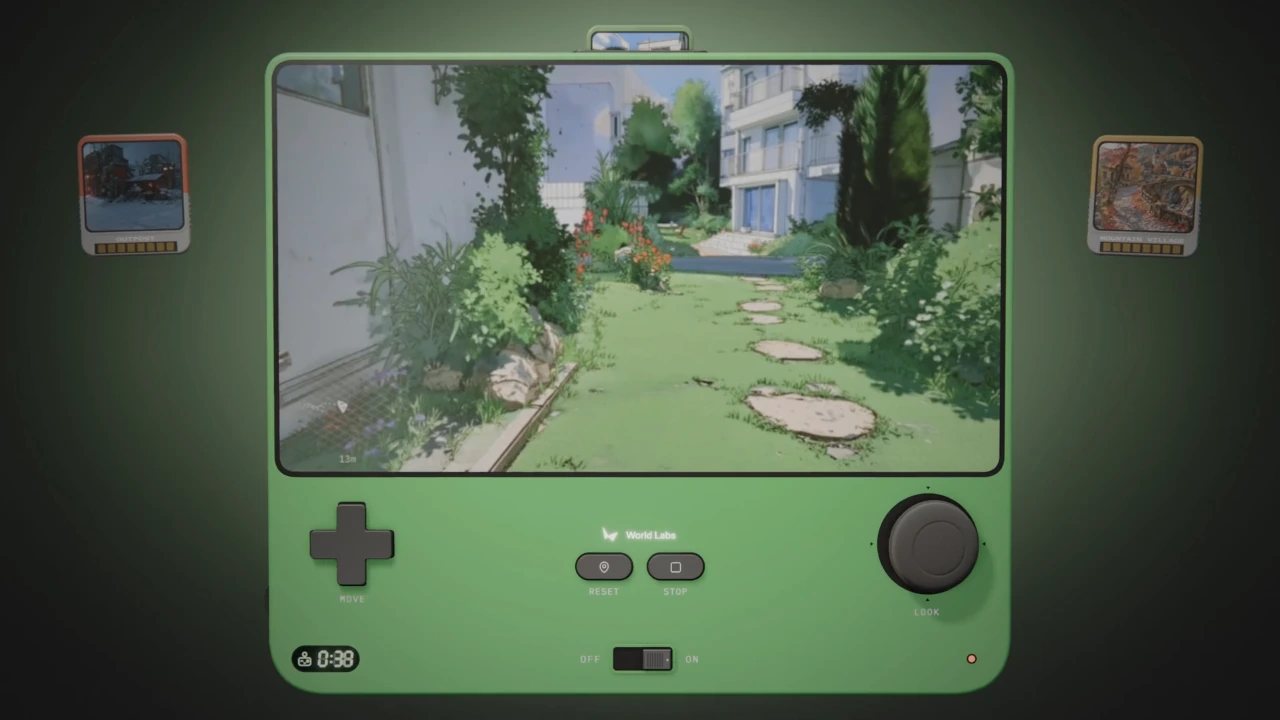
World Labs’ demo shows the courtyard and camera controls.
World Labs’s Atlas preview · Source video at 02:49
NVIDIA Lyra 2.0 builds a scene from a camera path
Gwarket’s take. For simulation, start with a loop that returns to the same spot. Check whether the geometry still lines up and test collisions in the simulator before using it in a training run.
Lyra 2.0 generates video along a camera path, then reconstructs a 3D scene. NVIDIA demonstrates an Isaac Sim import. Its research page dates the paper, weights and inference code to April, and the interface and training code to July. The source video revisits that work.

The research demo shows the street from a moving camera.
NVIDIA’s Lyra project page · Source video at 02:56
HairDeck turns a character image into rigged hair cards
Gwarket’s take. Before handing the rig to an animator, have the character turn and run. Watch the back of the head and check for strands clipping into the shoulders.
HairDeck produces hair cards and spring bones for game and virtual characters. Its research page puts source images next to the generated hairstyles.
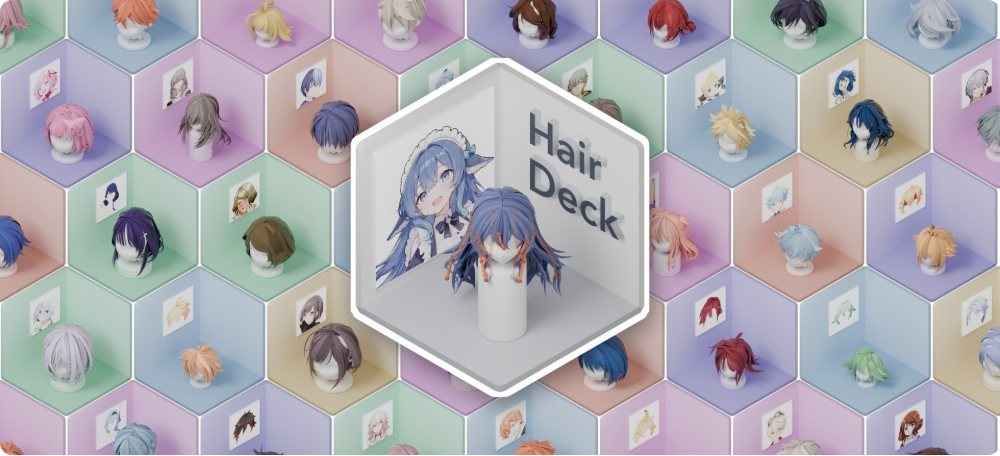
In the team’s overview, the orange lines show the bones that drive the hair cards.
HairDeck research page · Source video at 01:38
FlowHMR estimates 3D motion from an ordinary video
Gwarket’s take. Use it to block out a movement. Inspect landings, turns and moments when feet are hidden to estimate how much animation cleanup remains.
The method reconstructs pose and motion from one video and aims to reduce foot sliding and ground penetration. The researchers demonstrate motion transfer to a virtual character and to a simulated robot.
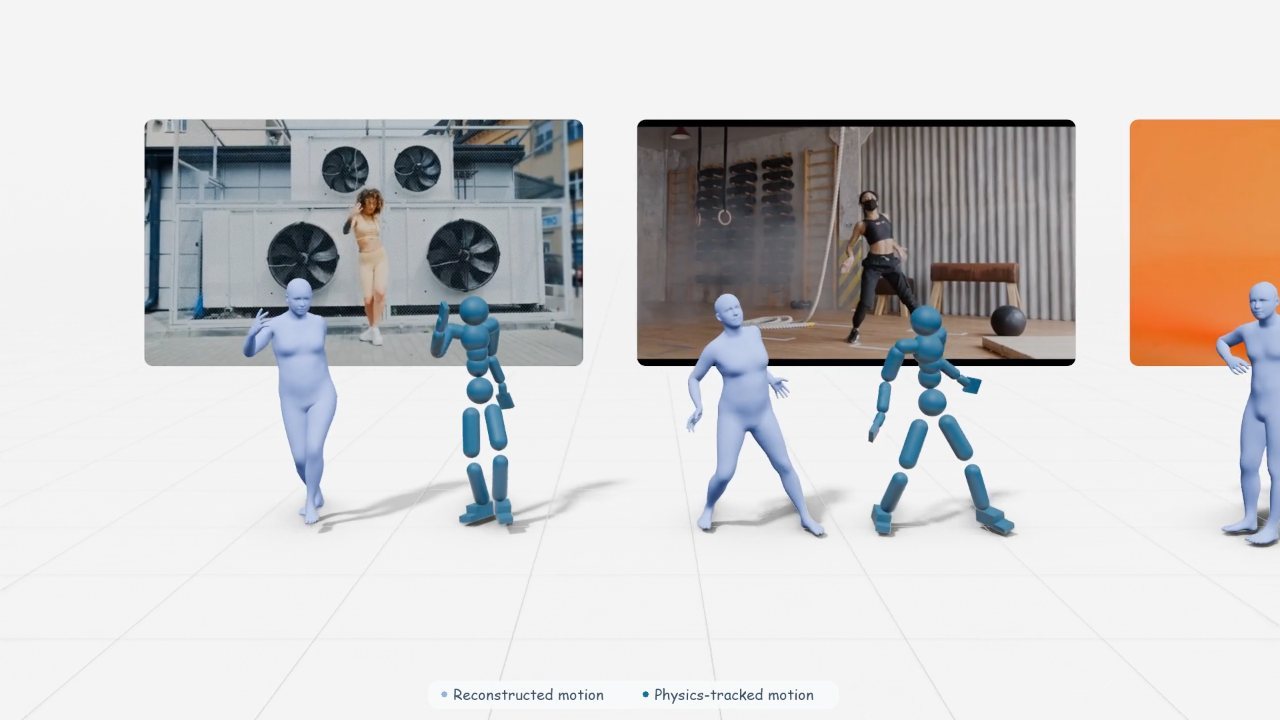
The demo shows the input video above the resulting animation.
FlowHMR research page · Source video at 03:00
Möbius fills gaps and edits motion from text
Gwarket’s take. Give it two seconds missing from the middle of an animation. Keep the neighboring poses and pacing fixed and see whether the fill joins cleanly at both ends.
Möbius can generate motion from text, describe input motion, complete missing segments and apply text edits to an existing motion sequence.
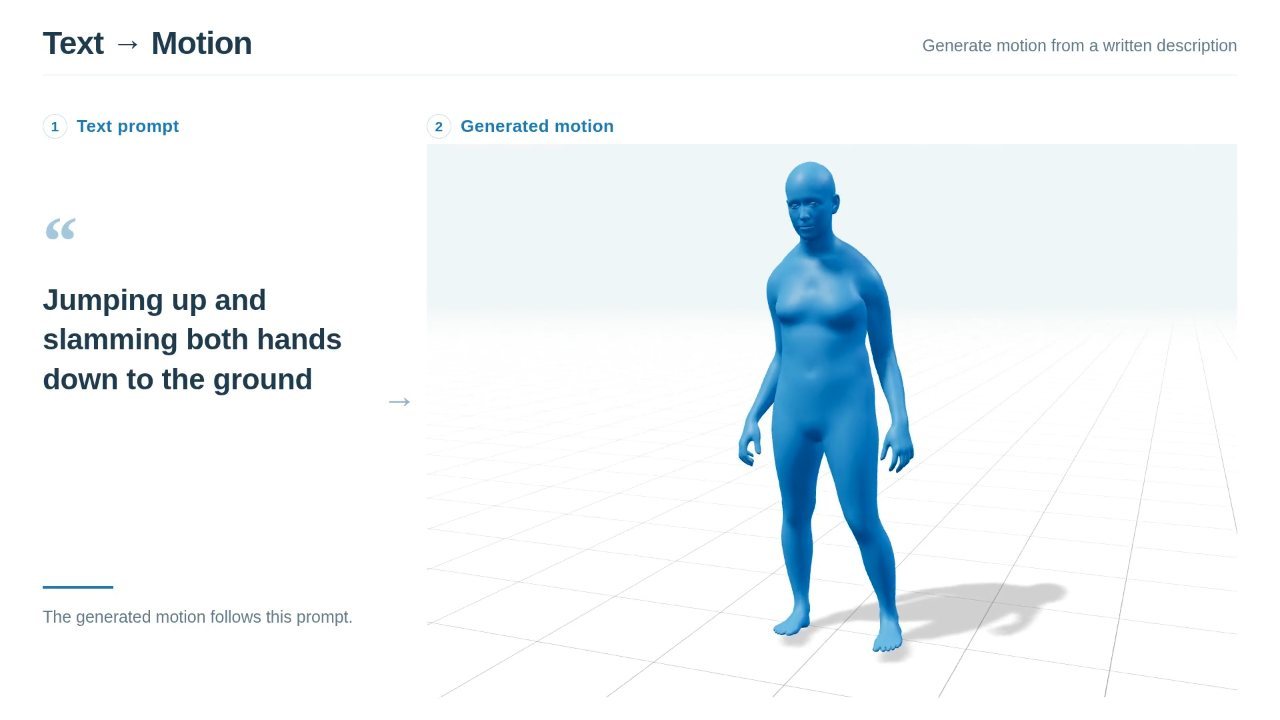
The research demo pairs the instruction with the resulting character motion.
Möbius research page · Source video at 03:09
uni-robot-agent gives different models the same robotics tools
Gwarket’s take. Keep the robot, environment and feedback fixed when you swap models. Compare task completion and count the times a person has to step in.
The project shares observation, tool calls and feedback across model and environment adapters. The repository lists an experimental Qwen option. The source video claims it outperformed Astra. That result needs a comparison under the same conditions.
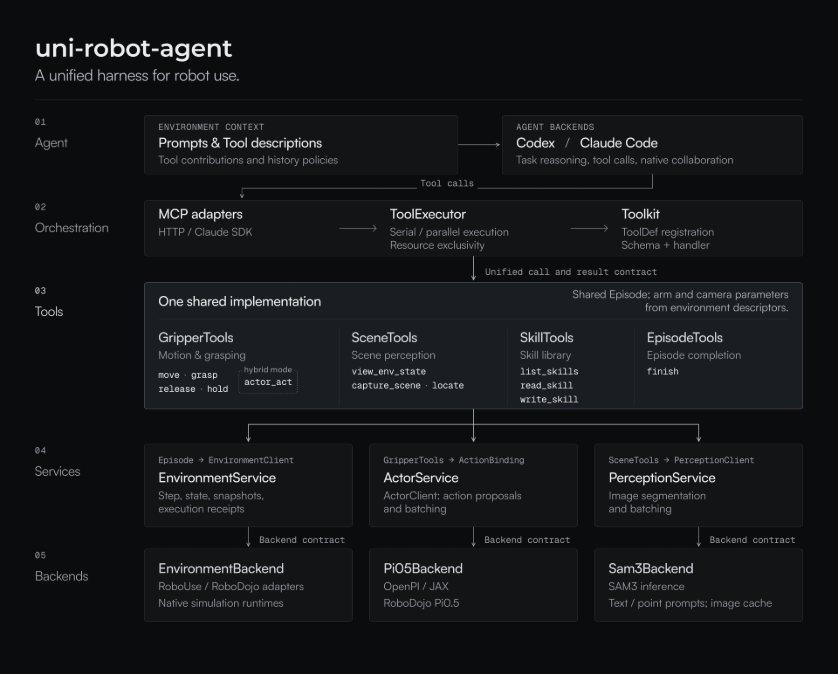
In the Open-RUA diagram, the tools are in the middle and the environment adapters are below them.
uni-robot-agent repository · Source video at 03:22
Behavior and weather models
42AI uses past behavior and context to predict choices
Gwarket’s take. Use it to form hypotheses. Before applying predictions to decisions about individuals, look for baseline comparisons, errors by group and the cost to a person when the model is wrong.
42AI describes using past behavior and context to predict choices and simulate risk. The video claims 98% accuracy. The public product page did not substantiate that figure or establish the test conditions.
42AI product page · Source video at 01:30
NVIDIA STRATA publishes weather model weights and inputs
Gwarket’s take. Compare rainfall forecasts with observations in the exact region and time window you serve. Use the forecast you already rely on as a baseline.
The STRATA model card documents the weights and inputs. The model predicts variables such as potential temperature, wind and specific humidity across atmospheric layers. It reports precipitation flux at the surface as an output.
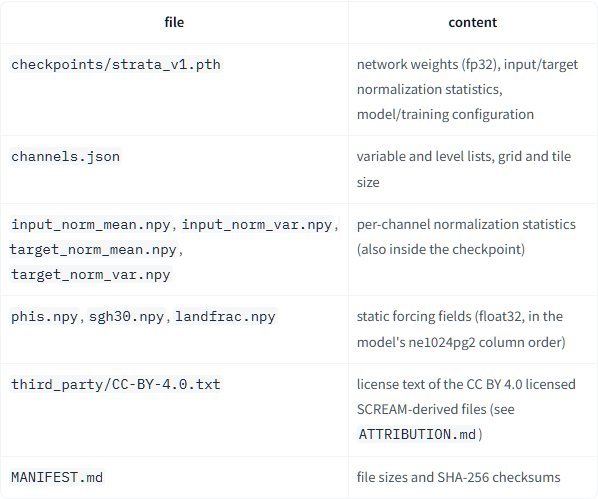
The model card lists checkpoints, weather variables and supporting files.
STRATA model card · Source video at 02:17
Follow the Gwarket Newsletter
Find each week’s issue under AI trends for original demos and a way to decide which updates are worth trying. You can also follow new Gwarket articles by RSS.
Related reading: Test an HTML-to-MP4 workflow with a six-second animation · Choose a first AI task you can evaluate.
This issue drew on Chanpin Jun’s November 8 roundup. The three featured sources were rechecked on November 11, 2026.