An Agent Is More Than an LLM: How State, Tools, and Memory Form a Working System
In the previous article, we made an important architecture decision:
Not every problem needs an Agent.
If deterministic code can solve the task, use code first. If the main uncertainty is language or semantics, add an LLM. If the model lacks external knowledge, add Retrieval or RAG. If the steps are mostly known, use a Workflow.
Agent behavior becomes valuable when:
The next step must be chosen dynamically from runtime results.
But once we decide that a task really does need an Agent, another question appears.
The loop from the previous article looked simple:
Goal
↓
Observe
↓
Decide
↓
Act
↓
Observe Result
↓
Continue or Stop
To implement that loop as a real system, however, we immediately need to answer three practical questions:
How does the system know where the task is now?
↓
State

How can the model affect the outside world?
↓
Tools

How can useful information survive across time?
↓
Memory
These components are what let an LLM participate in a system that can keep operating across multiple steps.
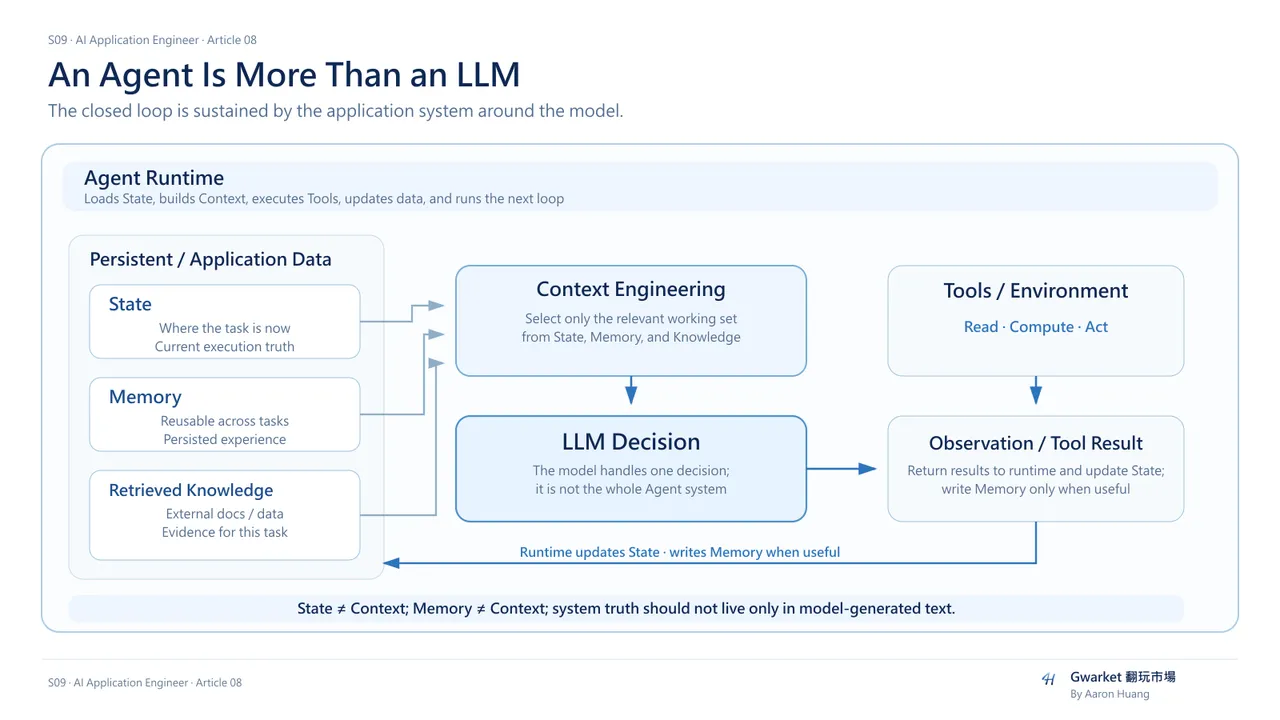
1. The Agent's “brain” is not the whole Agent
Many Agent diagrams place an LLM in the center and draw Tools and Memory around it. That can create the impression that an Agent is simply a more capable LLM.
A real system is closer to:
                 ┌──────────────┐
                 │     State    │
                 └──────┬───────┘
                        ↓
Observation → Context → LLM
                        ↓
                    Decision
                        ↓
                      Tool
                        ↓
                    Result
                        ↓
                  Update State
                        ↓
                     Memory
The LLM is important, but it is usually one reasoning component for one decision.
The application around the model is what keeps the task running.
2. Why an LLM alone cannot maintain an Agent
Suppose the goal is:
Fix the failing tests.
The first turn may look like:
User:
Fix the failing tests.

↓

LLM:
Run the tests first.
A tool executes:
run_tests()
and returns:
12 passed
2 failed
The next decision needs to know the goal, what has already been executed, which tests failed, and what should happen next.
An LLM does not inherently own a persistent task object. It receives the input for the current inference and produces the output for the current inference.
If the next call does not provide the relevant information again, the model does not magically know that the tests already ran.
That is why an Agent needs State.
3. State is the current truth of the task
A useful definition is:
State is application-held data that describes the current task, progress, and environment.
For example:
Goal:
Fix login test

Current State:
- authentication.py has been read
- tests have been executed
- 12 passed
- 2 failed
- failure: token expired
- refresh logic has not been changed yet
The next decision should continue from this Current State rather than start from a blank prompt.
Conceptually:
Decision = f(Current State, Observation, Goal)
is much closer to an Agent than:
Decision = f(User Prompt)
4. State is more than conversation history
State is often mistaken for “save the whole chat.”
But useful State can contain many structured values that are not conversational text.
A Coding Agent might track:
task_id
current_goal
files_read
files_modified
test_results
current_branch
failed_attempts
pending_actions
last_tool_result
A Travel Agent might track:
destination
travel_dates
budget
selected_flights
rejected_hotels
current_itinerary
booking_status
A Research Agent might track:
research_question
queries_completed
sources_found
claims_supported
claims_conflicted
open_questions
State is therefore closer to an Application Data Model than to simple chat history.
5. State prevents the model from guessing system truth
Without explicit State, a system can drift into language like:
LLM:
I think we already did that...
That is dangerous because the model begins inferring system state from generated language.
It may say:
The file has been updated.
when the file was never changed.
Or:
All tests passed.
when the integration test never ran.
Important execution facts should therefore live in System State, not only in model-generated prose.
For example:
{
  "tests_run": true,
  "passed": 12,
  "failed": 2
}
A key rule follows:
Do not let the model invent system truth.
6. State and Context are not the same thing
This is one of the most important boundaries in Agent architecture.
State
What information does the system currently hold?
Context
What information is supplied to the model for this inference?
State may contain:
100 tool results
30 files
20 decisions
5 failed attempts
The next model call usually does not need all of it.
The working Context might contain only:
Current Goal
Relevant File
Last Test Result
Important Constraints
Current Plan
So:
State
≠
Context
More precisely:
State
↓
Context Engineering
↓
Relevant Context
↓
LLM
This connects directly back to Article 02.
7. Do not put every piece of State into the Context Window
If every loop iteration sends the entire history back into the model, several problems grow together:
- token usage,
- latency,
- cost,
- irrelevant information,
- difficulty noticing the most important information.
A real Agent system therefore needs to select what the next decision actually requires:
Large State
↓
Select / Summarize / Retrieve
↓
Working Context
↓
LLM
Context Engineering does not disappear when we build Agents.
It becomes more important.
8. Tools are the interface between the Agent and its environment
State tells the system where it is.
Tools let the system interact with the world outside the model.
Article 04 already introduced Tool Calling. The model may produce a structured request such as:
{
  "tool": "run_tests",
  "arguments": {
    "scope": "auth"
  }
}
Inside an Agent system, the role of the Tool becomes clearer:
State
↓
LLM Decision
↓
Tool
↓
Environment
↓
Tool Result
↓
Observation
↓
Update State
A Tool is the interface through which an Agent can observe or change its environment.
9. Tools are not only “hands”
Some Tools primarily read:
read_file
search_web
query_database
get_order
They mainly produce Observations.
Some Tools write or act:
write_file
send_email
update_ticket
create_booking
They change the Environment.
Some Tools compute:
calculator
run_code
run_tests
They delegate a problem to a deterministic system.
So Tools can act as the Agent's hands, eyes, calculators, and data interfaces.
10. Tool-interface design directly affects Agent reliability
Suppose we give the model one tool:
do_everything(input)
The model must guess how to format the input, what the tool will do, and what its output means.
That ambiguity increases failure risk.
Compare that with:
search_orders(
  customer_id,
  date_range
)
and:
request_refund(
  order_id,
  reason
)
The Action Space is much clearer.
A large part of Agent system design is therefore Tool Interface Design:
Tool Name
Description
Input Schema
Output Schema
Error Contract
Clear interfaces make correct decisions easier.
11. A Tool Result is not automatically proof that the task succeeded
Suppose:
send_email()
returns:
200 OK
That proves the API call succeeded.
It does not prove that the email content was correct, the recipient was correct, or the user's task is complete.
Likewise, successfully executing:
run_tests()
does not mean the tests passed.
The Tool Result becomes an Observation.
The system must then ask:
What does this result mean for the Goal?
That is where:
Act
↓
Observe
↓
Decide Again
becomes a real feedback loop.
12. What is Memory?
If State answers:
Where is the current task now?
Memory can be defined as:
Information the system persists because it may be useful again across time or future executions.
Imagine an Agent planning a trip.
Current State may contain:
Searching Tokyo hotels
12 hotels compared
3 candidates remain
Those details may not need to live forever after the task ends.
But some information may remain useful:
User prefers:
- non-smoking room
- near MRT
- budget around JPY 20,000
That is closer to Memory.
13. State versus Memory
A practical distinction is:
| State | Memory | |
|---|---|---|
| Main purpose | Complete the current task | Help future tasks |
| Time range | Current execution | Across executions |
| Typical contents | step, tool result, progress | reusable knowledge, preference, experience |
| Always sent to the model? | No | Definitely not |
| Managed by | application | application / memory system |
For example:
State:
Currently on step 4
API call failed
Preparing retry
Memory:
When this API rate-limits, reduce batch size
They may overlap in implementation, but their roles differ.
14. Memory is not “save every conversation forever”
A strategy like:
Everything → Save Forever
quickly creates:
stale information
wrong inferences
conflicting preferences
duplicates
irrelevant data
The hard part of a Memory system is not simply storage.
It is:
What to remember?
When to retrieve?
What to update?
What to forget?
That is Memory Management.
15. Memory needs both Write and Read
A simple design separates:
Memory Write
Observation
↓
Worth remembering?
↓
Yes
↓
Store
Memory Read
Current Task
↓
Relevant memory?
↓
Retrieve
↓
Context
↓
LLM
Memory therefore is not just a database.
It also needs selection, retrieval, and update policies.
16. Memory and RAG may look similar, but their semantic roles differ
Both may use overlapping implementation techniques such as:
embed
↓
store
↓
retrieve
But they answer different questions.
RAG
What external knowledge does the model need now?
Examples:
company policies
product documentation
research reports
knowledge bases
Memory
What information from prior interaction or execution should remain useful later?
Examples:
user preference
previous decision
past failure pattern
task history
RAG is closer to External Knowledge.
Memory is closer to Persisted System Experience.
The implementation can overlap while the semantic role remains different.
17. Memory and Context are also different
We can summarize the three concepts:
Memory
Stored information across time
State
Current task information
Context
Information given to the model right now
Their relationship can look like:
State ──────┐
            │
Memory ─────┼→ Context Engineering → Current Context → LLM
            │
Retrieved ──┘
Knowledge
Context is not the data source itself.
Context is the working set for the current inference.
18. A fuller Agent loop
Now we can assemble the components:
Goal
↓
Load State
↓
Retrieve relevant Memory
↓
Get relevant external Knowledge
↓
Build Context
↓
LLM Decision
↓
Select Tool
↓
Execute Tool
↓
Observe Result
↓
Update State
↓
Write Memory if needed
↓
Continue or Stop
The LLM appears in only one part:
Build Context
↓
LLM Decision
Much of the Agent architecture lives outside the model.
19. The Agent Runtime is what connects the pieces
Who loads State?
Who builds Context?
Who writes Tool Results back into State?
Who decides when to call the model again?
Usually not the LLM itself.
That work belongs to the Agent Runtime / Application Runtime.
Conceptually:
while not done:

    state = load_state()

    context = build_context(
        state,
        retrieve_memory(state),
        retrieve_knowledge(state)
    )

    decision = llm(context)

    result = execute_tool(decision)

    state = update_state(
        state,
        result
    )

    save_state(state)
This is only pseudo-code, but it captures the real system skeleton.
20. What does an Agent Framework actually help with?
An Agent Framework usually does not provide a “smarter model.”
It helps manage infrastructure around the model:
State Management
Tool Registry
Tool Execution
Message / Context Assembly
Loop Control
Memory Integration
Tracing
Different frameworks therefore often differ in how they manage the execution loop rather than in the intelligence of the underlying model.
21. Do not use a Framework just because one exists
This returns to Article 07:
Minimum Necessary Complexity.
If your system is only:
User
↓
LLM
↓
Database Search
↓
Answer
you may not need a complex Agent Framework.
You can write:
retrieve()
generate()
validate()
directly.
A framework becomes more valuable when State, Tools, Memory, dynamic decisions, and multi-step execution become difficult to orchestrate yourself.
22. The important question about Memory is data responsibility
Many demos emphasize:
We have Memory.
A production system should instead ask:
Who writes it?
What is stored?
When is it updated?
Which source is authoritative?
How are conflicts resolved?
When does it expire?
Suppose the user once says:
I prefer hotels near MRT.
The system may preserve that as a preference.
But if the user later says:
This trip is in the mountains. MRT does not matter.
the old Memory should not override the current task constraint.
In general, explicit current task constraints should outrank older Memory.
Memory is a context source.
It is not absolute truth.
23. State also needs a System of Record
Suppose a Tool Result says:
booking_status = failed
but the model says:
Booking completed successfully.
Which is true?
The reliable Tool / System State should be authoritative, not the LLM narrative.
A core Production Agent principle is therefore:
System truth should be held by reliable application state or external systems, not only by model-generated text.
24. This is why Agent Engineering looks like Software Engineering
Real Agent Engineering is not only Prompt Engineering.
It includes:
Data Model
State Machine
API Design
Tool Contract
Persistence
Retrieval
Error Handling
Observability
Evaluation
The LLM is one Probabilistic Decision Component inside that system.
An Agent Engineer therefore does more than make a model answer.
The job is to place a probabilistic model inside a manageable software system.
25. Articles 06–08 now form one architecture chain
Article 06 asked:
What is an Agent?
Goal
→ Observe
→ Decide
→ Act
→ Feedback
Article 07 asked:
When do we actually need an Agent?
Minimum Necessary Complexity
Article 08 asks:
How does an Agent actually operate?
State
+
Tools
+
Memory
+
Runtime
One important question remains.
26. Once the Agent can act, capability is no longer the only concern
Once an Agent has:
State
Tools
Memory
Dynamic Decisions
it has meaningful Agency.
The next question is not simply:
Can we add more tools?
It becomes:
Which actions may it take?
Which actions require permission?
When should a human approve?
How do we prevent endless loops?
When must the system stop?
These questions are no longer only about Agent Capability.
They are about Agent Governance.
That is the focus of the final S09 article: