Action Space, Permissions, HITL, and Stop Conditions: How to Give an Agent Capability Without Losing Control
In the previous article, we broke an Agent into:
State
+
Tools
+
Memory
+
Runtime
We also saw that what keeps an Agent operating is not only the LLM, but the application system around it.
At this point, an Agent can already:
read data
↓
make a decision
↓
call a tool
↓
change the environment
↓
observe the result
↓
continue to the next step
But this is exactly where the question changes.
Earlier we asked:
Can the Agent complete the task?
Now we must ask:
What is the Agent actually allowed to do?
Once a model can do more than generate text and can call things like:
send_email()
write_file()
delete_record()
update_ticket()
create_booking()
deploy_service()
an error is no longer only a wrong sentence.
It may become a wrong action in the real environment.
That is the boundary where Agent systems move from Capability to Governance.
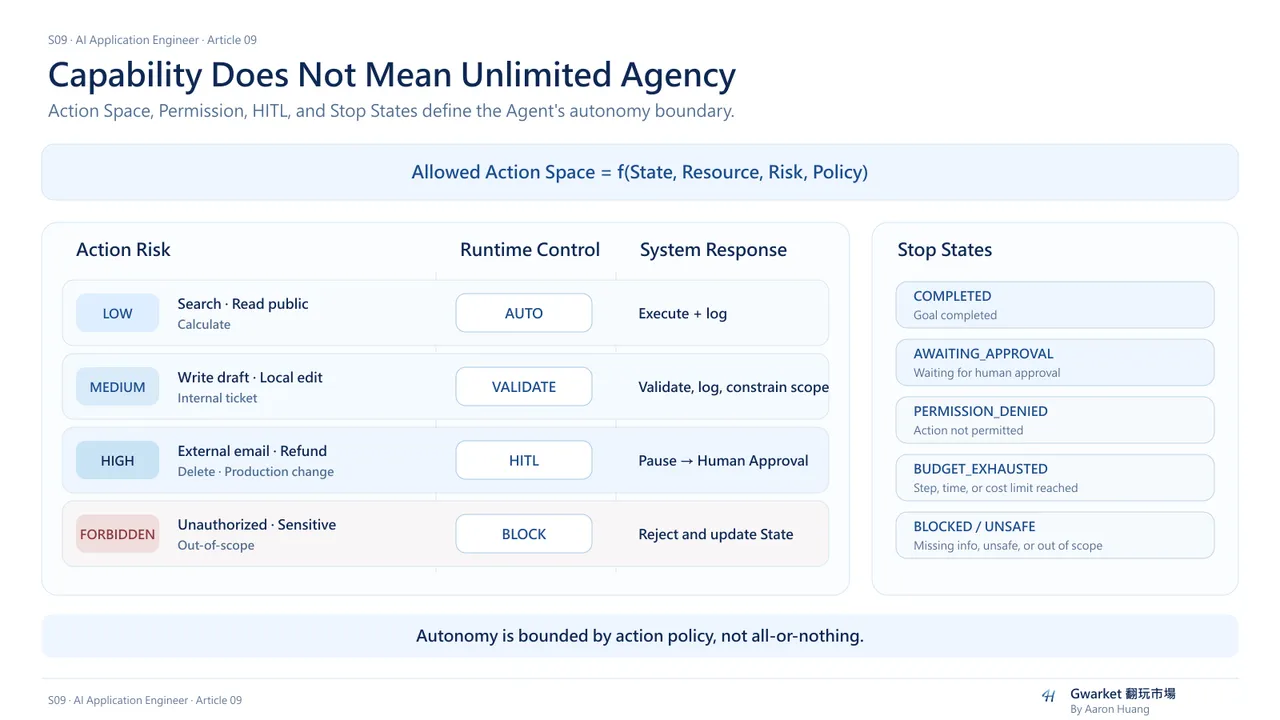
1. Agent risk comes from errors becoming actions
When a normal Chatbot is wrong:
Wrong Answer
the damage often remains at the information layer.
An Agent can instead follow this path:
Wrong Decision
↓
Wrong Tool
↓
Wrong Action
↓
Environment Changed
For example:
Model decides:
This is spam

↓

Tool:
delete_email()

↓

The email is actually deleted
Or:
Model decides:
This deployment is safe

↓

Tool:
deploy_production()

↓

Production actually changes
That is why Agent architecture cannot focus only on:
Reasoning Quality
It must also design:
Action Control
2. First question: what actions can the Agent choose?
In Article 06 we introduced:
Action Space
We can now define it more precisely:
Action Space is the set of actions an Agent is allowed to choose from in a given runtime.
A Coding Agent may have:
read_file
search_code
write_file
run_tests
git_diff
If we add:
git_push
merge_pr
deploy_production
the model itself has not changed.
But the potential impact has changed dramatically.
The important question is therefore not only:
How intelligent is the model?
It is:
How large is the Action Space we gave it?
3. Safety also depends on limiting the impact of one wrong action
Imagine two Agents.
Agent A:
read_file
search_code
run_tests
Agent B:
read_file
write_file
delete_file
git_push
deploy_production
Even if both use the same LLM, prompt, and reasoning process, their operational risk is very different.
Risk does not come only from:
Probability of Error
It also comes from:
Impact of Action
A useful conceptual model is:
Operational Risk
≈
Error Probability
×
Action Impact
This is not a literal mathematical formula.
It is a reminder that we should not only reduce model error.
We should also reduce the blast radius of each possible error.
4. Start the Action Space with least privilege
This is closely related to the security principle of:
Least Privilege
Do not begin by giving the Agent:
every tool
all data
all write permissions
all production actions
Ask instead:
Which actions are actually required
to complete this task?
A Research Agent may only need:
search
read
summarize
It may have no reason to possess:
send_email
delete_file
modify_database
If the task does not require an action:
do not expose that action.
5. A tool existing does not mean the Agent should execute it directly
Suppose the system contains:
issue_refund()
That does not mean that once the model decides:
Refund this order.
the runtime should immediately execute it.
A safer architecture may be:
LLM Decision
↓
Policy Check
↓
Permission Check
↓
Execution
So:
Tool Available
and:
Tool Executable Right Now
are different concepts.
6. Permission belongs in the runtime, not only in the prompt
A dangerous design is:
System Prompt:
Never delete production data.
while the Agent still has access to:
delete_production_data()
This effectively asks the model to remember forever not to press the dangerous button.
Prompts can provide behavioral guidance.
But critical permission boundaries should not live only in natural language.
A better structure is:
LLM
↓
requests Action
↓
Runtime checks policy
↓
Allowed?
├─ Yes → Execute
└─ No  → Reject
In other words:
Permission is a system control, not only a model instruction.
7. Read and Write actions usually have different risk
Many tools can be roughly separated into:
Read
and:
Write
Read actions:
search_document
read_file
query_database
get_calendar
mainly retrieve information.
Write actions:
send_email
update_database
delete_file
book_flight
deploy_service
change the environment.
This often means Read actions can be given more autonomy, while Write actions need stronger control.
But Read is not always low risk.
For example:
read_salary_database
read_customer_PII
read_secret_key
already involves sensitive access.
The real boundary is better described as:
Action
+
Resource
+
Scope
8. Permission is not only allowed versus blocked
Consider:
send_email()
The permission model may not be:
allowed
/
blocked
It may instead be:
can email yourself
can email internal colleagues
external recipients require approval
more than 20 recipients are blocked
attachments containing sensitive data are blocked
A permission model therefore asks:
Who?
What?
Where?
How much?
Under what condition?
That is an Action Boundary.
9. This is where Human-in-the-Loop becomes meaningful
HITL means:
Human-in-the-Loop
It is often interpreted as:
Let the Agent finish, then have a human check the result.
A more useful design is:
Put the human at high-risk decision boundaries.
For example:
Agent:
I want to send the email

↓

Runtime:
This is an external write action

↓

Human Approval Required

↓

Approve
↓
send_email()
That is very different from reviewing everything only after the task has already executed.
At that point it may already be too late.
10. HITL should not interrupt every step
If every tool call requires manual confirmation:
read_file()
↓
Approve?

search()
↓
Approve?

run_test()
↓
Approve?
the Agent quickly loses most of its value.
The real HITL design question is:
Which actions are important enough to interrupt automation?
11. A practical approach: classify actions by risk
A useful engineering heuristic is:
| Risk Level | Action Example | Control |
|---|---|---|
| Low | search, read public docs, calculator | Auto |
| Medium | write draft, modify local file, create internal ticket | Auto + Logging / Validation |
| High | send external email, refund, delete, production change | Human Approval |
| Forbidden | policy violation, sensitive data, unauthorized production action | Block |
This is not a universal industry standard.
The important idea is:
Different actions should not share the same execution policy.
12. Draft → Approve → Execute is a powerful pattern
For high-risk actions, separate the work into:
Draft
↓
Review
↓
Execute
For email:
Agent creates Email Draft
↓
Human Review
↓
Human Approve
↓
Runtime send_email()
For refunds:
Agent recommends refund of NT$2,000
↓
Policy Validation
↓
Human Approval
↓
Payment System Execute
For deployment:
Agent prepares changes
↓
Tests
↓
Preview / Diff
↓
Owner Approval
↓
Deploy
The model can still do most of the work.
The irreversible action is simply delayed until after the approval boundary.
13. Reversibility is another important dimension of Action Risk
Compare:
create_draft()
with:
send_email()
Both are technically writes.
But the operational risk differs.
A Draft is easy to edit, delete, or keep private.
A sent email has already reached someone else and may be difficult to fully retract.
Action Risk should therefore consider more than Read versus Write:
Reversible?
Externally Visible?
Financial Impact?
Production Impact?
Sensitive Data?
These factors help determine whether approval is required.
14. Permission answers “may I do this”; Stop Conditions answer “when should I stop”
So far we focused on Actions.
But an Agent also has a loop:
Observe
↓
Decide
↓
Act
↓
Observe
↓
...
Without Stop Conditions, the loop can theoretically continue indefinitely.
Every Agent loop therefore needs to answer:
Under what conditions should execution end?
15. The simplest Stop Condition: Goal Completed
For a Coding Agent:
Goal:
Fix failing tests
Stop when:
required tests passed
For a Research Agent:
Goal:
Answer the research question
Stop when:
required claims have enough evidence
For a Booking Agent:
Goal:
Complete the booking
Stop when:
booking_status = confirmed
So we need:
Goal
↓
Success Condition
But success conditions alone are not enough.
16. Agents also need Failure Stops
Suppose an Agent repeatedly:
Try
↓
Fail
↓
Retry
↓
Fail
↓
Retry
Without a boundary it may continue forever.
We can define limits such as:
max_attempts = 3
or:
same_failure_count >= 2
and then:
Stop
↓
Escalate
This is a Failure Stop Condition.
17. Budget is also a Stop Condition
Agent loops consume:
Tokens
API Calls
Time
Compute
Money
Sometimes the reason to stop is not success.
It is:
Continuing now exceeds the allowed budget.
For example:
max_steps = 20
max_tool_calls = 30
max_runtime = 10 minutes
max_cost = US$2
When the limit is reached:
Stop
or:
Ask Human
A production Agent therefore needs not only a Goal.
It also needs a Budget.
18. Lack of progress can also be a Stop Signal
An Agent may not be repeatedly failing.
It may simply be taking different actions without moving closer to the Goal.
For example:
Search A
↓
Search B
↓
Search C
↓
Search D
↓
Search E
It looks active, but:
Progress = 0
Useful signals can include:
no_new_evidence
repeated_tool_pattern
same_state
no_score_improvement
These can trigger:
Stop / Replan / Escalate
19. Stop does not always mean completed
An Agent can stop because it is:
Completed
but also because it is:
Blocked
Need Human
Permission Denied
Budget Exhausted
Insufficient Information
Unsafe Action
Tool Failure
So a single boolean like:
stopped = true
is often not enough.
A better design records a:
stop_reason
For example:
{
  "status": "stopped",
  "reason": "human_approval_required"
}
or:
{
  "status": "stopped",
  "reason": "max_attempts_exceeded"
}
This lets the runtime know what should happen next.
20. HITL is also a kind of Stop Condition
When an Agent proposes a High-Risk Action, the runtime can:
Pause
and create an:
Approval Request
For example:
Agent Loop
↓
High-Risk Decision
↓
Pause
↓
Human Review
↓
Approve / Reject
↓
Continue / Stop
HITL is therefore not merely an add-on outside the Agent.
It can be a formal state inside the Agent State Machine:
RUNNING
↓
AWAITING_APPROVAL
↓
RUNNING
or:
AWAITING_APPROVAL
↓
REJECTED
↓
STOPPED
21. Permission Denied should not become a puzzle for the model to bypass
Suppose the Agent requests:
delete_database()
and the runtime returns:
permission denied
A weak design lets the model respond:
I will try another tool to delete it.
That turns the permission boundary into something the model is expected to interpret voluntarily.
A better design is:
Permission Denied
↓
State Update
↓
Action unavailable
and sometimes:
Stop / Escalate
A policy decision should change the Action Space itself.
It should not merely send the model a warning sentence.
22. Action Space can shrink or expand with State
An Agent does not need the same permissions throughout the whole task.
For example:
State = Research
allows:
search
read
summarize
Then:
State = Draft
adds:
write_draft
Only after:
State = Approved
does the runtime enable:
publish
So:
State
↓
Allowed Action Space
Permissions can be tied directly to workflow state.
23. Autonomy is not simply Yes or No
Autonomy is not:
Autonomous
/
Not Autonomous
It is closer to a set of separate controls:
Can it search by itself?
Can it read data by itself?
Can it modify a local file?
Can it send an external message?
Can it spend money?
Can it deploy?
The same Agent can be:
Research = highly autonomous
while:
Production Change = human approval required
A more useful question is therefore:
Within which Action Boundaries is this Agent autonomous?
24. Good Agent Governance places Agency in the right places
Imagine a workflow:
Research market
↓
Analyze options
↓
Write proposal
↓
Send to client
A reasonable policy might be:
Research
→ Autonomous

Analysis
→ Autonomous

Draft
→ Autonomous

External Send
→ Human Approval
The Agent still completes most of the work.
But the irreversible external boundary remains controlled.
This is often better than either extreme:
everything manual
or:
everything autonomous
25. Governance information must also be observable
If the Agent is blocked, we should be able to answer:
Which Action?
Which Policy?
What was the State?
What Decision did the model propose?
Did a human approve?
What actually executed?
Agent traces should therefore include more than:
LLM Prompt
LLM Response
They should also include:
Action Requested
Permission Decision
Approval State
Execution Result
Stop Reason
This connects back to Article 05 Observability.
Article 05 asks:
What happened inside the Production AI system?
Article 09 asks more specifically:
How was Agent agency allowed, blocked, approved, or stopped?
26. An Agent does not always need to finish the task to succeed
Demos often define success as:
Agent finished the task
A more mature production system may succeed because:
Agent correctly stopped
For example:
Not enough information
→ Stop and ask

Permission required
→ Stop and request approval

Outside scope
→ Stop

High-risk action
→ Pause

Cannot verify
→ Escalate
Sometimes knowing that it should not continue is more important than continuing.
27. A more complete Governed Agent Loop
Now we can combine the concepts from the full S09 series:
Goal
↓
Load State
↓
Build Context
↓
LLM Decision
↓
Proposed Action
↓
Policy / Permission Check
↓
Allowed?
├─ No
│   ↓
│ Stop / Replan / Escalate
│
└─ Yes
    ↓
Risk requires Human Approval?
├─ Yes
│   ↓
│ Pause
│ ↓
│ Human Approve?
│ ├─ No → Stop
│ └─ Yes
│
└─ No
    ↓
Execute Tool
↓
Observe Result
↓
Update State
↓
Stop Condition?
├─ Yes → Stop with reason
└─ No  → Next Decision
At this point the Agent has moved from:
able to act
to:
able to act within controlled boundaries.
28. From LLM to Agent, S09 has really been adding system responsibility
Looking back across the series:
We first learned that an:
LLM
is not a knowledge base.
Then we learned that:
Context
determines what the model can see in the current inference.
Then:
Attention / Embedding
help explain model and semantic representation.
Then:
Prompt
Structured Output
Tool Calling
Sampling
let the model participate in an application.
Production AI adds:
Validation
Fallback
Observability
Evaluation
Agent systems add:
Goal
State
Tools
Memory
Dynamic Decision
And finally:
Permissions
HITL
Stop Conditions
answer the question:
When AI can change the real world, what responsibility must the system take?
29. AI Application Engineers design boundaries, not just prompts
By the end of the series, the job is no longer simply:
make the model as free as possible
or:
restrict the model until it cannot do anything
The real architecture work is deciding:
What should the model decide?
What should be a deterministic rule?
What belongs in State?
What goes into Context?
What may execute automatically?
What requires Approval?
What must be Blocked?
When must the system Stop?
These Boundary Decisions are at the center of AI Application architecture.
30. The final conclusion of S09
At the surface, an AI Agent may look like:
LLM
+
Tools
+
Loop
In production, a more complete system may contain:
Model
+
Context
+
State
+
Tools
+
Memory
+
Validation
+
Runtime
+
Permissions
+
Human Approval
+
Stop Conditions
+
Observability
+
Evaluation
And still:
More components are not automatically better.
Article 07 gave the series its most important constraint:
Minimum Necessary Complexity
Add the next capability only when the Task really needs it.
The goal is not to build the most autonomous Agent.
It is to build:
an AI system that can reliably complete tasks within explicit boundaries, knows when to act, and also knows when to stop.
That is the important transition from:
LLM
to:
AI Application Engineering