How to Build HTML Tools with AI: Start with a Reusable Text Cleaner
Conceptual illustration, not a completed tool or measured result.
To build an HTML tool with AI, choose one repetitive task with clear rules, ask for a single-file web page, and check its output against known answers. A text cleaner is a manageable first project; accounts and a database can wait.
Perhaps you clean up a list every week, remove extra spaces, and paste it back into a document. Each batch is small enough to handle manually, so the repeated work never gets a better solution.
A small HTML tool can turn that sequence into a file you open in your browser: paste text, clean it, and copy the result. The first version only needs to do that job correctly.
This guide draws on Simon Willison's public learning resources to explain how to specify a tool, ask AI to generate it, and check the result yourself. The text cleaner below is an original practice exercise, not a completed or tested tool recommendation.
What is a single-file HTML tool?
HTML provides the page structure, CSS controls its appearance, and JavaScript handles interactions and processing. Putting all three in one .html file can give you an input area, a processing button, and a results panel.
In an article published on December 10, 2025, Simon calls these single-file applications “HTML tools.” He favors a small scope and avoiding frameworks that require a build step, making the result easier to copy, save, and deploy. These are his practical preferences, not universal rules for web development. Read Useful patterns for building HTML tools.
Good starting points for non-engineers include text cleanup, fixed-format conversions, and simple calculations. You should be able to explain the processing rules and compare the input with the output.
Shared editing, account permissions, and long-term customer-data storage are beyond this introductory exercise. A narrower task makes mistakes easier to find than a request for a complete management system.
Learn from development histories, not just finished demos
The colophon on Simon's tools site collects development histories and code commits. Many entries link to the AI conversations used to produce the code. The page also identifies its tool descriptions as AI-generated.
Choose an example close to your task and examine three things: how the initial problem was described, what changed later, and which features arrived after the first version. A finished interface provides design ideas; its revision history helps you see how requirements and mistakes were clarified.
There is no need to copy an entire prompt. Start with one interaction you understand, such as showing a preview after someone pastes text, and decide whether it fits your work.
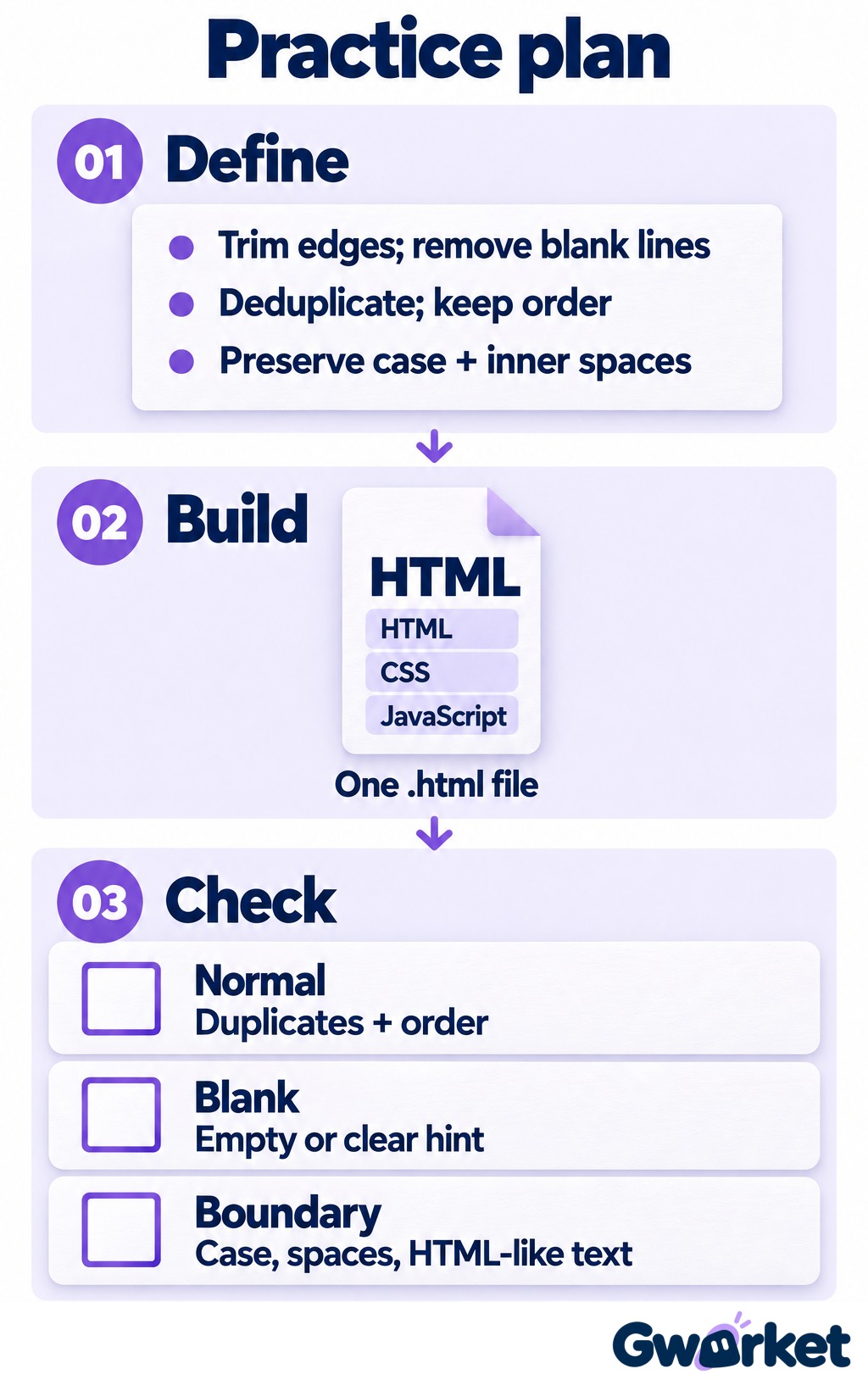
Suggested practice workflow, not measured tool results.
Practice exercise: Clean a list without rewriting its contents
Suppose you need to organize public event names, with one item per line. The first version should do just four things: trim whitespace from each line, remove empty lines, remove exact duplicates, and preserve the order in which items first appeared.
Keep capitalization and spaces within each line unchanged. AI Workshop and AI workshop should remain separate items. The tool should not rewrite names. These small decisions stop AI from guessing what “clean up” means in your workflow.
Use this specification as a starting prompt:
Build a text cleaner with a Traditional Chinese interface. Deliver one complete HTML file with its CSS and JavaScript included. Do not use React, external libraries, APIs, analytics, or network requests. Do not save the input. Include an original-text area, a result area, and Clean, Copy, and Clear buttons. Process the input line by line: trim leading and trailing whitespace, remove empty lines, and remove exact duplicates while preserving first-occurrence order. Preserve capitalization and spaces within each line. Display results as plain text; do not execute input content. If copying fails, show instructions for manual copying. Separately list test steps and limitations.
The prompt specifies both behavior and boundaries. It also prevents “cleanup” from becoming an editorial rewrite. If describing a bounded task is still unfamiliar, Gwarket's AI beginner guide provides a broader learning path for task definition and verification.
Review the generated HTML before opening it
Ask for a complete file rather than scattered code fragments. If you save it yourself, use a name such as text-cleaner.html and check that it has not become .html.txt.
Before opening it, ask AI to explain whether the code loads external resources, sends data anywhere, or stores input. Treat that explanation as an aid to review, not a security guarantee. If you cannot assess the code, have someone who can review it before testing with fictional text.
Once the contents have been reviewed, open the file in a browser and check that the input area and buttons appear. The specification aims to keep processing local by excluding external dependencies and network requests. Whether the generated implementation actually does that still needs to be checked.
A local HTML file can contain executable code. A single file is not automatically safe, and an unfamiliar HTML download should not be treated as harmless just because it opens in a browser.
Test correctness before polishing the interface
Start with a case you can check manually: a first line containing Taipei with spaces before and after it, a blank second line, Taipei again on the third line, and Kaohsiung on the fourth. The result should contain two lines, in this order: Taipei, then Kaohsiung.
Then check the less obvious cases:
- Empty input: Produce an empty result or a clear message, not invented content.
- Different capitalization: Keep both
AI WorkshopandAI workshop. - Internal spaces: Do not change
Taipei SessiontoTaipeiSession. - HTML-like input: Display
<b>Taipei</b>literally, without making it bold or executing content. - Copy and Clear: Paste into a plain-text editor to check line breaks. Clearing should empty both the input and output.
If the Copy button fails, record the browser, how you opened the file, and the error message before asking AI to fix it. “It doesn't work” leaves too much to guess. Selecting and copying the result manually is a reasonable fallback for a first version.
Run these cases again after every change. A new feature working does not establish that the existing rules still hold.
If the tool removes an item it should keep, send AI the smallest failing example and state both the actual and expected results. For example: “These two lines differ only in capitalization. Both should remain, but the result contains only one.” Fixing one issue at a time is easier to verify than combining a logic repair with new features and visual changes.
Decide when to keep the tool—and when to stop expanding it
After checking the tool, save the HTML file, original requirements, and test cases. Add a version to the filename, such as text-cleaner-v1.html, and save changes as a new version so you can return to the last working one.
Do not add API keys, real customer lists, or confidential company material to this exercise. Do not paste sensitive data into the AI conversation used to generate the tool, either. Before sharing with colleagues, document its purpose, limitations, and test results. Public deployment calls for a separate code review and deployment decision.
One question can guide your next step: when the same task returns next week, would you choose to open this tool again? If so, keep its scope small for now. Stable rules and checkable results are what turn a one-off generation into a reusable work tool.