What Exactly Is an AI Agent? From Chatbots to Closed-Loop Decision Systems
In the previous articles, we moved from the LLM itself into Production AI.
We covered why an LLM is not a knowledge base, Context Window and Context Engineering, Attention and Embeddings, Structured Output and Tool Calling, and finally failure, validation, and observability in production systems.
That brings us to one of the most overused terms in AI:
AI Agent.
Today, many products are called agents as soon as they combine:
LLM
+
Tool
Some systems simply put “You are an autonomous AI agent” in the prompt and adopt the label.
But if the ability to call a tool is enough to make something an Agent, almost every modern LLM application qualifies. The term stops being useful.
The more useful question is not:
Does it have an LLM?
Does it have tools?
It is:
Does the system form a loop in which results from the environment affect what it decides to do next?
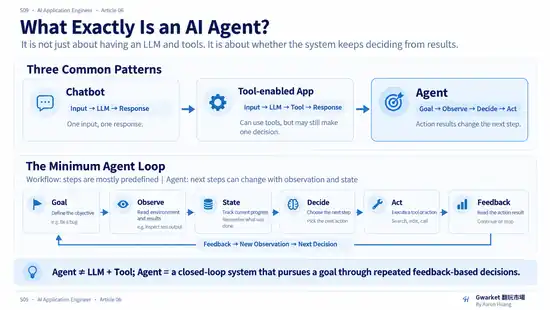
1. Do Not Start With the LLM
A common mistake is to define Agents by starting with the model.
For example:
GPT
Claude
Gemini
and then asking:
Which model is more “agentic”?
But an Agent is not primarily a model type.
It is closer to a:
System Architecture.
The same LLM can sit inside a chatbot, a RAG application, a workflow, or an Agent system as one decision component.
So:
Model ≠ Agent
More precisely:
Agent describes how the overall system observes, decides, acts, and updates over time—not the name of the underlying model.
2. Chatbot: The Simplest Input → Output Pattern
Start with the familiar chatbot:
User Input
↓
LLM
↓
Response
The user asks something. The model generates an answer.
This is a typical:
Input → Output
system.
Even with conversation history:
User
↓
Context
↓
LLM
↓
Response
the basic pattern is still similar.
The model's job is usually to produce the next response from the current input.
3. Adding a Tool Does Not Automatically Create an Agent
Suppose we add a calculator:
User
↓
LLM
↓
Calculator
↓
LLM
↓
Response
The model can decide that the question requires calculation and use the tool.
That is more system-like than a plain chatbot, but it still does not necessarily need to be called an Agent.
For example:
User asks for an exchange rate
↓
Model selects currency tool
↓
Gets the result
↓
Answers
The whole process may still be:
one decision
+
one tool call
+
one response
That is still close to a:
Tool-enabled LLM Application.
Tool Calling is therefore a common Agent capability, but not a sufficient definition of an Agent.
4. Where Agent Behavior Begins: The Closed Loop
Now consider a different task:
Find out why the tests are failing and fix the problem.
If the system only does:
Read error
↓
Generate answer
it behaves more like an analysis assistant.
But suppose it does:
Observe error
↓
Analyze
↓
Choose action
↓
Modify code
↓
Run tests
↓
Observe result
↓
Choose next action
↓
...
Now the structure changes.
This is no longer a single:
Input → Output
It becomes:
Observe
↓
Decide
↓
Act
↓
Observe
↓
Decide
↓
Act
...
That is a:
Closed Loop.
This is one of the most useful ideas for understanding Agents.
5. The Basic Agent Loop
We can abstract the system as:
Environment
    ↓
Observation
    ↓
State
    ↓
Decision
    ↓
Action
    ↓
Environment changes
    ↓
New Observation
    ↓
New State
    ↓
Next Decision
Or more simply:
Observe
↓
Decide
↓
Act
↓
Observe again
The important part is:
Observe again.
The result of an Action becomes new information for the next Decision.
That creates the feedback loop.
6. An Agent Does Not Just Act—It Decides Again From the Result
Suppose a model is told:
Send an email.
If the system simply does:
LLM
↓
send_email()
that only proves it can perform an Action.
A different system might:
Read the email thread
↓
Decide who needs a reply
↓
Find related documents
↓
Draft a response
↓
Check whether information is missing
↓
If missing → search
↓
Draft again
↓
Send
↓
Read the send result
↓
Decide whether the task is complete
The important difference is not the number of tools.
It is that:
Tool results affect the next decision.
7. Goal: Why Does an Agent Need an Objective?
A chatbot usually answers a question like:
How should I respond to this user message?
An Agent faces something closer to:
How far am I from the Goal?
For example:
Fix this bug.
The Goal is not merely:
Generate some code.
The real goal may be:
Tests pass
+
The bug is fixed
+
No new regression is introduced
The Agent therefore needs to ask:
Am I done?
If not:
What should I do next?
This is goal-directed behavior.
An Agent is not only generating the next response. It is selecting the next action that moves the system toward a goal.
8. Decision: The Core Question Is Not What to Say, but What to Do Next
A normal LLM interaction emphasizes:
What should the model say?
Agent architecture emphasizes:
What should the system do next?
Those are different questions.
The next step might be to answer the user, search for information, read a file, run tests, call an API, wait, ask for human confirmation, re-plan, or stop.
The LLM in an Agent system often acts as a:
Decision Engine
rather than only a:
Text Generator.
9. Action: Decisions Must Be Able to Affect the Environment
If a system can only produce text, the interaction loop it can create is limited.
Agents therefore usually have some:
Action Space
A Coding Agent might have:
read_file
write_file
search_code
run_tests
git_diff
A Travel Agent might have:
search_flights
search_hotels
check_calendar
create_itinerary
A Customer Service Agent might have:
lookup_order
check_policy
update_ticket
issue_refund_request
These Actions allow the system to change its environment.
For now, this article only needs the idea that an Action Space exists.
Questions such as which actions are allowed, which require permission, when human approval is required, and when the system must stop belong to Article 09.
10. Observation: Action Results Must Return to the System
Suppose the Agent executes:
run_tests()
and receives:
12 passed
2 failed
That is not just output for the user.
It becomes an:
Observation.
The next decision might be:
Two tests still failed
↓
The task is not complete
↓
Read the failure stack
↓
Continue fixing
The value of the Agent loop is:
Action Result
→ New Observation
→ New Decision
If an Action result never affects what the system does next, it is difficult to describe that architecture as a meaningful closed-loop Agent.
11. State: The System Needs to Know Where It Is
Once a task becomes multi-step, the system needs to know:
What has already been done?
What results do we have?
What problems remain?
What stage are we in?
That is:
State.
For example:
Goal:
Fix the login issue

State:
- authentication code inspected
- token expiration bug found
- refresh logic modified
- unit tests passed
- integration test still failing
The next Decision should not start from zero.
It should continue from the:
Current State
Article 08 will separate State, Memory, and Context more carefully.
For now, the important point is:
A closed-loop Agent needs some notion of State to know where it is in the task.
12. A More Complete Agent Loop
Putting these ideas together:
Goal
 ↓
State
 ↓
Observe Environment
 ↓
Decision
 ↓
Select Action
 ↓
Execute
 ↓
Observe Result
 ↓
Update State
 ↓
Goal completed?
 ├─ Yes → Stop
 └─ No  → Next Decision
This is much more useful than defining an Agent as:
LLM + Tools
13. Workflow vs Agent
This is an important boundary.
Suppose a system is:
Step 1: Search
Step 2: Summarize
Step 3: Write
Step 4: Send email
Regardless of what Step 2 produces, it always follows:
1 → 2 → 3 → 4
That is closer to a:
Workflow.
An Agent might instead do:
Search
↓
Enough evidence?
├─ No → Search again
└─ Yes
      ↓
Analyze
      ↓
Conflicting evidence?
├─ Yes → Find more evidence
└─ No
      ↓
Produce result
The next step is not entirely predefined. It changes according to the current observation and state.
14. Workflow and Agent Are Not Black and White
Real systems are rarely:
100% Workflow
or:
100% Autonomous Agent
Many useful systems look more like:
Deterministic Workflow
        ↓
Agent Decision Point
        ↓
Deterministic Execution
        ↓
Validation
        ↓
Agent Decision Point
For example:
Fixed:
Retrieve the data

↓

Agent:
Choose the type of analysis

↓

Fixed:
Execute the selected analysis tool

↓

Agent:
Decide whether the result is sufficient
Using an Agent therefore does not mean handing every decision to the model.
A more practical design principle is:
Add agency only where judgment is actually required.
That leads directly into Article 07:
How should we choose between LLM, RAG, Workflow, and Agent?
15. More Autonomy Does Not Mean a Better Architecture
Once people understand closed loops, another mistake appears:
A longer loop and more freedom must mean a more advanced Agent.
Not necessarily.
If a task can be solved by:
SQL query
→ deterministic calculation
→ answer
but we replace it with:
Agent plans
↓
Agent chooses tools
↓
Agent retries
↓
Agent validates itself
we may only increase:
- latency
- cost
- failure surface
- debugging difficulty
An Agent is not the highest form of an AI Application.
It is simply an architecture that fits certain problems.
16. When Does Agent Thinking Become Useful?
A simple starting rule is:
If the task is:
Input
↓
One reasoning step
↓
Output
you probably do not need an Agent.
If it is:
Input
↓
Known fixed steps
↓
Output
a Workflow may be enough.
If:
The goal is known
but the next step depends on the previous result
Agent Thinking starts to become useful.
Examples include:
Debugging
Research
Complex troubleshooting
Multi-step operations
Open-ended task execution
because their next step often cannot be fully known before the task starts.
17. A First-Principles Definition of an Agent
If we remove the buzzwords, an Agent needs at least:
Goal
+
State
+
Observation
+
Decision
+
Action
+
Feedback
forming:
Goal
↓
Observe
↓
Decide
↓
Act
↓
Observe Result
↓
Update
↓
Continue or Stop
A useful working definition is:
An Agent is a closed-loop system that uses its current state and observations to choose the next action, then uses the result of that action to update subsequent decisions until the task stops.
An LLM can be the decision engine.
But:
Agent ≠ LLM.
18. Why Agents Are Harder to Build
The previous Production AI article already showed that even a normal AI Application has:
Model Failure
Retrieval Failure
Tool Failure
Validation
Latency
Cost
Observability
Evaluation
Adding a closed loop does not remove those problems.
It amplifies them.
A single bad Decision can create a bad Action, and that Action can change the next environment or state. Failure can therefore accumulate across the loop.
That is why the hardest part of building an Agent is not simply:
Giving the model more things it can do.
It is:
Knowing when the system should decide for itself, how it should choose the next step, and when the problem does not require an Agent at all.
That leads to the next article:
How Do You Choose Between LLM, RAG, Workflow, and Agent?
The goal is not to select the most advanced architecture.
It is to find:
the minimum necessary complexity required to complete the task.